

A Jira Kanban board gives teams a simple way to see work, understand what is slowing them down, and keep tasks moving toward completion.
But for an experienced engineering manager, product leader, or CIO, the real question is not whether Jira can display tasks in columns.
It is:
Can your Jira Kanban workflow help the team deliver work more predictably without adding unnecessary process?
That depends on how the board is designed, how work-in-progress is controlled, how teams use workflow data, and whether Jira has been configured around the way the organization actually works.
Jira supports Kanban with configurable workflows, WIP limits, swimlanes, backlogs and reports such as cumulative flow diagrams and control charts. Atlassian positions Kanban specifically around visualizing work, managing work in progress and improving flow.
For organizations already using Jira, the opportunity is therefore bigger than simply creating another board.
A well-designed Kanban board in Jira can become an operational view of how work moves through your organization.
What Is a Jira Kanban Board?
A Jira Kanban board is a visual representation of work as it moves through a defined workflow.
A typical board might look like:
Backlog → To Do → In Progress → Code Review → Testing → Ready for Release → Done
Each card represents a Jira work item, such as a:
- User story
- Task
- Bug
- Change request
- Support request
- Improvement
- Technical debt item
As work progresses, the card moves across the board.
This gives the team an immediate view of:
- What is waiting?
- What is currently being worked on?
- What is blocked?
- What is ready for testing?
- What is ready for release?
- What has been completed?
Atlassian describes Kanban boards as a way to visualize workflow, limit work in progress and identify bottlenecks.
The important part is that the board should represent your real workflow, not an idealized process that looks good on paper.
Why Are Jira Kanban Boards Important for Agile Teams?
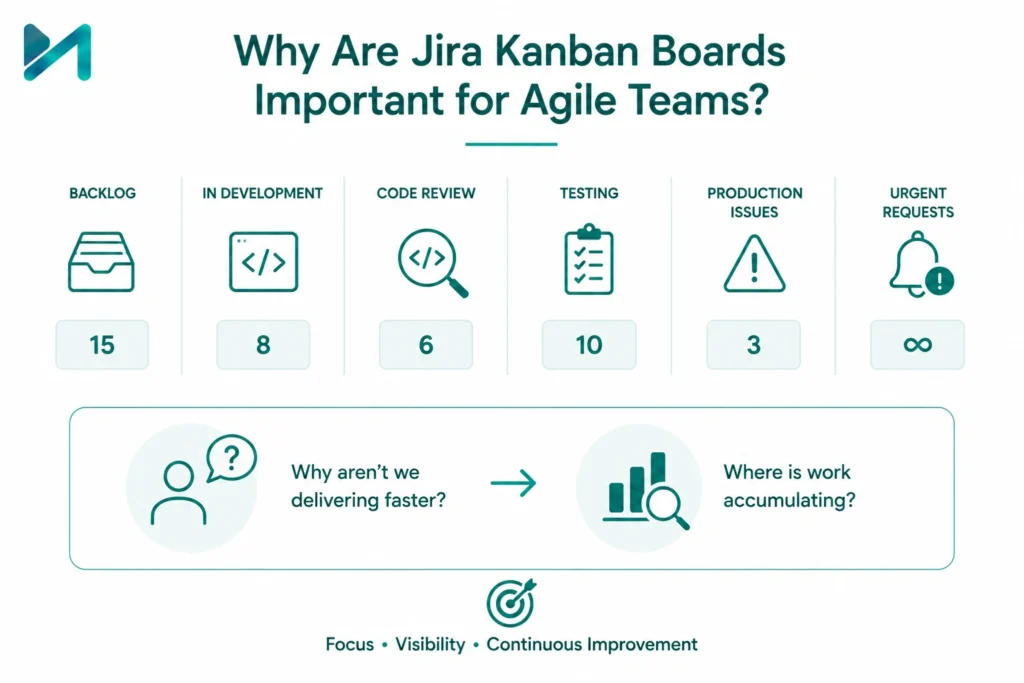
Agile teams do not usually struggle because they cannot create tasks.
They struggle because too many things are happening at the same time.
A team may have:
- 15 tasks waiting for development
- 8 tasks in development
- 6 items waiting for code review
- 10 items waiting for testing
- 3 production issues
- Several urgent requests arriving every day
Everyone looks busy, but delivery is still slow.
A Jira Kanban board makes this flow visible.
Instead of asking:
“Why aren’t we delivering faster?”
the team can start asking:
“Where is work accumulating?”
That shift is important for continuous improvement.
Jira Kanban vs Scrum: Which One Should Your Team Use?
One common misconception is that Agile automatically means Scrum.
It doesn’t.
The right board depends on how your team receives and manages work.
|
Jira Kanban |
Jira Scrum |
|
Continuous flow of work |
Fixed-length sprints |
|
No mandatory sprint commitment |
Sprint planning and commitment |
|
WIP limits are central |
Sprint capacity is central |
|
Work pulled when capacity is available |
Work planned into a sprint |
|
Useful for support and operational teams |
Useful for sprint-based product development |
|
Focus on flow and cycle time |
Focus on sprint goals and velocity |
Atlassian describes Kanban as particularly suited to teams managing a continuous flow of work, while Scrum is designed around fixed sprints.
Choose Kanban when:
- Work arrives continuously.
- Priorities change frequently.
- Support and development work are mixed.
- You need to visualize bottlenecks.
- You want to control work in progress.
- Your team doesn’t work naturally in fixed sprint cycles.
Choose Scrum when:
- The team works in planned sprints.
- Sprint goals are important.
- The team regularly commits to a defined scope.
- Sprint planning and reviews are established practices.
And if your organization uses both models, Jira can support different boards and workflows for different teams.
Not sure whether your Jira environment is structured correctly for Kanban, Scrum, or a hybrid approach?
MicroGenesis helps organizations assess Jira workflows, boards, automation and governance and align them with the way teams actually work.
Talk to a Jira Consulting Expert →
How Does Kanban Work in Jira?
The Kanban approach in Jira is built around a few fundamental ideas:
Visualize the Work
Every important work item should be visible.
Limit Work in Progress
Don’t allow the team to start unlimited work simultaneously.
Manage Flow
Look at how quickly work moves from commitment to completion.
Make Bottlenecks Visible
When work starts accumulating in a particular stage, investigate why.
Improve Continuously
Use workflow data and team feedback to improve the process.
This is where Jira becomes more than a task tracker.
It provides a visual and measurable representation of the team’s workflow.
Design Jira Kanban Columns Around Your Real Workflow
One of the biggest mistakes teams make is creating generic columns such as:
To Do → In Progress → Done
and stopping there.
That may be enough for a small team.
For an enterprise development team, it can hide important bottlenecks.
Consider this workflow:
Backlog → Ready for Development → Development → Code Review → QA → UAT → Ready for Release → Done
Now imagine 20 items are sitting in QA.
The board immediately tells you something important:
Testing is becoming a constraint on delivery.
Without that separate workflow stage, the problem might remain hidden inside a generic “In Progress” column.
The rule:
Create columns around meaningful stages where work changes state.
Do not create a column for every tiny activity.
The objective is visibility, not complexity.
Use WIP Limits to Stop Teams From Starting Too Much Work
Work in Progress, or WIP, is one of the most important concepts in Kanban.
A WIP limit defines the maximum number of work items allowed in a particular workflow stage.
For example:
|
Workflow Stage |
WIP Limit |
|
Development |
5 |
|
Code Review |
3 |
|
Testing |
4 |
|
UAT |
3 |
Suppose your development team has a WIP limit of 5.
Once five items are already being developed, the team should focus on completing or moving existing work rather than continuously pulling in new tasks.
This changes the team’s behavior from:
Start more work
to:
Finish existing work
Atlassian specifically recommends using WIP limits to expose bottlenecks, encourage focus and reduce unfinished work.
How should you decide your WIP limit?
Don’t simply choose a random number.
Start by looking at:
- Team size
- Skill distribution
- Historical workflow data
- Average work items in each stage
- Bottlenecks
- Dependencies
- Review capacity
Then adjust based on what the data tells you.
Use Swimlanes to Separate Different Types of Work
A Jira Kanban board can become difficult to read when multiple types of work compete for attention.
This is where swimlanes can help.
You could create swimlanes for:
Expedite
Production incidents or critical customer issues.
Features
Planned product development.
Bugs
Defects requiring engineering attention.
Technical Debt
Refactoring, upgrades and engineering improvements.
Strategic Work
Large initiatives tied to business objectives.
You can also organize swimlanes around teams, priorities or other criteria. Atlassian describes swimlanes as a way to categorize work items so teams can more easily see groups of work on the board.
The important point is to use swimlanes to answer a business question.
Don’t create them simply because Jira allows them.
If your Jira board has become crowded, inconsistent or difficult for leadership to interpret, the problem may be the configuration rather than Jira itself.
MicroGenesis can help simplify workflows, restructure boards, introduce governance and optimize Jira for enterprise teams.
Explore Jira Consulting Services →
Use the Jira Kanban Backlog Properly
The backlog should not become a dumping ground for every idea anyone has ever submitted.
A healthy Kanban backlog should provide a prioritized pool of work that the team can pull from when capacity becomes available.
For example:
Ideas → Reviewed → Prioritized → Ready → In Progress
This gives product managers and delivery teams a clearer separation between:
Potential work
and
Committed work
Atlassian refers to the backlog as the place where customers, product managers and teammates can put ideas before the team is ready to pick them up.
That distinction becomes increasingly important as organizations grow.
Track Cycle Time Instead of Just Counting Completed Tasks
A common management mistake is measuring productivity by asking:
“How many tickets did the team close?”
That number alone tells you very little.
A better question is:
“How long does it take for work to move through our workflow?”
This is where cycle time becomes useful.
Cycle time measures the time taken for work to move through the relevant delivery stages.
For example:
Development Started: Monday
Ready for Release: Friday
Cycle time = 4 working days
Now imagine the same team is averaging:
- January: 4 days
- February: 5 days
- March: 7 days
- April: 9 days
The number of completed tickets might still look healthy.
But the flow is deteriorating.
That is a management signal worth investigating.
Use Cumulative Flow Diagrams to Find Bottlenecks
A Cumulative Flow Diagram (CFD) provides a visual representation of how work accumulates across workflow states over time.
If one area begins widening significantly, it may indicate that work is accumulating in that stage.
For example:
Development: Stable
Code Review: Increasing
Testing: Increasing sharply
That could indicate that the testing stage does not have enough capacity.
Atlassian explains that the cumulative flow diagram helps teams see how work items accumulate across statuses and identify bottlenecks.
This turns the Jira Kanban board into a useful management instrument.
Instead of relying only on opinions during retrospectives, teams can examine actual workflow behavior.
Use Control Charts to Understand Cycle Time
A Jira control chart can help teams analyze how long work items take to move through the workflow.
Instead of looking only at the average, teams can examine variation.
For example:
Typical cycle time: 4 days
But individual items might take:
2, 3, 4, 5, 17 days
That 17-day item deserves investigation.
Was it blocked?
Was there a dependency?
Did requirements change?
Was testing delayed?
Did another team need to approve it?
The goal isn’t to punish the team for the outlier.
The goal is to understand why the outlier happened and whether the process can prevent similar delays.
Jira provides Kanban-oriented reporting, including cumulative flow diagrams and control charts, to help teams analyze flow and cycle time.
Don’t Turn Your Kanban Board Into a Wall of Customization
Jira is highly configurable.
That is one of its strengths.
It can also become one of its biggest problems.
Organizations sometimes create:
- Too many custom fields
- Too many statuses
- Complex workflows
- Multiple approval steps
- Duplicate issue types
- Excessive automation rules
- Unnecessary board filters
The result?
The team spends more time managing Jira than managing the work.
A good Kanban implementation should make the workflow easier to understand, not harder.
If your Jira environment has accumulated years of customizations, an enterprise Jira cleanup can be a useful starting point.
Connect Jira Kanban With Development Tools
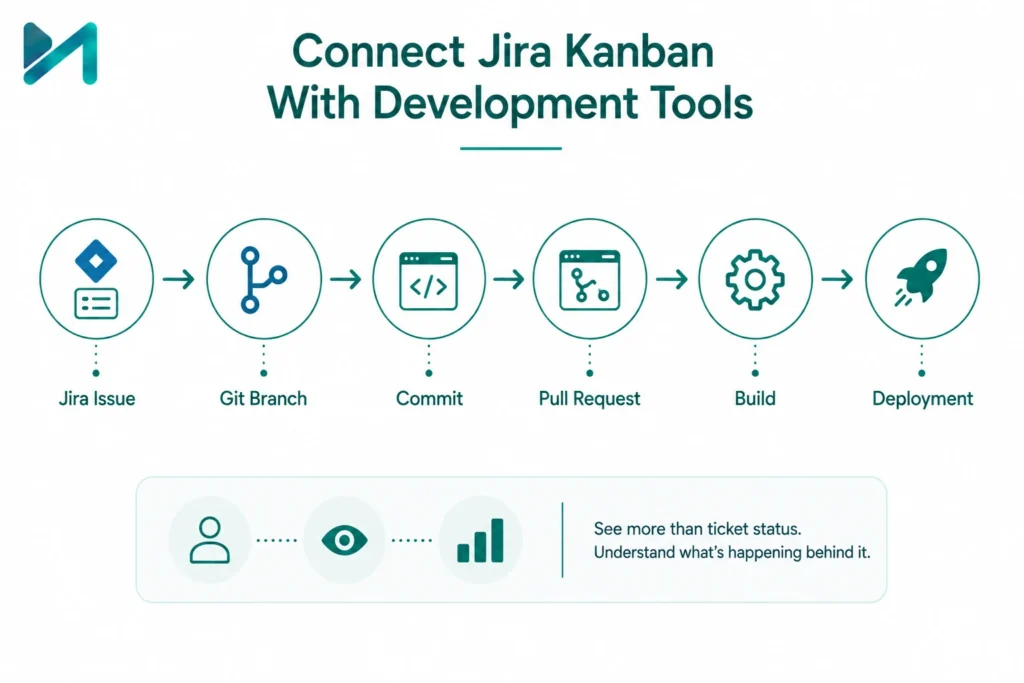
For software teams, the Kanban board becomes significantly more useful when it is connected to the development toolchain.
For example:
Jira Issue
↓
Git Branch
↓
Commit
↓
Pull Request
↓
Build
↓
Deployment
This allows product managers and engineering leaders to see more than the status of a ticket.
They can understand what is happening behind that status.
For organizations working across Jira, Bitbucket, GitHub or other development platforms, integrations can provide stronger visibility across planning and delivery.
You can also explore Jira integrations and add-ons when evaluating how far your Jira environment should be extended.
Want Jira to connect planning, development and delivery instead of operating as another isolated project tool?
MicroGenesis helps organizations integrate Jira with their existing toolchain and design workflows that support real engineering and business processes.
Speak With Our Atlassian Experts →
Use Automation to Keep Kanban Work Moving
Automation can remove repetitive administrative work from your Kanban process.
For example:
When a pull request is merged
Automatically transition the Jira issue to the next stage.
When an issue enters testing
Automatically assign it to the appropriate QA queue.
When a critical issue is created
Notify the appropriate team.
When an item remains blocked
Send a reminder to the owner.
When a release is completed
Update the related work items.
The goal isn’t to automate everything.
The goal is to automate predictable actions that don’t require human judgment.
Jira provides automation capabilities that can help reduce manual work and keep work moving through predefined processes.
For more ideas, see Jira Automation Workflows.
How to Set Up a Jira Kanban Board: A Practical Approach
If you’re creating or redesigning a Jira Kanban board, use this sequence.
Step 1: Map the Existing Process
Before changing Jira, understand how work actually moves today.
Talk to:
- Developers
- Product owners
- QA teams
- Project managers
- Operations
- Business stakeholders
Step 2: Identify the Real Workflow
Document the major states:
Requested → Ready → In Progress → Review → Test → Done
Then identify where exceptions occur.
Step 3: Identify Bottlenecks
Look at where work waits.
Waiting is often more important than active development time.
Step 4: Establish WIP Limits
Start conservatively.
For example:
Development: 4
Code Review: 2
Testing: 3
Then monitor the results.
Step 5: Configure Swimlanes
Use them only when they improve prioritization or visibility.
Step 6: Define the Definition of Done
A card should not move to Done simply because development is complete.
Define what “Done” means for your organization.
It could require:
- Code complete
- Peer review complete
- Testing complete
- Documentation updated
- Acceptance criteria met
- Deployment completed
Step 7: Measure and Improve
Review:
- Cycle time
- Lead time
- WIP
- Blocked work
- Throughput
- Aging work items
- Bottleneck stages
Then make incremental changes.
Jira Kanban Board Best Practices
For mature teams, these practices make a noticeable difference:
Keep workflows understandable
If someone needs a training session just to understand your board, it may be too complicated.
Limit WIP
Starting fewer things and finishing more is usually better than keeping everyone busy with multiple open tasks.
Make blocked work obvious
A blocked ticket should not look identical to healthy work.
Review aging items
A ticket that has been “almost done” for two weeks deserves attention.
Keep the backlog healthy
Prioritize and clean it regularly.
Use metrics for improvement
Don’t turn metrics into employee surveillance.
Review workflow regularly
Your process should evolve as the organization evolves.
Avoid unnecessary customization
Configure Jira around genuine business needs.
Jira Kanban Board Examples by Industry
Kanban is not limited to software development.
Software Development
Backlog → Development → Code Review → QA → Release → Done
Useful for continuous feature and bug delivery.
IT Operations
Request → Triage → In Progress → Waiting → Resolved → Closed
Useful for operational work and service requests.
For organizations using Jira Service Management, you can explore Jira Service Management setup best practices.
Marketing
Brief → Planning → Content → Design → Review → Approved → Published
Useful for campaign and content operations.
HR
Request → Review → Approval → Processing → Completed
Useful for onboarding and internal employee requests.
Finance
Request → Validation → Approval → Processing → Completed
Useful for financial operations and approval workflows.
Product Management
Idea → Discovery → Prioritized → Development → Validation → Released
This can also connect Jira with product discovery processes.
What Are the Signs Your Jira Kanban Board Needs Improvement?
If you’re a Jira administrator, engineering manager or IT leader, look for these warning signs:
- Most cards stay in “In Progress.”
- The team constantly exceeds WIP limits.
- Nobody trusts the board’s status.
- Work is tracked outside Jira.
- Managers ask for separate spreadsheets.
- The backlog contains years of outdated work.
- There are dozens of unused statuses.
- Teams manually update the same information in several systems.
- Cycle time keeps increasing.
- Teams cannot explain where work is getting stuck.
- These are not necessarily signs that Jira is the wrong platform.
Often, they indicate that the Jira configuration and operating model need attention.
When Should You Bring in a Jira Consultant?
A Jira consultant can be particularly valuable when your organization is moving beyond basic Jira usage.
Consider professional help when you are:
- Implementing Jira across multiple teams
- Redesigning complex workflows
- Migrating from another platform
- Integrating Jira with development tools
- Standardizing Jira across business units
- Cleaning up an existing Jira environment
- Building enterprise governance
- Automating repetitive workflows
- Improving reporting and dashboards
- Supporting a large-scale Agile transformation
The value of a Jira consultant isn’t simply knowing where the configuration settings are.
It’s understanding how Jira should support the organization’s operating model.
How MicroGenesis Helps Organizations Get More From Jira
MicroGenesis works with organizations that want to move beyond basic Jira administration and build a more effective Atlassian environment.
Our Jira consulting and implementation services can support areas such as:
- Jira implementation
- Workflow design
- Kanban and Agile configuration
- Jira customization
- Automation
- Integrations
- Data migration
- Jira optimization
- Governance
- Reporting and dashboards
- User adoption
- Enterprise Jira support
As an Atlassian Solution Partner, MicroGenesis combines platform expertise with experience in enterprise digital transformation.
The objective is simple:
Make Jira work the way your organization works.
Not the other way around.
Frequently Asked Questions About Jira Kanban Boards
What is a Jira Kanban board?
A Jira Kanban board is a visual workflow management tool that shows work items as they move through stages such as To Do, In Progress and Done. Teams can customize workflows and use WIP limits and reports to improve flow.
How does Kanban work in Jira?
Kanban in Jira uses visual work items, workflow columns, WIP limits and continuous-flow practices to help teams manage and improve delivery.
What is the difference between Jira and Kanban?
Jira is a software platform. Kanban is a workflow management method. Jira provides Kanban boards and features that allow teams to apply Kanban principles to their work.
Is Jira Kanban better than Scrum?
Neither is universally better. Kanban is generally better suited to continuous-flow work, while Scrum is designed around fixed-length sprints. The right approach depends on how your team plans, receives and delivers work.
What is a WIP limit in Jira?
A WIP limit sets the maximum number of work items that can occupy a workflow stage. WIP limits help teams identify bottlenecks and encourage completion before additional work is started.
What is a swimlane in Jira?
A swimlane is a horizontal grouping mechanism on a Jira board that helps teams organize work by criteria such as priority, user, team or work type.
What is cycle time in Jira Kanban?
Cycle time measures how long a work item takes to move through the relevant workflow stages. Teams can use cycle-time data to understand delivery performance and identify variation.
What is a cumulative flow diagram in Jira?
A cumulative flow diagram shows how work items move through different workflow statuses over time. It can help teams identify stages where work is accumulating.
Can Jira Kanban be used outside software development?
Yes. Kanban boards can be used for marketing, HR, business operations, IT service work and other processes where teams need to visualize and manage a continuous flow of work. Atlassian explicitly highlights software, marketing, business and HR use cases.
Final Thoughts
A Jira Kanban board is easy to create.
Creating one that genuinely improves how an organization delivers work is a different challenge.
The strongest Kanban implementations don’t try to make teams work faster by simply adding more tasks to the board.
They help teams see the work, control work in progress, identify bottlenecks, understand delivery performance and continuously improve the workflow.
For a small team, that may mean a simple:
To Do → In Progress → Done
board.
For a growing enterprise, it may require carefully designed workflows, WIP limits, swimlanes, automation, integrations, reporting and governance.
And that’s where Jira consulting becomes valuable.
If your organization is getting more complexity from Jira than value, it may be time to step back and redesign the environment around your actual business and engineering processes.
Talk to MicroGenesis about Jira Consulting and Implementation →