

In a busy IT environment, service teams rarely struggle because they lack enough tools. More often, the problem is that too many routine tasks still depend on people remembering what to do next.
A ticket arrives. Someone has to categorize it. Another person assigns it. A manager needs to be notified when an SLA is at risk. An inactive request needs to be closed. A high-priority incident needs to reach the right team immediately.
These are exactly the kinds of repetitive processes that Jira Service Management (JSM) automation can simplify.
Jira Service Management automation allows teams to create rules that respond to events, evaluate conditions, and perform actions automatically. When designed properly, it can support everything from ticket routing and SLA escalation to approvals, notifications, employee onboarding, incident response, and cross-team workflows.
But automation is not simply about creating as many rules as possible. For larger organizations, poorly designed automation can create duplicate actions, conflicting workflows, maintenance problems, and governance issues.
This guide explains Jira Service Management automation, its features, automation rules, workflows, practical use cases, implementation considerations, and best practices. It also explains when organizations can manage automation internally and when working with a Jira Service Management consultant makes sense.
What Is Jira Service Management Automation?
Jira Service Management automation is a rule-based capability that allows teams to automate repetitive service management activities based on predefined events and conditions.
A basic automation workflow can look like this:
Request submitted
↓
Trigger detects the request
↓
Conditions evaluate the request
↓
JSM performs the required action
↓
Customer or agent receives an update
For example, suppose an employee submits an access request.
Instead of an agent manually reviewing and routing it, an automation rule could:
- Identify the request type.
- Check the employee’s department.
- Assign the request to the appropriate team.
- Set the priority.
- Notify the approver.
- Start the applicable SLA.
- Escalate the request if it remains pending.
This is where JSM automation becomes more than a convenience. It becomes part of the organization’s service delivery process.
If your Jira environment has grown organically and automation rules are becoming difficult to manage, it may be worth reviewing the overall configuration before adding more rules. Our guide to enterprise Jira cleanup best practices covers some of the areas organizations should review as Jira environments mature.
Why Use Automation in Jira Service Management?
The business case for automation is straightforward: let people spend less time performing predictable administrative work and more time solving problems that require judgment.
Reduce Manual Work
Service agents frequently perform repetitive actions such as:
- Assigning tickets
- Updating statuses
- Sending notifications
- Adding comments
- Following up on inactive requests
- Escalating tickets
- Creating related tasks
Automation can handle these predictable steps consistently.
Improve SLA Compliance
SLA management is particularly suitable for automation.
For example, when an incident is approaching its response target, an automation rule can notify the responsible team or escalate the request to a manager.
This helps service teams move from reactive SLA management to proactive intervention.
Improve Ticket Routing
Instead of relying on a service desk agent to determine where every request belongs, routing rules can use information such as:
- Request type
- Priority
- Department
- Location
- Customer
- Category
- Custom fields
This can reduce unnecessary handoffs and help requests reach the right team faster.
Create Consistent Workflows
Two agents should not have to handle the same request in completely different ways.
Automation helps standardize predictable parts of the process while allowing agents to handle exceptions manually.
Improve the Customer Experience
Customers generally don’t care whether a notification was sent manually or automatically. They care that:
- Their request was acknowledged.
- They know what happens next.
- The right team is working on it.
- They receive timely updates.
- Their issue is resolved within the expected timeframe.
Automation helps make those experiences more consistent.
Scale Service Operations
As request volumes increase, adding more manual steps is rarely a sustainable strategy.
Well-designed automation allows organizations to handle higher volumes without making every increase in demand dependent on additional administrative effort.
Looking to identify which JSM processes should be automated first?
MicroGenesis helps organizations review Jira Service Management workflows, identify automation opportunities, and design practical service processes around business requirements.
Talk to a Jira Service Management Expert →
How Does Jira Service Management Automation Work?
A JSM automation rule generally consists of several building blocks.
Triggers: When Should Automation Start?
A trigger defines the event that starts the rule.
Examples include:
- Issue created
- Issue transitioned
- Comment added
- Field updated
- SLA approaching breach
- Scheduled event
- Request created
Example
A user submits an incident.
Trigger: Issue created
The automation rule then evaluates the request and determines what should happen next.
Conditions: Should the Rule Continue?
Conditions prevent automation from acting on every issue.
For example:
Trigger: Issue created
Condition: Priority = Critical
Action: Notify the incident manager.
Conditions can be based on factors such as:
- Issue type
- Priority
- Status
- Request type
- User
- Group
- Custom field
- JQL criteria
This is particularly important in enterprise environments because overly broad rules can create unintended actions.
Actions: What Should Happen?
Actions are what the automation actually performs.
Examples include:
- Assign an issue
- Change priority
- Transition an issue
- Add a comment
- Send an email
- Notify a team
- Create another issue
- Update a field
- Link issues
Example
Trigger: SLA approaching breach
Condition: Priority = High
Action: Notify the service manager and escalate the ticket.
Smart Values: Making Rules Dynamic
Smart values allow automation to use information from an issue dynamically.
For example:
{{issue.key}}
can reference the issue key, while:
{{issue.summary}}
can reference the issue summary.
A notification could therefore dynamically include information such as:
Ticket {{issue.key}} — {{issue.summary}} requires attention.
Smart values become particularly useful when automation needs to work across many tickets without relying on static information.
Rule Actor and Permissions
Automation doesn’t operate outside Jira’s permission model.
The account executing the automation must have the required permissions to perform the intended action.
This is an area that is sometimes overlooked during implementation.
A rule may be logically correct but still fail because the automation actor does not have permission to perform the action.
Audit Logs
Automation should never be treated as a “set it and forget it” capability.
Audit logs help administrators understand:
- When a rule ran
- Whether it succeeded
- Which actions were performed
- Why an action failed
- How frequently a rule is being triggered
For complex environments, regular audit-log reviews are an important part of automation governance.
Jira Service Management Automation Features
The most useful automation capabilities generally fall into several categories.
|
Automation capability |
Example |
|
Ticket routing |
Send incidents to the appropriate support team |
|
Assignment |
Automatically assign requests |
|
SLA automation |
Escalate tickets approaching SLA breach |
|
Notifications |
Alert agents, managers or customers |
|
Status automation |
Move tickets based on predefined events |
|
Scheduled automation |
Process inactive requests periodically |
|
Approvals |
Trigger approval workflows |
|
Issue creation |
Create related tasks automatically |
|
Smart values |
Use dynamic issue information |
|
Integrations |
Connect Jira with other tools and systems |
|
Audit logs |
Monitor automation execution |
These capabilities make JSM useful not only for traditional IT help desks, but also for broader enterprise service management.
Jira Service Management Automation Rules and Workflows
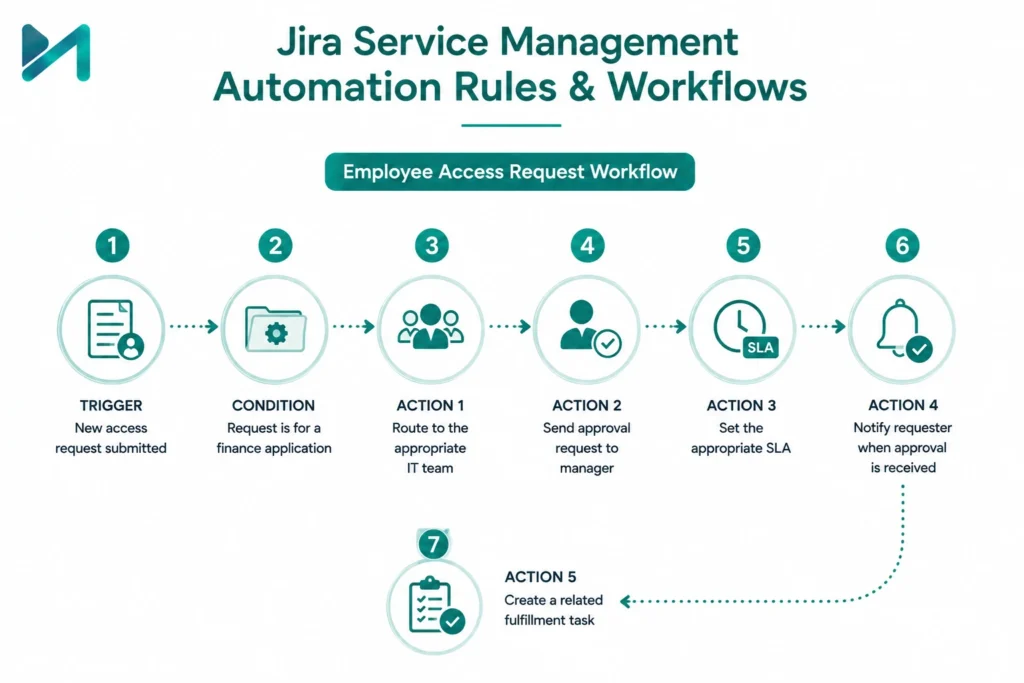
A good automation rule should solve a clearly defined business problem.
Consider this example:
Employee Access Request
Trigger:
New access request submitted.
Condition:
Request is for a finance application.
Action 1:
Route to the appropriate IT team.
Action 2:
Send approval request to the employee’s manager.
Action 3:
Set the appropriate SLA.
Action 4:
Notify the requester when approval is received.
Action 5:
Create a related fulfillment task.
This is a much more valuable automation workflow than simply creating a rule that changes a status.
The goal should be to automate the process, not just individual clicks.
For organizations reviewing their broader workflow architecture, Jira Agile workflows and boards provides useful context around structuring work effectively in Jira.
10 Jira Service Management Automation Use Cases
Automated Ticket Assignment
New tickets can be automatically assigned according to:
- Request type
- Product
- Location
- Department
- Priority
- Expertise
This reduces manual triage.
Example
A password-reset request goes to the service desk queue, while a network incident goes directly to the infrastructure team.
Automated Ticket Routing
Routing can become more sophisticated when organizations have multiple service teams.
For example:
Location = Dubai + Application = ERP
→ Middle East Application Support
Location = India + Application = ERP
→ India Application Support
This kind of routing can be particularly useful for global organizations operating multiple support teams.
SLA Breach Prevention
An automation rule can monitor SLA conditions and take action before a target is missed.
For example:
SLA remaining < 30 minutes
→ Notify assigned agent
→ Notify team lead
→ Escalate if no action occurs
This creates a proactive escalation process rather than waiting for the SLA to fail.
Automatic Escalation
Critical incidents often require a predefined escalation path.
For example:
Priority = Critical
→ Assign to Incident Management
→ Notify service manager
→ Notify relevant stakeholders
→ Escalate if unresolved after defined period
Automation makes this process repeatable.
Auto-Close Inactive Tickets
Not every ticket requires manual closure.
For example:
No customer response for 5 days
→ Send reminder
No response after reminder
→ Transition to Resolved/Closed
The exact timing should be aligned with your service policy rather than copied blindly from another organization.
Automatically Reopen Requests
Automation can also work in the opposite direction.
If a customer replies to a recently closed request, the workflow can automatically reopen it or route it back to the appropriate queue.
This avoids situations where a customer responds to a closed ticket and receives no meaningful follow-up.
Employee Onboarding
JSM can support structured onboarding workflows.
A new employee request could initiate tasks for:
- Laptop allocation
- Application access
- Email setup
- Security access
- Identity management
- Facilities
Instead of HR or IT teams coordinating each task manually, automation can create and track the required work.
Employee Offboarding
The same principle applies when employees leave.
A request can trigger tasks for:
- Access removal
- Asset recovery
- Account deactivation
- Application access revocation
- Manager confirmation
This creates a more consistent process and reduces the risk of missed steps.
Incident Response
Automation can help accelerate incident workflows.
For example:
Critical incident created
→ Set priority
→ Assign incident team
→ Notify stakeholders
→ Create related tasks
→ Start relevant SLA
→ Track escalation
For organizations managing complex service environments, how Jira Service Management simplifies ITSM for teams provides additional context on using JSM as part of broader service operations.
Change and Approval Workflows
Automation can help coordinate change requests by triggering approvals, notifications, tasks, and status transitions based on predefined criteria.
For example:
Standard change
→ Predefined approval path
High-risk change
→ Additional approval
Emergency change
→ Escalated review process
The objective is not to remove governance. It is to make governance easier to execute consistently.
Already using Jira Service Management but still handling repetitive work manually?
Our Jira experts can help you identify opportunities for automated routing, SLA escalation, approvals, notifications, and workflow optimization.
Explore Jira Consulting Services →
Jira Service Management Automation for Different Industries
Automation becomes more valuable when it reflects the way an organization actually operates.
IT & Technology
Common use cases include:
- Incident management
- Access requests
- Application support
- SLA escalation
- Change management
Financial Services
Financial organizations can use automation for:
- Access approvals
- Compliance-related requests
- Employee onboarding
- Incident escalation
- Internal service requests
For a broader view of JSM in financial services, see how Jira Service Management empowers financial services companies.
Healthcare
Healthcare organizations can automate:
- IT support requests
- Application access
- Equipment-related requests
- Incident workflows
- Employee onboarding
See how Jira Service Management enhances operations for the healthcare industry for a deeper industry-specific perspective.
Pharma & Life Sciences
Automation can support:
- Service requests
- Access management
- Incident management
- Approval workflows
- Operational support
Jira Service Management for pharma and life sciences explores this use case further.
Manufacturing
Manufacturing organizations can use JSM automation for:
- Production support
- IT incidents
- Application requests
- Equipment-related service requests
- Change workflows
Transport & Logistics
Automation can support distributed operations by helping teams manage:
- Application incidents
- Location-based support
- Infrastructure requests
- SLA escalation
- Operational service requests
See how Jira Service Management transforms efficiency in transport and logistics.
Hi-Tech & Electronics
Technology organizations can automate:
- Engineering support
- IT requests
- Incident response
- Access management
- Change processes
Jira Service Management SLA Automation
SLA automation deserves special attention because service teams often measure performance against response and resolution targets.
A basic SLA escalation workflow could look like:
Ticket created
↓
SLA starts
↓
80% of target consumed
↓
Notify assigned agent
↓
90% consumed
↓
Notify team lead
↓
Target at risk
↓
Escalate
The exact thresholds should be based on your service-level policies and business priorities.
Automation can also help with:
- SLA notifications
- Priority changes
- Escalation
- Reassignment
- Stakeholder communication
- Follow-up tasks
The key is to automate the response to an SLA risk—not simply create more notifications.
Jira Service Management Automated Ticket Routing
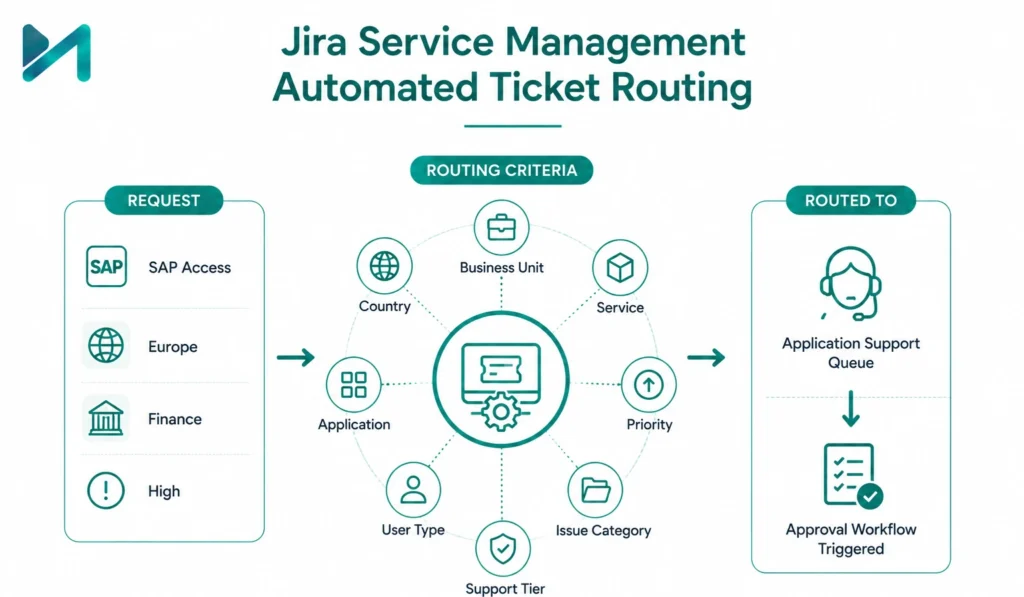
Ticket routing is another area where organizations can achieve significant operational improvements.
A simple service desk might route every request into one queue.
A larger enterprise might need routing based on:
- Business unit
- Country
- Service
- Application
- Priority
- User type
- Issue category
- Support tier
For example:
Request: SAP access
Region: Europe
Department: Finance
Priority: High
The automation could route the request directly to the relevant application-support queue while triggering the appropriate approval workflow.
This reduces unnecessary handoffs and gives service managers better control over workload distribution.
How to Implement Jira Service Management Automation
Successful automation starts with process design, not the automation rule itself.
Step 1: Identify Repetitive Processes
Start by asking:
- Which tasks are repeated every day?
- Where do agents spend time on administrative work?
- Which steps are frequently forgotten?
- Where do tickets get delayed?
- Which SLA breaches happen repeatedly?
Don’t automate everything.
Start with processes where automation can produce a clear operational benefit.
Step 2: Map the Existing Workflow
Document:
Request → Triage → Assignment → Approval → Fulfillment → Resolution → Closure
Identify where decisions are predictable and where human judgment is still required.
Automation should handle the predictable parts.
Step 3: Define Automation Rules
For each process, document:
- Trigger
- Conditions
- Actions
- Owner
- Expected outcome
- Exception scenarios
This makes rules easier to maintain.
Step 4: Test Before Going Live
Complex rules should be tested carefully before being deployed to production.
Pay particular attention to:
- Duplicate actions
- Incorrect assignments
- Notification loops
- Permission failures
- Conflicting rules
- Unexpected status transitions
Step 5: Monitor Audit Logs
After deployment, review automation results.
Ask:
- Is the rule triggering when expected?
- Are actions succeeding?
- Are there unnecessary executions?
- Are users receiving too many notifications?
- Are exceptions being handled correctly?
Step 6: Measure Business Impact
Don’t measure automation only by the number of rules created.
Instead, look at outcomes such as:
- Reduced manual triage
- Faster response times
- Lower SLA breach rates
- Reduced ticket backlog
- Improved first-response performance
- Reduced administrative effort
- Improved customer satisfaction
That is what makes automation a business improvement rather than simply a technical configuration exercise.
Jira Service Management Automation Best Practices
Start Small
Automate one or two high-value processes first.
Once the team understands the results, expand gradually.
Keep Rules Focused
A rule should have a clear purpose.
Avoid creating one extremely complicated rule that tries to handle every possible scenario.
Use Conditions Carefully
Conditions reduce unintended actions.
Always ask:
“What could happen if this condition is missing?”
Give Rules Clear Names
Instead of:
Automation Rule 14
Use:
Escalate Critical Incident When SLA Is at Risk
Clear naming makes administration much easier.
Review Audit Logs
Automation should be monitored after deployment, particularly for important service workflows.
Avoid Automation Loops
When several rules update the same issue, one action can unintentionally trigger another rule.
Review dependencies before deploying complex automation.
Document Business Purpose
For every important rule, document:
- Why it exists
- What triggers it
- What it does
- Who owns it
- What happens if it fails
Review Automation as Your Business Changes
A workflow that works for a 50-person team may not work for a 5,000-person organization.
New services, departments, locations, and integrations can change how automation should operate.
Common Jira Service Management Automation Mistakes
Automation can create problems when implemented without sufficient governance.
Automating a broken process
If the underlying workflow is inefficient, automation may simply make the inefficient process run faster.
Creating too many rules
More rules do not automatically mean more efficiency.
Ignoring exceptions
Not every request follows the standard workflow.
Poor permission configuration
Rules can fail when the automation actor lacks the required permissions.
No ownership
Someone should be responsible for reviewing and maintaining important rules.
Excessive notifications
Automation should reduce noise, not create more of it.
No performance review
Organizations should periodically evaluate whether rules are still delivering value.
For organizations experiencing broader Jira performance challenges as teams grow, Jira performance issues and growing teams is worth reviewing alongside your automation strategy.
When Should You Work With a Jira Service Management Consultant?
Basic automation rules can often be configured internally.
Professional assistance becomes more valuable when the environment includes:
- Multiple service projects
- Complex workflows
- Enterprise-wide automation
- Multiple business units
- Advanced SLA structures
- Cross-project processes
- External integrations
- Migration from another ITSM platform
- Complex approval processes
- Large-scale Jira customization
- Existing automation rules that are difficult to maintain
At this point, the challenge isn’t simply:
“How do I create a Jira automation rule?”
The bigger question becomes:
“How should automation fit into our overall service management operating model?”
A Jira implementation consultant can help organizations assess existing processes, design workflows, configure automation, establish governance, integrate systems, and support adoption.
Planning a new Jira Service Management implementation or redesigning an existing environment?
MicroGenesis can help with service design, workflow configuration, automation, integrations, SLAs, governance, and optimization.
Jira Service Management Automation vs. Manual Service Management
|
Area |
Manual approach |
Automated approach |
|
Ticket assignment |
Agent manually assigns |
Rules route automatically |
|
SLA monitoring |
Agent monitors queues |
Rules trigger alerts/escalation |
|
Notifications |
Sent manually |
Triggered automatically |
|
Ticket closure |
Agent reviews manually |
Rules can handle defined inactive cases |
|
Approvals |
Manually coordinated |
Workflow-driven |
|
Employee onboarding |
Multiple manual handoffs |
Automated task creation and routing |
|
Reporting |
Manual status collection |
Data can be surfaced through Jira workflows and reports |
|
Escalation |
Depends on individuals |
Predefined escalation rules |
Automation doesn’t eliminate the need for service agents. Instead, it allows them to spend more time on work where human judgment matters.
Frequently Asked Questions
What is Jira Service Management automation?
Jira Service Management automation is a rule-based capability that allows organizations to automatically perform actions based on events, conditions, schedules, and issue information.
How can teams use automation within Jira Service Management?
Teams can use automation for ticket routing, assignment, SLA escalation, notifications, approvals, incident workflows, employee onboarding, ticket closure, and other repetitive service processes.
What are the main Jira Service Management automation features?
Common capabilities include triggers, conditions, actions, smart values, scheduled automation, notifications, issue creation, workflow transitions, and audit logs.
What are Jira Service Management automation rules?
Automation rules define what should happen when a specific event occurs and specified conditions are satisfied.
For example:
Trigger: High-priority incident created
Condition: Priority = Critical
Action: Assign to incident team and notify the service manager.
Can Jira Service Management automatically route tickets?
Yes. Organizations can design routing rules based on factors such as request type, priority, department, location, service, and other issue information.
Can Jira Service Management automate SLA escalation?
Yes. Automation can be used to trigger notifications, reassignment, escalation, or other actions when an SLA is approaching its target or meets defined conditions.
Can Jira Service Management automatically assign tickets?
Yes. Automation can assign issues according to predefined business rules, provided the workflow and permissions are configured appropriately.
Is Jira Service Management a no-code ITSM platform?
Jira Service Management provides configurable, rule-based capabilities that allow many service processes to be automated without writing traditional application code. More complex enterprise requirements may still require integrations, scripting, apps, or professional configuration.
How do I set up Jira Service Management automation?
A typical process is to identify the business requirement, define the trigger, add conditions, configure actions, test the rule, review audit logs, and then monitor its business impact.
Can JSM automation work across multiple projects?
Automation can support cross-project workflows depending on the configuration, permissions, and specific requirements of the Jira environment. Enterprise implementations should define appropriate governance before creating cross-project rules.
When should I use Jira Service Management implementation services?
Professional implementation support can be valuable when an organization has complex workflows, multiple service projects, integrations, enterprise SLAs, migration requirements, or needs to establish a scalable governance model.
Final Thoughts
Jira Service Management automation is most valuable when it is connected to a clear service-management strategy.
The objective isn’t to create hundreds of automation rules. It is to identify repetitive activities that slow teams down and build reliable workflows around them.
For a growing organization, that could mean automatically routing requests, escalating SLA risks, coordinating employee onboarding, managing approvals, or accelerating incident response.
For an enterprise, the opportunity is broader: automation can become part of a consistent operating model across IT, HR, facilities, finance, security, and other service teams.
The best results come when organizations combine Jira Service Management configuration, workflow design, automation, integrations, governance, and ongoing optimization rather than treating automation as an isolated feature.
MicroGenesis helps organizations get more from the Atlassian ecosystem through Jira consulting, implementation, workflow optimization, automation, integrations, and service management expertise.
Ready to make Jira Service Management work smarter?
Whether you’re starting a new JSM implementation or have an existing environment that needs optimization, our team can help you identify the right automation opportunities and turn them into scalable service workflows.