
Choosing a CI/CD platform is easy when you are starting from scratch.
It becomes much harder when your organization already has hundreds of pipelines, multiple development teams, legacy applications, security requirements, cloud environments, and years of Jenkins investment.
That is where the Jenkins vs GitLab CI decision becomes an enterprise architecture question rather than a simple tool comparison.
Jenkins has been a trusted automation server for years. GitLab CI/CD takes a different approach by bringing source code management, CI/CD, security, package management, and DevOps workflows into a more integrated platform.
The question for an enterprise is therefore not simply:
“Which CI/CD tool is better?”
It is:
“Which platform gives our engineering organization the right combination of capability, cost, governance, security, scalability, and operational simplicity?”
That distinction matters.
GitLab’s 2024 Global DevSecOps Survey, based on more than 5,000 professionals, found that 67% of respondents said their software development lifecycle was mostly or completely automated, while 64% wanted to consolidate their toolchain.
That second number is particularly important.
Enterprises are not just looking for more automation. They are increasingly looking for less toolchain complexity.
This is where GitLab and Jenkins take very different paths.
Jenkins vs GitLab CI: Quick Enterprise Verdict
| Enterprise consideration | Jenkins | GitLab CI/CD |
| License entry cost | Open source | Free tier available, paid tiers for advanced capabilities |
| CI/CD capability | Excellent | Excellent |
| Source code management | Requires separate platform | Built in |
| Pipeline configuration | Jenkinsfile / Groovy | .gitlab-ci.yml / YAML |
| Plugin ecosystem | 2,000+ community plugins | Integrated platform capabilities |
| Security integration | Usually requires plugins and integrations | Built into GitLab platform, depending on tier |
| Container registry | Requires separate solution | Built in |
| Runner model | Jenkins agents | GitLab Runners |
| SaaS option | No, Jenkins is self-hosted | Yes |
| Self-managed option | Yes | Yes |
| Migration effort | None if already on Jenkins | Required when migrating |
| Operational responsibility | Higher | Lower with SaaS |
| Flexibility | Very high | High |
| Toolchain consolidation | Usually requires integrations | Stronger native integration |
| Best fit | Highly customized environments | Organizations seeking an integrated DevSecOps platform |
Short answer: Jenkins remains an excellent choice when flexibility, existing investment, and deep customization are priorities.
GitLab CI/CD generally has the stronger enterprise proposition when the goal is to consolidate SCM, CI/CD, security, artifacts, and developer workflows into one platform.
But that does not automatically mean you should migrate.
What Is the Difference Between Jenkins and GitLab CI/CD?
Evaluating Jenkins vs GitLab CI for Your Enterprise? Start With Your DevOps Environment.
The right CI/CD platform depends on more than features. Your existing pipelines, engineering practices, cloud environment, security requirements, developer skills, integrations, and long-term DevOps strategy all influence the decision.
MicroGenesis helps enterprises assess their current DevOps and CI/CD environment to identify the right modernization path, whether that means optimizing Jenkins, adopting GitLab CI/CD, or taking a phased approach.
Explore MicroGenesis DevOps Services
At the simplest level, both automate the software delivery lifecycle.
A typical pipeline can include:
Source code validation
Build
Unit testing
Integration testing
Security scanning
Packaging
Deployment
Production release
Jenkins provides this through an extensible automation server and a large plugin ecosystem.
GitLab CI/CD provides CI/CD as a native part of the GitLab platform.
GitLab’s own migration documentation identifies several important differences:
- Jenkins uses Groovy-based Jenkinsfiles or Jenkins DSL.
- GitLab CI/CD uses YAML configuration through .gitlab-ci.yml.
- Jenkins requires a separate source control management solution.
- GitLab includes source code management.
- Jenkins generally requires separate solutions for container image storage.
- GitLab provides an integrated container registry.
- GitLab provides built-in security scanning templates, while Jenkins commonly relies on plugins and third-party integrations.
That architectural difference becomes increasingly important as organizations scale.
Jenkins: Why Enterprises Still Choose It
Jenkins is not an outdated tool.
It remains one of the most flexible CI/CD automation platforms available.
The Jenkins project describes Jenkins as a self-contained, open-source automation server that can automate building, testing, delivering, and deploying software.
Its biggest advantage is flexibility.
Jenkins Has a Huge Plugin Ecosystem
The official Jenkins plugin index currently lists more than 2,000 community-contributed plugins.
That ecosystem allows organizations to connect Jenkins with:
- Git
- GitHub
- GitLab
- Bitbucket
- Docker
- Kubernetes
- AWS
- Azure
- Google Cloud
- Jira
- Artifactory
- SonarQube
- Testing tools
- Security platforms
- Deployment platforms
For enterprises with unusual workflows, this flexibility can be extremely valuable.
Jenkins Supports Highly Customized Pipelines
Jenkins Pipeline allows teams to define complex delivery workflows as code.
A Jenkins Pipeline is commonly stored in a Jenkins file, allowing pipeline definitions to live alongside application source code.
This supports sophisticated workflows involving:
- Conditional deployments
- Parallel execution
- Custom approvals
- Multiple environments
- Specialized testing
- External integrations
- Custom scripts
For teams that have spent years developing these workflows, replacing Jenkins is not a simple tool swap.
It is a migration project.
GitLab CI/CD: Why Enterprises Are Moving Toward Consolidation
GitLab takes a fundamentally different approach.
Instead of treating CI/CD as a separate automation engine, GitLab integrates it into a broader DevSecOps platform.
A GitLab environment can bring together:
Source Code
↓
Merge Requests
↓
CI/CD
↓
Security
↓
Artifacts
↓
Container Registry
↓
Deployment
↓
Monitoring
This reduces the number of separate systems engineering teams need to connect.
GitLab’s 2024 research found that 64% of respondents wanted to consolidate their toolchains.
GitLab has also reported that more than half of DevOps teams surveyed were using six or more tools, with 13% managing up to 14 tools, illustrating the scale of toolchain complexity in modern development environments.
For a CIO or CTO, this changes the economic conversation.
You are no longer comparing only:
Jenkins vs GitLab CI
You are comparing:
Jenkins + SCM + registry + security tools + integrations + infrastructure
against:
GitLab platform + required integrations
That is a much more meaningful enterprise comparison.
Jenkins vs GitLab CI: Cost Comparison
Cost is where this comparison becomes interesting.
Jenkins has a major advantage:
The Jenkins software itself is open source.
There is no Jenkins license fee for the core platform.
However, that does not mean Jenkins has zero cost.
An enterprise Jenkins environment can require:
- Jenkins controllers
- Build agents
- Storage
- Backup
- Plugin management
- Security administration
- Upgrades
- Monitoring
- High availability architecture
- Kubernetes or cloud infrastructure
- Engineering support
Jenkins itself documents scaling considerations involving large numbers of users, nodes, agents, folders, projects, concurrent jobs, job results, logs, and even multiple controllers.
So the correct comparison is:
Jenkins license cost = $0
but:
Jenkins TCO ≠ $0
What Does GitLab Cost?
GitLab has Free, Premium, and Ultimate tiers.
As of the current GitLab pricing page, GitLab Premium is listed at $29 per user per month when billed annually, while Ultimate uses custom pricing.
For illustration, consider an enterprise with 100 users.
GitLab Premium example
100 users × $29 × 12 months
= $34,800 per year
This is an illustrative subscription calculation, not a quotation.
Your actual GitLab cost can vary depending on:
- Number of users
- GitLab deployment model
- Premium or Ultimate requirements
- Compute usage
- Storage
- Add-ons
- Enterprise agreement
- Support requirements
GitLab also lists additional consumption-based costs for certain resources, including compute minutes and storage.
So GitLab should not be evaluated purely on the subscription number either.
The Real Enterprise Cost Comparison
A more realistic model looks like this.
Jenkins TCO
Jenkins license
$0
Infrastructure
Build agents
Storage
Plugin management
Security
Administration
Upgrades
Monitoring
Support
Integration maintenance
GitLab CI/CD TCO
GitLab subscription
Runners / compute
Storage
Administration
Integration
Support
Migration
This is why a simple statement such as:
“Jenkins is free, so Jenkins is cheaper”
can be misleading.
The better question is:
Jenkins vs GitLab CI: Pipeline Architecture
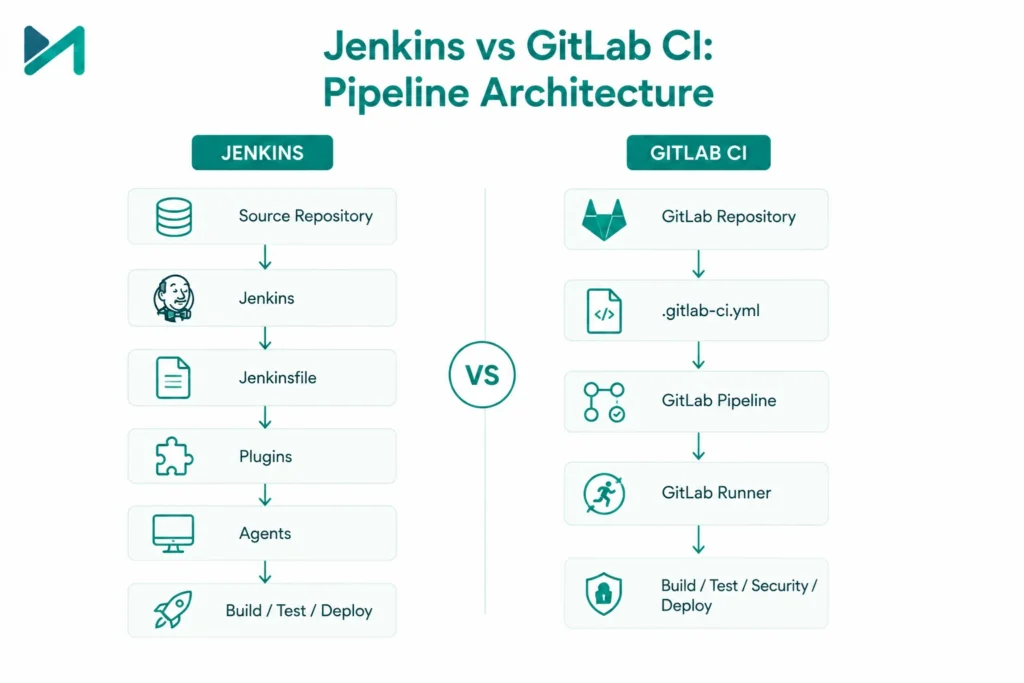
The pipeline configuration model is another major difference.
Jenkins
Typically:
Source Repository
↓
Jenkins
↓
Jenkinsfile
↓
Plugins
↓
Agents
↓
Build / Test / Deploy
GitLab
Typically:
GitLab Repository
↓
.gitlab-ci.yml
↓
GitLab Pipeline
↓
GitLab Runner
↓
Build / Test / Security / Deploy
GitLab’s documentation states that Jenkins uses Groovy or Jenkins DSL while GitLab CI/CD uses YAML configuration.
Neither approach is inherently superior.
The question is which model better fits your engineering organization.
Jenkins vs GitLab CI: Plugin Dependency
This is one area where Jenkins has enormous power but also creates operational responsibility.
Jenkins has 2,000+ community-contributed plugins.
That gives teams tremendous flexibility.
But every plugin can potentially become part of your operational dependency graph.
An enterprise may eventually have:
- Jenkins core
- 50 plugins
- 100 plugins
- 150 plugins
- Custom shared libraries
- Internal scripts
- Custom integrations
The result can be highly capable.
It can also become difficult to maintain.
This is particularly important during upgrades.
Your team needs to understand:
- Which plugins are critical?
- Which are abandoned?
- Which have dependencies?
- Which require upgrades?
- Which interact with credentials?
- Which affect production deployments?
Jenkins itself provides usage statistics because plugin adoption and configuration patterns are important aspects of the Jenkins ecosystem.
GitLab CI vs Jenkins: Toolchain Consolidation
This is arguably GitLab’s strongest enterprise advantage.
Suppose your current architecture looks like:
GitHub
Jenkins
JFrog
SonarQube
Snyk
Docker Registry
Jira
Kubernetes
Monitoring
There may be good reasons for every tool.
But every integration creates another operational dependency.
GitLab can consolidate several of these capabilities into one platform.
GitLab’s 2024 research found:
- 67% report mostly or completely automated SDLCs.
- 78% were using AI in software development or planned to within two years.
The strategic question becomes:
Do we want the flexibility of a best-of-breed toolchain, or the operational simplicity of a more integrated platform?
Security: Jenkins vs GitLab CI
Security is another major consideration for enterprise buyers.
Jenkins can absolutely support secure CI/CD.
However, organizations often need to integrate multiple security tools and plugins.
GitLab provides more security capabilities directly within its platform, depending on the selected tier.
GitLab documentation highlights capabilities including:
- Security scanning
- Secret detection
- Vulnerability management
- Merge request integration
- Pipeline security
- Software supply chain security
GitLab’s application security documentation explains that security scanning can be integrated with merge requests and pipelines so vulnerabilities can be identified during development.
This can simplify governance.
However, GitLab does not eliminate security responsibility.
For example, GitLab warns that self-managed runners execute CI/CD job code and can create security risks if shared infrastructure is not properly isolated.
The lesson is:
A more integrated platform can simplify security operations, but it does not replace security architecture.
Scaling: Which Performs Better?
Both platforms can scale.
Jenkins uses a controller and agent architecture.
The Jenkins controller coordinates workloads while agents execute builds. Jenkins documents distributed builds and agent-based scaling as core approaches for large environments.
Jenkins can also scale agents dynamically on Kubernetes.
GitLab uses runners to execute CI/CD jobs.
GitLab runners can be:
- Shared
- Group-specific
- Project-specific
- Self-managed
- Hosted
GitLab also supports runner autoscaling.
GitLab-hosted runners can provision a new VM for individual jobs, reducing the need for customers to maintain the underlying runner infrastructure themselves.
Therefore, the question is not:
“Can Jenkins scale?”
It absolutely can.
The better question is:
“How much engineering effort do we want to spend making our CI/CD platform scale?”
Jenkins vs GitLab CI: Migration Effort
This is where organizations with existing Jenkins environments need to be realistic.
Migrating from Jenkins to GitLab CI is not simply:
Jenkinsfile → .gitlab-ci.yml
GitLab itself recommends creating a migration plan and assessing the existing Jenkins environment before migration.
You need to inventory:
1. Jenkins jobs
How many pipelines actually exist?
2. Plugins
Which plugins are being used?
3. Shared libraries
Are pipelines dependent on internal shared libraries?
4. Credentials
How are secrets stored and accessed?
5. Build agents
What software is installed on each agent?
6. External integrations
Does Jenkins connect to:
- Artifactory
- AWS
- Azure
- Kubernetes
- Jira
- ServiceNow
- Testing platforms
- Deployment tools?
7. Deployment logic
Are there production approval workflows?
8. Custom scripts
Are there shell scripts or Groovy libraries that are critical to delivery?
9. Compliance
Are there audit requirements around pipeline execution?
This assessment determines the actual migration effort.
Planning a Jenkins-to-GitLab Migration? Assess the Complexity Before You Commit.
A Jenkins migration is rarely just a matter of rewriting Jenkinsfiles.
Existing plugins, shared libraries, credentials, agents, deployment workflows, integrations, compliance requirements, and legacy applications can all influence the migration effort.
MicroGenesis can help you assess your Jenkins environment, identify migration dependencies, classify workloads, and create a phased CI/CD modernization roadmap.
Discuss Your Jenkins-to-GitLab Migration
Jenkins to GitLab Migration: Easy, Moderate or Complex?
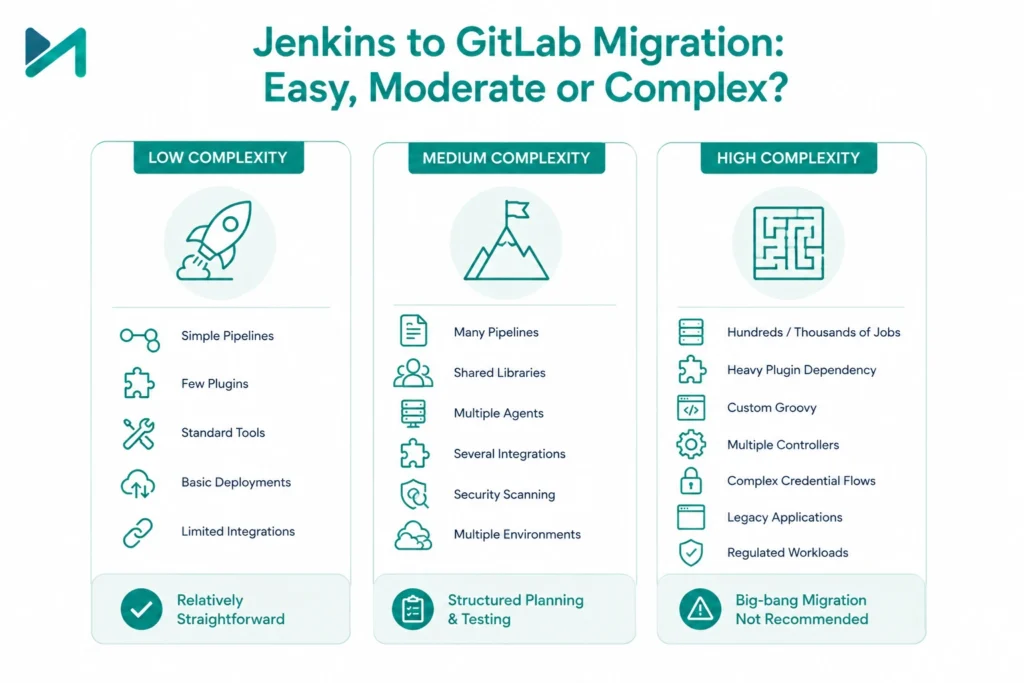
A useful enterprise classification is:
Low Complexity
You have:
- Simple Jenkins pipelines
- Few plugins
- Standard build tools
- Basic deployments
- Limited integrations
Migration can be relatively straightforward.
Medium Complexity
You have:
- Dozens or hundreds of pipelines
- Shared Jenkins libraries
- Multiple agents
- Several external integrations
- Security scanning
- Multiple deployment environments
Migration requires structured planning and testing.
High Complexity
You have:
- Hundreds or thousands of jobs
- Heavy plugin dependency
- Custom Groovy
- Proprietary deployment logic
- Multiple controllers
- Complex credential flows
- Legacy applications
- Regulated workloads
At this point, a big-bang migration is usually the wrong strategy.
A Better Jenkins to GitLab Migration Strategy
Instead of migrating everything simultaneously, use a phased approach.
Phase 1: Discovery
Inventory:
- Jobs
- Plugins
- Agents
- Credentials
- Dependencies
- Integrations
Phase 2: Classification
Group pipelines into:
- Simple
- Moderate
- Complex
- Business-critical
Phase 3: Pilot
Select a small number of representative applications.
Phase 4: Pipeline Conversion
Convert Jenkins files into .gitlab-ci.yml configurations.
Phase 5: Validation
Compare:
- Build results
- Test results
- Deployment behavior
- Security
- Performance
Phase 6: Parallel Operation
Run Jenkins and GitLab CI/CD simultaneously for selected workloads.
Phase 7: Migration Waves
Move applications in controlled groups.
Phase 8: Jenkins Retirement
Only retire Jenkins after dependencies and rollback requirements have been addressed.
GitLab’s official migration guidance similarly recommends planning, understanding Jenkins plugins and agents, moving projects, creating .gitlab-ci.yml files, migrating configurations, and then optimizing pipeline efficiency.
Modernize Your CI/CD Without Disrupting Software Delivery.
A phased migration gives enterprise teams the opportunity to validate the target architecture, test representative applications, modernize pipelines, strengthen security, and move workloads in controlled waves.
MicroGenesis supports enterprises across CI/CD modernization, DevOps automation, cloud integration, DevSecOps, pipeline engineering, containerized delivery, and enterprise GitLab adoption.
Explore Enterprise DevOps Capabilities
What About Organizations That Do Not Want to Migrate?
You do not necessarily need to.
GitLab officially supports Jenkins integration for organizations that want to continue using Jenkins while connecting it with GitLab.
This can be useful when:
- Jenkins is deeply embedded
- Migration risk is high
- Teams need time to prepare
- Certain applications have complex pipelines
- The organization wants GitLab SCM while retaining Jenkins temporarily
This creates a possible transition architecture:
GitLab
↓
Source Code + Merge Requests
↓
Jenkins
↓
Build / Test / Deployment
This can provide a migration path without forcing an immediate cutover.
When Jenkins Is the Better Choice
Jenkins can be the better enterprise option when:
1. You already have significant Jenkins investment
Replacing a mature Jenkins environment can cost more than maintaining it.
2. Your workflows are highly customized
Jenkins offers enormous flexibility through plugins and pipeline extensions.
3. You require unusual integrations
If Jenkins already integrates successfully with your environment, there may be little business value in changing.
4. You have strong Jenkins expertise
An experienced internal team reduces operational overhead.
5. You want maximum CI/CD independence
Jenkins allows organizations to construct their own toolchain around the automation engine.
When GitLab CI/CD Is the Better Choice
GitLab CI/CD is often stronger when:
1. You want toconsolidateyour toolchain
The 64% toolchain consolidation figure from GitLab’s survey is highly relevant here.
2. You want SCM and CI/CD together
GitLab provides source control and CI/CD within the same platform.
3. Security integration is important
GitLab can bring security scanning and DevSecOps workflows closer to development.
4. You want SaaS
GitLab.com provides a hosted option, whereas Jenkins must be self-hosted.
5. You want to reduce platform administration
A managed GitLab deployment can reduce some of the infrastructure responsibilities associated with running Jenkins yourself.
6. You want a broader DevSecOps platform
GitLab goes beyond CI/CD into planning, source control, security, package management, and deployment workflows.
Jenkins vs GitLab CI: Which Wins?
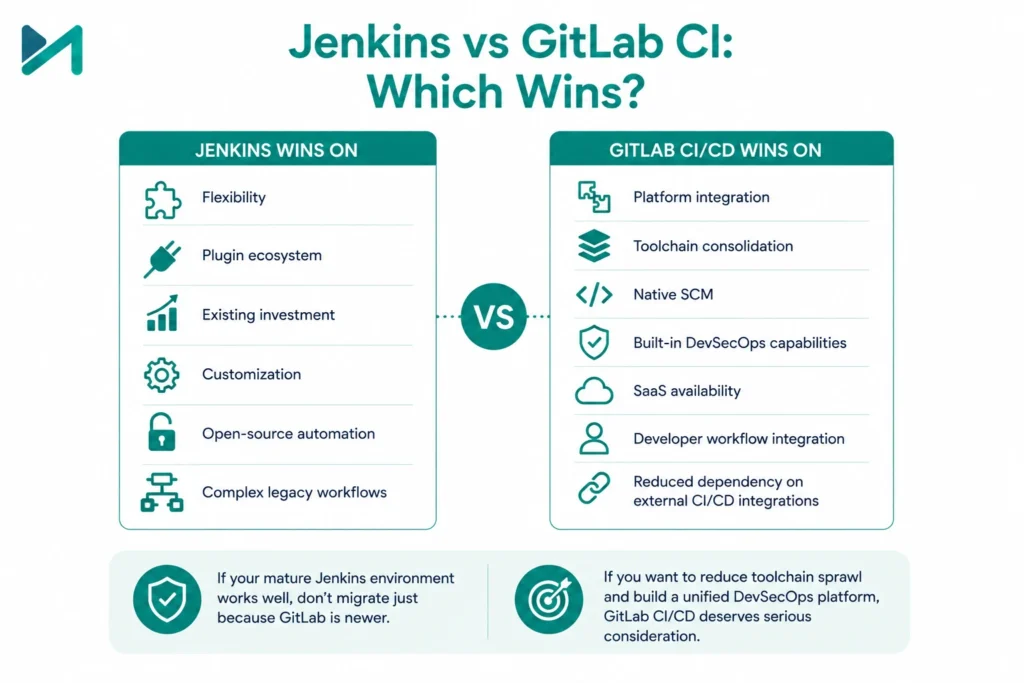
There is no universal winner.
But for an enterprise evaluating the platforms today, the decision can be framed clearly.
Jenkins wins on:
- Flexibility
- Plugin ecosystem
- Existing investment
- Customization
- Open-source automation
- Complex legacy workflows
GitLab CI/CD wins on:
- Platform integration
- Toolchain consolidation
- Native SCM
- Built-in DevSecOps capabilities
- SaaS availability
- Developer workflow integration
- Reduced dependency on external CI/CD integrations
So:
If you have a mature Jenkins environment that works well, migration should not be justified simply because GitLab is newer or more integrated.
But:
If your organization is trying to reduce toolchain sprawl and establish a unified DevSecOps platform, GitLab CI/CD deserves serious consideration.
The Decision Matrix for Enterprise Buyers
| Criteria | Jenkins | GitLab CI/CD | Winner |
| License entry cost | 5/5 | 4/5 | Jenkins |
| Pipeline flexibility | 5/5 | 4/5 | Jenkins |
| Plugin ecosystem | 5/5 | 4/5 | Jenkins |
| Built-in SCM | 2/5 | 5/5 | GitLab |
| Toolchain consolidation | 3/5 | 5/5 | GitLab |
| Security integration | 3/5 | 5/5 | GitLab |
| SaaS availability | 1/5 | 5/5 | GitLab |
| Self-managed flexibility | 5/5 | 5/5 | Tie |
| Existing Jenkins migration effort | 5/5 | 2/5 | Jenkins |
| Enterprise platform integration | 3/5 | 5/5 | GitLab |
| Custom legacy workflows | 5/5 | 4/5 | Jenkins |
| Operational simplicity | 3/5 | 5/5 | GitLab |
The scores are a decision framework, not vendor benchmark results.
Your own architecture, team skills, application portfolio, and compliance requirements should determine the final weighting.
How MicroGenesis Can Help With GitLab CI/CD
Choosing GitLab over Jenkins is only the beginning.
The difficult part is designing a CI/CD architecture that works across your actual enterprise environment.
MicroGenesis helps organizations evaluate, implement, modernize, and optimize CI/CD and DevOps environments.
For organizations considering GitLab, MicroGenesis can support:
- GitLab CI/CD strategy
- GitLab implementation
- Jenkins to GitLab migration planning
- Pipeline modernization
- CI/CD architecture
- GitLab Runner implementation
- DevSecOps integration
- Security automation
- Containerized CI/CD
- Cloud-native pipelines
- Pipeline optimization
- Enterprise GitLab adoption
- Toolchain consolidation
You can explore the MicroGenesis GitLab Consulting Services to understand how the engagement can be aligned with your existing engineering environment.
If your organization is still evaluating the wider CI/CD landscape, our guide to CI/CD tools for your DevOps team can help establish the broader selection criteria.
For organizations building a complete delivery lifecycle, understanding Continuous Integration and Continuous Deployment is also useful before selecting the platform.
How to Decide in the Next 30 Days
If you are currently evaluating Jenkins vs GitLab CI, do not begin with a product demonstration.
Start with your environment.
Week 1: Inventory
Document:
- Number of pipelines
- Number of developers
- Number of Jenkins controllers
- Number of agents
- Plugins
- Integrations
- Build minutes
- Deployment environments
Week 2: Cost
Calculate:
- Infrastructure
- Administration
- Licensing
- Support
- Security tools
- Storage
- Runner costs
- Engineering effort
Week 3: Pilot
Select:
- One simple application
- One medium-complexity application
- One critical application
Test the target platform.
Week 4: Business Case
Compare:
Current Jenkins TCO
against
GitLab TCO + migration investment
Then measure:
- Pipeline duration
- Failure rate
- Developer experience
- Security coverage
- Operational effort
- Toolchain reduction
This gives leadership evidence rather than opinion.
Frequently Asked Questions
Is Jenkins cheaper than GitLab CI?
Jenkins has no license fee for the open-source platform, but enterprises still incur infrastructure, administration, security, maintenance, and support costs. GitLab has subscription costs for paid tiers, so the correct comparison is total cost of ownership rather than license price alone.
Is GitLab CI better than Jenkins?
Not universally. GitLab CI/CD is generally stronger for organizations seeking an integrated DevSecOps platform and toolchain consolidation. Jenkins is often stronger where deep customization, plugin flexibility, and existing investment are important.
How difficult is it to migrate from Jenkins to GitLab?
It depends on the Jenkins environment. Simple pipelines can be relatively straightforward. Large environments with hundreds of jobs, shared libraries, custom plugins, credentials, and deployment integrations require structured migration planning.
Can Jenkins and GitLab CI/CD work together?
Yes. GitLab provides Jenkins integration capabilities, allowing organizations to continue using Jenkins while adopting GitLab.
Does GitLab eliminate the need for CI/CD tools?
GitLab can consolidate several capabilities, but enterprises may still require external tools depending on their architecture, cloud environment, testing strategy, security requirements, and deployment model.
Should an enterprise migrate every Jenkins pipeline to GitLab?
No. Migration should be based on business value. Pipelines that are stable, highly customized, or expensive to migrate may be better left on Jenkins, while newer or strategically important workloads may be good candidates for GitLab CI/CD.
Final Verdict: Jenkins vs GitLab CI
The Jenkins vs GitLab CI decision is ultimately about more than pipeline automation.
Jenkins gives enterprises a mature, flexible automation engine with an ecosystem of 2,000+ community plugins.
GitLab takes a more integrated approach, combining source control, CI/CD, security, package management, and other DevSecOps capabilities within a broader platform.
Meanwhile, GitLab’s research shows that 64% of DevSecOps professionals want to consolidate their toolchains, while 67% report mostly or completely automated software development lifecycles.
That is the strategic signal CIOs should pay attention to.
The winning platform is not necessarily the one with the lowest license cost.
It is the one that gives your organization the best combination of:
- Cost
- Engineering productivity
- Security
- Scalability
- Developer experience
- Operational simplicity
- Governance
- Long-term flexibility
- Choose Jenkins when your existing investment, customization, and flexibility outweigh the benefits of changing platforms.
- Choose GitLab CI/CD when platform consolidation, integrated DevSecOps, and simplified enterprise delivery are higher priorities.
- Consider a phased hybrid approach when migration risk is high.
And if you are moving from Jenkins to GitLab, do not treat it as a simple pipeline conversion.
Treat it as an enterprise CI/CD modernization program.
MicroGenesis can help you assess your current Jenkins environment, design the target GitLab architecture, plan migration waves, modernize pipelines, integrate security, and establish an enterprise-grade CI/CD operating model.
Explore MicroGenesis GitLab Consulting Services
The goal is not simply to replace Jenkins. The goal is to build a CI/CD platform that makes your engineering organization faster, safer, easier to govern, and ready to scale.