

Moving applications and infrastructure to AWS offers organisations an opportunity to improve scalability, modernise existing systems and reduce the operational challenges of managing physical infrastructure.
However, the actual migration process requires more than transferring servers and deploying applications in a cloud environment.
Consider an enterprise running its business applications across multiple physical servers and virtual machines. These applications communicate with shared databases, authentication services, ERP systems and third-party platforms.
Moving one component without preparing the others could interrupt business operations, affect application performance or introduce security risks.
Successful application and infrastructure migration to AWS requires a coordinated approach that considers workload dependencies, target infrastructure, data protection, migration execution and business continuity.
In this article, we explore how organisations can migrate applications and infrastructure to AWS while maintaining operational stability and preparing for long-term cloud performance.
What Is Application and Infrastructure Migration to AWS?
Application and infrastructure migration to AWS involves moving existing applications, servers, databases, storage and supporting technology resources from their current environment to Amazon Web Services.
The source environment may include:
On-premises data centres.
Physical and virtual servers.
Private cloud environments.
Other public cloud platforms.
Hybrid infrastructure.
Legacy enterprise application environments.
Depending on business requirements, organisations may migrate applications with minimal changes or introduce architectural improvements during the transition.
The objective is to establish an AWS environment that supports existing business operations while providing opportunities for scalability, reliability and optimisation.
For a broader understanding of cloud adoption, explore our AWS Cloud Consulting and Transformation Guide.
Application Migration vs Infrastructure Migration to AWS
Although application and infrastructure migration are closely related, they involve different technical considerations.
| Consideration | Application migration | Infrastructure migration |
|---|---|---|
| Primary focus | Moving business applications and supporting components | Moving servers, storage and infrastructure resources |
| Key activities | Application configuration, compatibility and integration | Server replication, networking and resource provisioning |
| Dependencies | Databases, APIs and business systems | Computing, storage, networking and security |
| Testing requirements | Business functionality and application performance | Infrastructure availability, connectivity and performance |
| Expected outcome | Functional applications operating on AWS | Reliable infrastructure supporting cloud workloads |
For enterprise environments, these activities need to be coordinated.
An application may be successfully transferred to AWS but remain unusable if its database connections, network configurations or authentication dependencies are not functioning correctly.
What Types of Workloads Can Be Migrated to AWS?
AWS supports a wide range of enterprise applications and infrastructure workloads, subject to technical compatibility, licensing and business requirements.
| Workload type | Potential AWS destination |
|---|---|
| Physical and virtual servers | Amazon EC2 |
| Enterprise web applications | Amazon EC2, Amazon ECS or AWS Elastic Beanstalk |
| Containerised applications | Amazon ECS or Amazon EKS |
| Relational databases | Amazon RDS, Amazon Aurora or Amazon EC2 |
| File storage | Amazon EFS or Amazon FSx |
| Object storage and archives | Amazon S3 |
| Windows-based applications | Amazon EC2 and compatible AWS services |
| Legacy business applications | Amazon EC2 or a modernised architecture |
The appropriate destination depends on application architecture, performance requirements, operating system compatibility and the organisation’s cloud strategy.
Not every workload needs to be modernised during migration. In some cases, moving an application first and improving its architecture later may be a more practical approach.
Step-by-Step Process for Application and Infrastructure Migration to AWS
A structured migration process helps organisations coordinate technical activities, manage dependencies and reduce unexpected disruption.
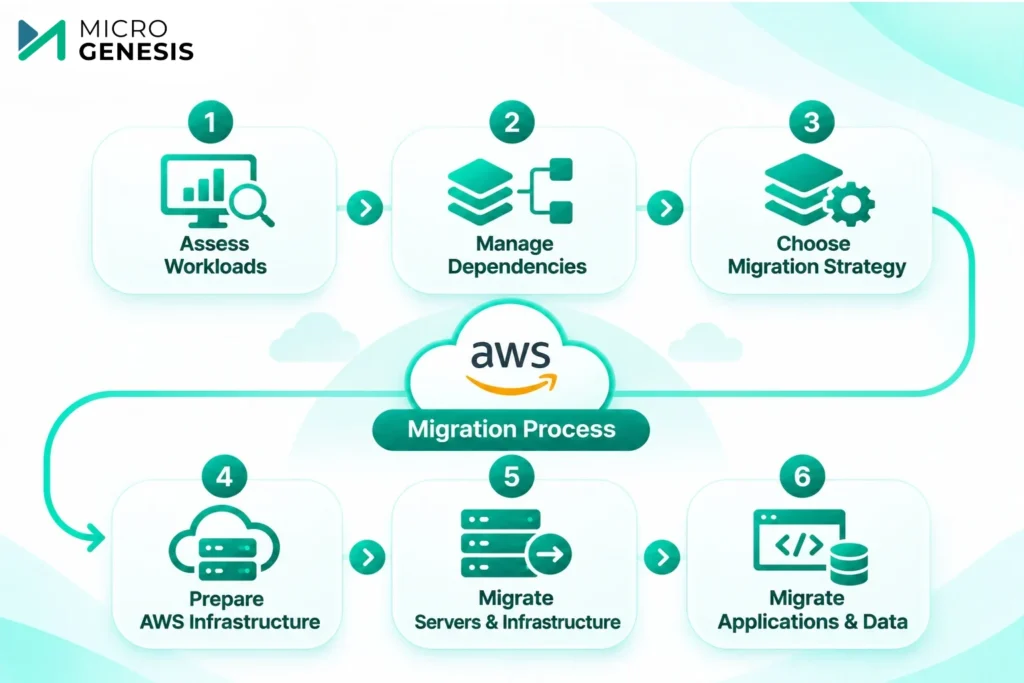
Step 1: Assess Existing Workloads and Migration Readiness
Before migration begins, establish a clear understanding of the existing technology environment.
This includes identifying applications, servers, databases, network configurations and supporting services.
Key assessment activities include:
Documenting existing applications and infrastructure.
Reviewing operating system and software compatibility.
Analysing resource utilisation and performance.
Identifying application and database dependencies.
Reviewing licensing and security requirements.
Establishing acceptable downtime and recovery requirements.
For example, a legacy application running on an older operating system may require compatibility validation before it can be migrated to AWS.
Identifying these requirements early prevents avoidable delays during execution.
Our guide to AWS migration assessment and planning explains how to evaluate workload readiness, identify risks and develop a migration roadmap.
Step 2: Identify and Manage Application Dependencies
Application dependencies determine how workloads should be grouped and migrated.
An enterprise application may rely on several components, including:
Application and web servers.
Shared databases.
Authentication services.
Internal and external APIs.
File storage.
Messaging services.
Scheduled processes.
Third-party applications.
Consider a manufacturing organisation migrating its order management application to AWS while retaining its ERP system on-premises.
The migrated application must continue exchanging customer, product and order information with the ERP system.
This requires secure network connectivity, appropriate access controls and validation of complete business transactions.
Depending on the dependencies, organisations may choose to migrate related workloads together or establish temporary hybrid connectivity during the transition.
Step 3: Select the Appropriate Workload Migration Strategy
Different workloads require different migration approaches.
For application and infrastructure migration, three commonly considered strategies are:
| Strategy | Approach | Suitable scenario |
|---|---|---|
| Rehost | Move applications with minimal changes | Data centre exits and time-sensitive migrations |
| Replatform | Introduce selected improvements during migration | Moving compatible databases to managed AWS services |
| Refactor | Redesign applications to use cloud-native capabilities | Applications requiring significant scalability or architectural improvements |
Other strategies include relocating supported infrastructure, replacing applications, retiring unused workloads and retaining selected systems in their existing environment.
For example, an organisation approaching the end of its data centre lease may prioritise rehosting its existing applications. Once operations are stable, selected workloads can be evaluated for modernisation.
The migration strategy should support business priorities rather than introduce unnecessary changes.
Read more about AWS cloud strategy and assessment to understand how migration decisions align with broader cloud objectives.
Planning to migrate legacy or business-critical applications?
Discuss your application migration requirements with MicroGenesis to identify a suitable migration strategy.
Step 4: Prepare the Target AWS Infrastructure
Before transferring production workloads, the target AWS environment must be ready to support them.
This involves more than provisioning computing resources.
The environment should provide appropriate networking, security, monitoring, storage and operational controls.
| AWS infrastructure component | Purpose |
|---|---|
| Amazon VPC | Establish network isolation and connectivity |
| Amazon EC2 | Provide computing resources for compatible workloads |
| Amazon EBS | Provide block storage for EC2 instances |
| Amazon S3 | Store objects, files and archives |
| Elastic Load Balancing | Distribute application traffic |
| AWS IAM | Manage identities and access permissions |
| Amazon CloudWatch | Monitor resources and application performance |
| AWS Backup | Manage backups for supported resources |
| AWS Direct Connect or Site-to-Site VPN | Establish connectivity with existing environments |
Enterprise organisations may also establish an AWS landing zone to provide consistent account management, security and governance across workloads.
Our guide to AWS cloud architecture and implementation explains how to design and prepare a reliable AWS environment.
Step 5: Perform Server and Infrastructure Migration
Server migration involves moving supported physical servers, virtual machines and their associated workloads to AWS.
AWS Application Migration Service (AWS MGN) supports server replication and migration for compatible source environments.
A typical replication-based migration process includes:
Validate source server compatibility.
Configure the migration environment.
Install replication agents where required.
Begin initial data replication.
Monitor replication health and progress.
Launch test instances in AWS.
Validate server functionality and configuration.
Prepare and launch production instances during cutover.
Continuous replication can help reduce the amount of data that needs to be transferred during the final migration window.
However, replication alone does not guarantee application consistency or uninterrupted operations. Application-specific validation and controlled cutover remain essential.
Step 6: Execute Application and Data Migration
Once the supporting infrastructure is prepared, applications and associated data can be migrated according to the selected strategy.
Application migration activities may include:
Deploying or replicating application components.
Updating application configurations.
Establishing database connections.
Configuring application access and authentication.
Migrating files and supporting data.
Reconnecting internal and external integrations.
Configuring application monitoring.
Validating business workflows.
For database migration, AWS Database Migration Service (AWS DMS) can support compatible database engines and migration scenarios.
AWS DataSync can support applicable file and storage migration requirements.
Where ongoing database replication is used, the migration team should monitor replication delays and verify that the target database is consistent before production cutover.
Need assistance migrating enterprise applications, servers or databases?
Explore MicroGenesis AWS consulting and migration capabilities to discuss your workload requirements and migration approach.
AWS Tools for Application and Infrastructure Migration
AWS provides several tools that support different migration requirements.
| AWS tool | Primary purpose |
|---|---|
| AWS Application Migration Service (AWS MGN) | Replication and migration of compatible server workloads |
| AWS Database Migration Service (AWS DMS) | Database migration and ongoing data replication |
| AWS DataSync | Transfer of data between supported storage environments |
| AWS Transfer Family | Managed file transfers using supported protocols |
| AWS CloudFormation | Consistent provisioning of AWS infrastructure |
| AWS Systems Manager | Operational management of supported infrastructure |
| Amazon CloudWatch | Infrastructure and application monitoring |
The right combination of tools depends on workload compatibility, data volume, connectivity, application dependencies and migration requirements.
Migration tools simplify technical activities, but they cannot replace proper planning, testing and operational coordination.
Testing and Validation Before AWS Migration Cutover
One of the most important stages of migration is confirming that workloads function correctly in the target environment before switching production traffic.
A server starting successfully in AWS does not necessarily mean the application is ready for production.
The complete business process must be validated.
What Should Be Tested Before Migration Go-Live?
| Testing area | What to validate |
|---|---|
| Functional testing | Application features and business workflows |
| Integration testing | Communication with databases, APIs and external systems |
| Performance testing | Response times, resource utilisation and transaction handling |
| Security testing | Access permissions, encryption and network controls |
| Data validation | Record completeness, accuracy and consistency |
| Infrastructure testing | Server availability, storage and connectivity |
| Recovery testing | Applicable backup, restoration and recovery procedures |
| User acceptance testing | Business user approval of critical processes |
For example, when migrating an order management application, testing should confirm that users can create orders, retrieve customer information, update inventory and exchange transaction data with the ERP system.
Testing should cover successful transactions as well as error scenarios.
AWS Migration Cutover: Moving Workloads into Production
Cutover is the point at which production operations transition from the existing environment to AWS.
This stage requires coordination between infrastructure teams, application owners, database administrators, security teams and business stakeholders.
Preparing an AWS Migration Cutover Plan
A cutover plan should define the sequence of activities, responsible teams, expected timings and approval requirements.
| Cutover activity | Purpose |
|---|---|
| Confirm migration readiness | Ensure technical and business prerequisites are complete |
| Notify stakeholders | Communicate migration windows and expected impact |
| Restrict source application changes where required | Prevent data inconsistencies |
| Complete final data synchronisation | Transfer outstanding changes |
| Launch production workloads | Activate the target AWS environment |
| Update application endpoints or DNS | Redirect traffic to the new environment |
| Validate critical business processes | Confirm production functionality |
| Monitor application performance | Identify operational issues |
| Obtain business approval | Confirm successful transition |
Establish a Rollback and Recovery Plan
Not every migration proceeds exactly as planned.
A rollback plan should define what happens if critical applications fail, data inconsistencies are identified or performance falls below agreed requirements.
It should establish rollback decision criteria, responsible teams, recovery procedures and acceptable recovery times.
Where applications begin accepting new production transactions in AWS, rollback may require reverse data synchronisation or another controlled recovery approach.
These requirements should be evaluated and tested before cutover wherever feasible.
Common Challenges When Migrating Applications and Infrastructure to AWS
Enterprise migrations can encounter technical and operational challenges even when the overall strategy is well defined.
| Migration challenge | Recommended solution |
|---|---|
| Undocumented application dependencies | Perform dependency discovery and group related workloads |
| Legacy application incompatibility | Validate compatibility and test required modifications |
| Unexpected downtime | Establish controlled migration windows and recovery plans |
| Slow data replication | Assess network capacity and monitor replication progress |
| Application performance issues | Establish performance baselines and validate resource sizing |
| Security configuration gaps | Review permissions, encryption and network access |
| Inconsistent database records | Perform data reconciliation and application-level validation |
| Unexpected AWS costs | Monitor resource utilisation and optimise configurations |
Addressing these challenges early helps organisations reduce rework and improve migration predictability.
Post-Migration Validation and Optimisation
Once applications are operating in AWS, the focus shifts towards stabilising the environment and improving operational efficiency.
Application and Infrastructure Stabilisation
During the initial post-migration period, organisations should monitor application availability, performance, system logs, integration reliability and user-reported issues.
The objective is to identify problems before they significantly affect business operations.
AWS Performance and Cost Optimisation
Resources selected during migration may need adjustments once actual production usage becomes available.
Optimisation opportunities may include:
Right-sizing EC2 instances.
Reviewing storage performance and capacity.
Configuring appropriate scaling policies.
Removing unused migration resources.
Reviewing data transfer charges.
Evaluating suitable AWS pricing options.
Improving monitoring and backup configurations.
Explore our article on AWS cost optimisation for practical ways to manage cloud expenditure after migration.
Operational Handover
Before closing the migration project, confirm that operational teams have the documentation, access, monitoring capabilities and support procedures required to manage the new environment.
Source infrastructure should only be decommissioned after business acceptance, recovery requirements and data retention obligations have been addressed.
How MicroGenesis Supports Application and Infrastructure Migration to AWS
Migrating enterprise workloads requires an understanding of both cloud infrastructure and the applications that depend on it.
MicroGenesis brings together cloud consulting, enterprise application engineering, DevOps, integration and managed services capabilities to support organisations throughout the migration lifecycle.
Our AWS migration approach includes:
Workload assessment: Evaluating existing applications, servers and infrastructure dependencies.
Migration planning: Defining workload priorities, migration strategies and execution requirements.
AWS infrastructure preparation: Establishing appropriate computing, networking, storage and security configurations.
Application and server migration: Supporting the transition of compatible enterprise workloads to AWS.
Testing and validation: Reviewing application functionality, integrations, performance and operational readiness.
Cutover support: Coordinating production migration and recovery planning.
Post-migration optimisation: Identifying opportunities to improve performance, resource utilisation and operational efficiency.
Whether you are planning a data centre exit, migrating legacy applications or transitioning to a hybrid cloud environment, we help you establish a migration approach aligned with your business requirements.
Frequently Asked Questions About Application and Infrastructure Migration to AWS
How do you migrate an existing application to AWS?
Application migration involves assessing the workload, identifying dependencies, selecting a migration strategy, preparing the AWS environment, transferring application components and data, testing functionality and completing production cutover.
Can physical servers and virtual machines be migrated to AWS?
Yes. Compatible physical servers and virtual machines can be migrated using tools such as AWS Application Migration Service. Operating system compatibility, licensing and technical requirements should be assessed beforehand.
Can applications be migrated to AWS without downtime?
Some workloads can be migrated with minimal downtime through continuous replication and controlled cutover. However, achievable downtime depends on application architecture, data consistency and business requirements.
Do applications need to be redesigned before moving to AWS?
Not necessarily. Compatible applications can often be migrated with minimal changes using a rehosting approach. Other workloads may benefit from replatforming or architectural modernisation.
How long does application and infrastructure migration to AWS take?
Migration timelines depend on workload volume, application complexity, data transfer requirements, dependencies and testing activities. A detailed assessment helps establish a realistic schedule.
What happens after applications are migrated to AWS?
Post-migration activities include performance monitoring, issue resolution, security validation, cost optimisation, operational handover and ongoing infrastructure management.
Discuss Your Application Migration Requirements with MicroGenesis
Application and infrastructure migration to AWS is an opportunity to improve how your organisation operates, manages and scales its technology environment.
Achieving these benefits requires careful preparation, coordinated execution and thorough validation of business-critical workloads.
MicroGenesis helps organisations assess existing applications, prepare AWS infrastructure, execute workload migrations and establish a reliable cloud environment aligned with their operational requirements.
Whether you are migrating a single business application or an entire enterprise infrastructure environment, our approach focuses on reducing migration risks and supporting long-term cloud performance.
Discuss Your Application Migration Requirements with MicroGenesis