
A well-designed DevOps lifecycle can help organizations release software faster, automate repetitive work, improve collaboration, and maintain reliable production environments. But adopting DevOps is not simply a matter of installing CI/CD tools. Teams need the right processes, automation strategy, cloud infrastructure, security practices, and operational controls working together.
This guide explains the DevOps lifecycle phases, what happens at each stage, which technologies can support them, and how organizations can turn the lifecycle into a repeatable software delivery process.
If your organization is planning a new DevOps initiative or struggling with an existing delivery pipeline, DevOps services from MicroGenesis can help assess your current environment and design a practical implementation strategy.
What Is the DevOps Lifecycle?
The DevOps lifecycle is a continuous software delivery process that connects development and IT operations through planning, coding, building, testing, releasing, deploying, operating, and monitoring.
Unlike a traditional development process where teams may work in separate handoffs, DevOps connects these activities through automation, collaboration, continuous feedback, and shared responsibility.
A typical DevOps life cycle looks like this:
Plan → Code → Build → Test → Release → Deploy → Operate → Monitor → Feedback
The exact implementation varies according to the organization’s technology stack, application architecture, security requirements, and delivery model.
For an organization, the real value comes from designing these stages as one connected workflow rather than implementing each stage independently.
Why Does the DevOps Lifecycle Matter for Businesses?
Organizations usually adopt DevOps because software delivery needs to become faster, more predictable, and easier to manage as applications and teams grow.
A mature DevOps process can help organizations:
- Reduce manual deployment activities
- Automate software testing and validation
- Shorten development feedback cycles
- Improve release consistency
- Detect defects earlier
- Standardize development and deployment processes
- Improve collaboration between development and operations
- Increase production visibility
- Respond faster to incidents
- Establish repeatable delivery practices
However, simply purchasing DevOps tools does not guarantee these outcomes.
A successful implementation requires alignment between people, processes, technology, security, and operational responsibilities.
This is why organizations evaluating DevOps should first understand their current delivery process and identify where automation or process improvements will have the greatest impact.
What Are the DevOps Lifecycle Phases?
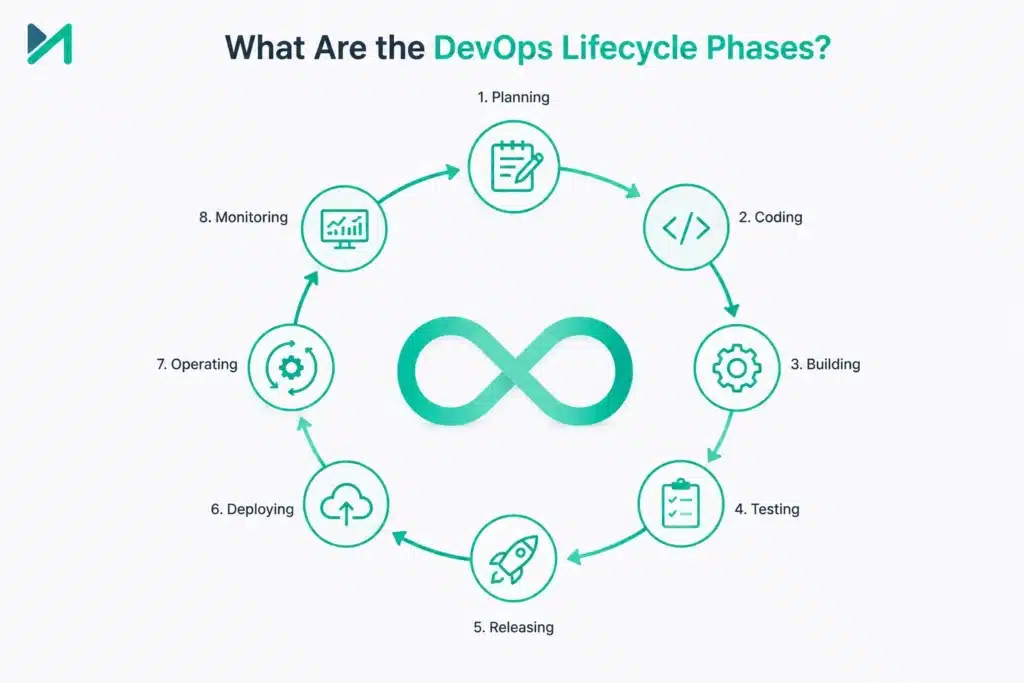
The commonly used DevOps lifecycle phases are:
- Planning
- Coding
- Building
- Testing
- Releasing
- Deploying
- Operating
- Monitoring
These DevOps stages form a continuous loop. Information from production can influence planning, testing results can influence development, and deployment performance can influence future automation decisions.
The following sections explain what each phase involves and what organizations should consider when implementing it.
Planning
Planning establishes what the team needs to deliver and how the work will move through the development process.
A practical DevOps planning process can include:
- Business requirements
- Product priorities
- Technical requirements
- Development tasks
- Dependencies
- Release objectives
- Security considerations
- Infrastructure requirements
- Operational requirements
Development and operations should not plan in isolation. Infrastructure, deployment, monitoring, security, and support requirements should be considered early.
For teams already using Agile project management, DevOps planning can connect development backlogs with the technical workflow used to deliver those changes.
How to improve the planning phase
Organizations can improve this stage by:
- Defining clear ownership for work
- Maintaining a prioritized backlog
- Identifying dependencies early
- Including security and operations requirements
- Connecting development tasks with release objectives
- Reviewing production feedback during planning
The goal is to create a clear path from business requirement to deployable software.
Coding
The coding phase converts requirements and technical designs into software.
Version control systems such as Git provide the foundation for managing source code and collaborating across development teams.
A strong DevOps coding process commonly includes:
- Source control
- Branching strategies
- Pull requests
- Peer reviews
- Coding standards
- Dependency management
- Automated code checks
- Security scanning
Small, reviewable changes are generally easier to test and integrate than large batches of changes.
Security should also be considered during coding rather than waiting until the application is ready for production. Static analysis, dependency checks, and secure coding practices can help identify issues earlier.
Building
The build phase turns source code into a testable and deployable artifact.
Depending on the application, this may involve:
- Compiling code
- Installing dependencies
- Running automated checks
- Packaging applications
- Creating container images
- Publishing artifacts
- Preparing deployment packages
This is where continuous integration becomes particularly valuable.
With CI, code changes can be integrated and validated regularly instead of waiting until the end of a development cycle.
Organizations evaluating their CI tooling can compare options in our guide to CI/CD tools for your DevOps team.
What should a reliable build process provide?
A well-designed build process should be:
Repeatable: The same source and configuration should produce predictable results.
Automated: Routine build activities should not depend on manual intervention.
Traceable: Teams should be able to identify which source changes produced a particular build.
Fast enough for frequent feedback: Slow builds can become a bottleneck in the wider DevOps pipeline.
Testing
Testing determines whether a software change is ready to progress through the delivery pipeline.
Modern DevOps teams typically combine several forms of testing, including:
- Unit testing
- Integration testing
- Functional testing
- Regression testing
- Performance testing
- Security testing
- Acceptance testing
Testing should be automated wherever practical.
For example, a code change can trigger a pipeline that builds the application, executes automated tests, evaluates the results, and prevents an unsuccessful build from moving further through the delivery process.
This approach reduces dependence on manual validation and creates faster feedback for developers.
Read our guide on continuous integration and continuous deployment in DevOps to understand how CI/CD connects development, testing, and delivery.
How to improve DevOps testing
Organizations can strengthen testing by:
- Automating repetitive tests
- Running tests early in the pipeline
- Separating fast tests from longer test suites
- Tracking recurring failures
- Adding security testing
- Maintaining reliable test environments
- Monitoring test execution time
Testing should improve delivery confidence without becoming an unnecessary bottleneck.
Releasing
The release stage prepares an application version for deployment.
Depending on the organization’s governance model, this can involve:
- Version management
- Release approvals
- Environment validation
- Release notes
- Change records
- Deployment preparation
- Rollback planning
Not every organization needs the same degree of manual approval. Highly regulated environments may require formal controls, while other teams may automate much of the release process.
The objective is to create a predictable transition from a validated build to a deployable release.
Deploying
Deployment makes the application available in the intended environment.
A DevOps deployment process may involve development, testing, staging, and production environments.
Automation can standardize how applications and infrastructure are deployed across these environments.
Common deployment approaches include:
- Rolling deployment
- Blue-green deployment
- Canary deployment
- Feature-based releases
The right approach depends on the application’s architecture, business risk, infrastructure, and availability requirements.
If your organization is experiencing slow releases, repeated deployment failures, or manual handoffs, DevOps deployment speed bottlenecks can help identify areas worth investigating.
Operating
The operate phase focuses on keeping deployed applications and infrastructure reliable.
Typical activities include:
- Infrastructure management
- Application support
- Incident management
- Capacity management
- Configuration management
- Patching
- Backup management
- Performance optimization
This is where the connection between development and operations becomes particularly important.
Developers need visibility into production behavior, while operations teams need reliable mechanisms for reporting incidents and feeding operational information back into engineering.
Cloud platforms, Infrastructure as Code, containers, and automation can help standardize these activities.
For organizations moving workloads to cloud environments, see our guide on migrating to the cloud with DevOps.
Monitoring
Monitoring provides visibility into what happens after deployment.
Teams can monitor:
- Application availability
- Response times
- Error rates
- Infrastructure health
- Resource utilization
- Service dependencies
- User experience
Monitoring is valuable only when the collected information leads to action.
For example, if a deployment causes an increase in application errors, the team should be able to identify the change, investigate the cause, and either correct or roll back the release.
This creates the feedback loop that connects operations back to development.
A mature DevOps cycle therefore does not stop when software reaches production. Production behavior becomes an input into the next planning and development cycle.
How to Implement the DevOps Lifecycle
Understanding the phases of DevOps is only the beginning. Organizations need to translate these phases into an operational delivery model.
A practical implementation can follow these steps.
Step 1: Assess the Existing Software Delivery Process
Before selecting tools, document how software currently moves from development to production.
Identify:
- Manual activities
- Approval points
- Testing bottlenecks
- Deployment failures
- Environment inconsistencies
- Security gaps
- Monitoring limitations
- Handoffs between teams
This assessment establishes where DevOps improvements can deliver the most value.
Step 2: Define the Target DevOps Workflow
Map the desired flow from planning through production.
For example:
Planning → Source Control → CI Build → Automated Testing → Release → Deployment → Monitoring → Feedback
Define ownership and success criteria for each stage.
Step 3: Select the Right DevOps Toolchain
Tools should support the process rather than determine it.
Depending on requirements, a DevOps toolchain may include:
- Source control platforms
- CI/CD platforms
- Container technologies
- Infrastructure as Code
- Artifact repositories
- Security tools
- Monitoring platforms
- Collaboration tools
Our DevOps implementation roadmap provides additional guidance for planning this transformation.
Step 4: Automate High-Value Activities First
Do not attempt to automate everything simultaneously.
Start with repetitive activities that create measurable delays or errors, such as:
- Builds
- Unit testing
- Deployment
- Infrastructure provisioning
- Security checks
- Environment configuration
Once the initial automation is stable, expand the pipeline.
Step 5: Integrate Security
Security should be incorporated throughout the lifecycle rather than treated as a final checkpoint.
This approach is commonly referred to as DevSecOps.
Our guide on What Is DevSecOps and How Does It Work? explains how security practices can be integrated into the DevOps process.
Step 6: Measure and Improve
After implementation, teams should measure whether the new process is actually improving delivery.
Useful indicators can include:
- Deployment frequency
- Lead time for changes
- Change failure rate
- Recovery time
- Build duration
- Test failure rate
- Deployment success rate
- Pipeline utilization
These measurements help teams identify bottlenecks and prioritize future improvements.
When Should You Work With a DevOps Services Partner?
Organizations do not always need external assistance for every DevOps activity. However, professional expertise can be valuable when the environment involves multiple teams, legacy applications, complex cloud infrastructure, security requirements, or an existing pipeline that is difficult to optimize.
A DevOps services partner can help with:
- DevOps assessment
- CI/CD implementation
- Pipeline automation
- Cloud and DevOps integration
- Infrastructure automation
- Containerization
- DevSecOps adoption
- Toolchain integration
- Monitoring and observability
- DevOps process optimization
The right partner should begin with an assessment rather than immediately recommending a particular tool.
The implementation should be based on your existing architecture, development model, operational requirements, security posture, and business objectives.
How to Choose the Right DevOps Implementation Approach
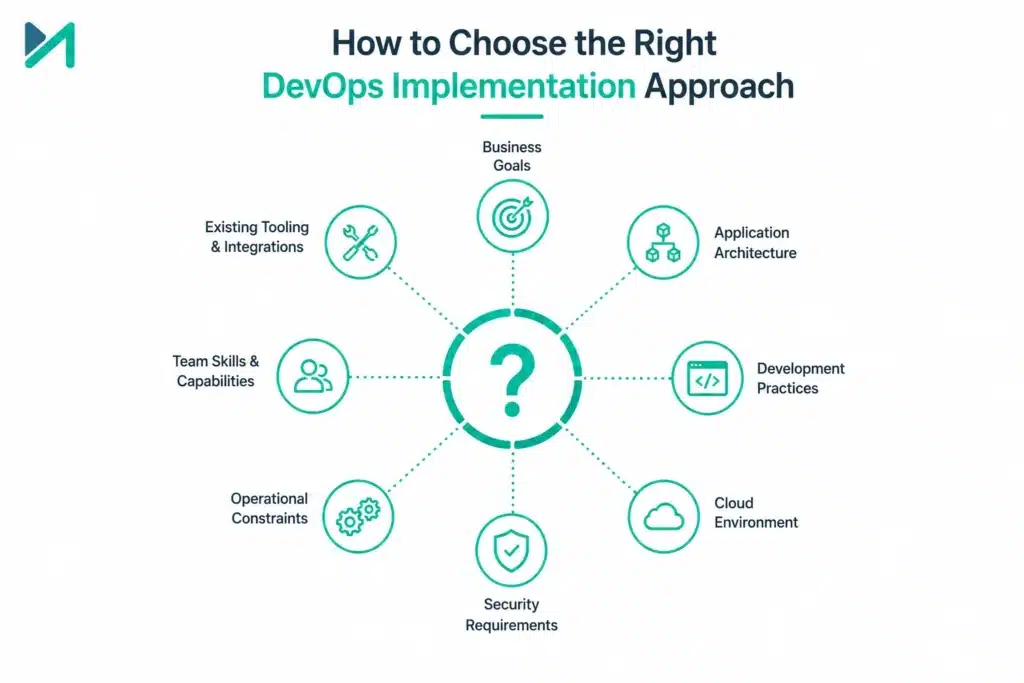
Choosing a DevOps approach should start with your existing software delivery environment, not with a specific tool. Every organization has different application architectures, development practices, cloud environments, security requirements, and operational constraints.
Before implementing or redesigning a DevOps lifecycle, evaluate the following areas.
Assess Your Current Development Process
Start by mapping how software currently moves from an approved requirement to production.
Look for:
- Manual build and deployment activities
- Long testing cycles
- Repeated production issues
- Disconnected development and operations teams
- Environment inconsistencies
- Limited application visibility
- Security checks performed too late
- CI/CD pipeline failures
- Slow release approvals
This assessment helps identify where automation can deliver meaningful improvements.
For organizations with complex environments, a structured DevOps implementation strategy can help establish priorities before introducing new tools or changing existing workflows.
Build a DevOps Toolchain Around Your Requirements
There is no universal DevOps toolchain that works for every organization.
Your selection should depend on factors such as:
- Existing development platforms
- Programming languages and frameworks
- Cloud infrastructure
- Application architecture
- Security requirements
- Compliance obligations
- Team expertise
- Existing integrations
- Budget and licensing considerations
- Long-term maintenance requirements
A typical toolchain may include source control, CI/CD, automated testing, artifact management, containerization, infrastructure automation, security scanning, monitoring, and collaboration platforms.
The goal is to create an integrated delivery system rather than accumulate disconnected tools.
Integrate CI/CD Into the DevOps Lifecycle
CI/CD is one of the most important automation layers within the DevOps lifecycle.
A well-designed pipeline can connect activities such as:
Code Commit → Build → Test → Security Checks → Package → Release → Deploy → Monitor
Automation at these points reduces repetitive manual work and gives teams faster feedback.
However, pipeline automation should be designed carefully. Poorly configured pipelines can create new bottlenecks instead of removing existing ones.
Common problems include slow builds, unreliable tests, unnecessary approvals, environment differences, and deployment failures.
Our guide to common CI/CD failures and solutions covers issues that teams should consider when improving their delivery pipelines.
Automate the Right DevOps Activities
Automation should focus on activities that are repetitive, predictable, and prone to human error.
Common candidates include:
- Application builds
- Automated testing
- Deployment
- Infrastructure provisioning
- Environment configuration
- Security scanning
- Artifact management
- Release notifications
- Monitoring and alerting
The objective is not maximum automation for its own sake. Instead, automation should improve delivery speed, consistency, reliability, or visibility.
Teams can use DevOps automation best practices to prioritize automation opportunities and avoid creating unnecessarily complicated pipelines.
Connect DevOps With Cloud Infrastructure
Cloud platforms can provide flexible infrastructure for modern DevOps environments, but simply moving applications to the cloud does not create a DevOps process.
Teams still need consistent methods for:
- Provisioning infrastructure
- Managing configurations
- Deploying applications
- Controlling access
- Monitoring resources
- Managing costs
- Scaling workloads
- Recovering from failures
Infrastructure as Code can help organizations manage infrastructure through repeatable and version-controlled configurations.
For organizations planning cloud transformation, migrating to the cloud with DevOps explains how DevOps practices can be incorporated into the migration process.
Add Security Throughout the DevOps Lifecycle
Security should not be treated as a final approval before production.
A modern DevOps lifecycle can incorporate security checks across development, build, testing, release, and deployment.
Depending on the environment, this can include:
- Source-code analysis
- Dependency scanning
- Container security
- Infrastructure security checks
- Secret detection
- Vulnerability scanning
- Access controls
- Compliance validation
This approach is commonly associated with DevSecOps.
Integrating security earlier can help teams identify issues before they reach production and reduce the disruption associated with late-stage security findings.
Use Containers Where They Make Sense
Containerization can provide consistency between development, testing, and production environments.
Containers package an application and its dependencies into a standardized unit that can be deployed across supported environments.
They can be particularly useful when teams need:
- Consistent application environments
- Portable workloads
- Repeatable deployments
- Scalable application infrastructure
- Better resource utilization
Organizations considering container-based DevOps architectures can explore our complete guide to containerization in cloud and DevOps environments.
Containerization is not mandatory for every DevOps implementation. The architecture should be selected according to application requirements rather than following a technology trend.
Establish a Strong DevOps Culture
Technology alone cannot establish an effective DevOps life cycle.
Teams need shared ownership across development, operations, security, and other relevant functions.
A strong DevOps culture encourages:
- Shared responsibility
- Open communication
- Continuous improvement
- Knowledge sharing
- Automation
- Fast feedback
- Learning from failures
- Measurable outcomes
This becomes particularly important as organizations move from isolated team-level DevOps adoption toward enterprise-wide implementation.
Read our guide to building a strong DevOps culture for practical considerations around collaboration and organizational change.
How to Know If Your DevOps Lifecycle Is Working
A DevOps transformation should be measurable.
Instead of relying only on tool adoption, organizations should evaluate whether the software delivery process is becoming more reliable and efficient.
Useful indicators include:
Deployment Frequency
Measures how often teams successfully deploy changes.
Lead Time for Changes
Measures how long it takes for a change to move from development into production.
Change Failure Rate
Shows how frequently deployments result in incidents, rollbacks, or remediation work.
Recovery Time
Measures how quickly teams can restore service after a production failure.
Pipeline Performance
Build duration, test execution time, deployment duration, and pipeline failure rates can help identify technical bottlenecks.
Developer Experience
Teams should also consider whether the delivery process has become easier to use. Excessive pipeline complexity, unreliable environments, or frequent manual intervention can reduce the benefits of DevOps even when automation levels appear high.
These measurements should be reviewed together rather than treated as isolated targets.
Common DevOps Lifecycle Challenges
Even well-planned implementations can encounter obstacles.
Tool Sprawl
Adding too many disconnected tools can increase maintenance requirements and make troubleshooting harder.
Poorly Designed Pipelines
A pipeline with unnecessary stages, unreliable tests, or excessive manual approvals can slow delivery.
Lack of Standardization
Different teams using completely different deployment and configuration practices can make enterprise-scale DevOps difficult to manage.
Resistance to Change
Teams accustomed to separate development and operations responsibilities may need time, training, and clear ownership models to adopt shared DevOps practices.
Legacy Applications
Older applications may not support modern deployment models without architectural or process changes.
Security and Compliance Constraints
Regulated environments may require additional controls, approvals, evidence collection, and auditability.
Limited Observability
Without sufficient monitoring and operational visibility, teams may struggle to understand the impact of new releases.
Understanding these challenges before implementation makes it easier to build a realistic DevOps roadmap.
When Should You Modernize Your DevOps Lifecycle?
Your current process may need improvement if you regularly experience:
- Long release cycles
- Frequent deployment failures
- Manual deployment work
- Repeated production defects
- Slow feedback from testing
- Poor visibility into application performance
- Inconsistent environments
- Difficult cloud deployments
- Too many disconnected tools
- Increasing operational workload
These symptoms do not always mean that the organization needs a complete DevOps transformation. Sometimes a targeted improvement to CI/CD, testing, infrastructure automation, monitoring, or deployment practices can address the primary bottleneck.
A practical assessment should determine the smallest set of changes capable of producing meaningful improvement.
DevOps Implementation With MicroGenesis
Implementing the DevOps lifecycle successfully requires more than selecting CI/CD software. Organizations need to connect development practices, automation, infrastructure, security, testing, deployment, and monitoring into a process that teams can operate consistently.
MicroGenesis supports organizations with DevOps consulting and implementation across areas such as:
- DevOps strategy
- CI/CD implementation
- Pipeline automation
- Cloud DevOps
- DevSecOps
- Infrastructure automation
- Containerization
- Toolchain integration
- Deployment optimization
- Monitoring and operational improvement
If you operate in Bangalore and prefer a location-focused engagement, explore our DevOps services in Bangalore for local consulting and implementation support.
For organizations operating across regions or requiring broader transformation support, our DevOps services provide a wider range of consulting, implementation, automation, and optimization capabilities.
Why Choose MicroGenesis for DevOps Implementation?
MicroGenesis helps organizations design and improve DevOps practices across software development, cloud, automation, and operational environments.
Our approach can cover the complete lifecycle, from assessing the existing development process to implementing automation and improving production operations.
Depending on your requirements, our team can support:
- DevOps strategy and consulting
- CI/CD pipeline implementation
- DevOps automation
- Cloud DevOps
- Containerization
- Infrastructure automation
- DevSecOps
- Tool integration
- DevOps optimization
- Ongoing DevOps support
For organizations with specialized embedded software development environments, Embedded DevOps services can help connect DevOps practices with embedded engineering requirements.
If your current delivery process includes too many manual steps, inconsistent deployments, slow feedback, or disconnected development and operations teams, our DevOps services can help you evaluate the current state and define a practical improvement roadmap.
Frequently Asked Questions About the DevOps Lifecycle
What is the DevOps lifecycle?
The DevOps lifecycle is a continuous process connecting planning, coding, building, testing, releasing, deploying, operating, and monitoring. Feedback from each stage helps teams improve subsequent development and delivery activities.
What are the phases of DevOps?
The commonly used phases are planning, coding, building, testing, releasing, deploying, operating, and monitoring. Organizations may combine or expand these stages depending on their delivery model and tooling.
What are the 7 Cs of DevOps?
The 7 Cs are commonly described as continuous planning, continuous coding, continuous integration, continuous testing, continuous deployment, continuous monitoring, and continuous feedback. They emphasize that DevOps activities should operate as an ongoing cycle.
What tools are used in the DevOps lifecycle?
DevOps teams may use source control, CI/CD, testing, containerization, Infrastructure as Code, security, artifact management, monitoring, and collaboration tools. The exact toolchain should be selected according to the organization’s technical and operational requirements.
How can I implement a DevOps lifecycle?
Start by assessing the existing software delivery process, identifying bottlenecks, defining the target workflow, selecting suitable tools, automating high-value activities, integrating security, and measuring delivery performance.
Why is CI/CD important in the DevOps lifecycle?
CI/CD automates important parts of software integration, testing, release, and deployment. This allows teams to obtain faster feedback, reduce manual intervention, and establish a more consistent software delivery process.
Start Improving Your DevOps Lifecycle
A successful DevOps lifecycle should make software delivery more predictable, measurable, and repeatable.
The right approach depends on where your organization is today. You may need to introduce CI/CD, improve automated testing, modernize deployment practices, integrate security, move workloads to the cloud, or optimize an existing DevOps pipeline.
The first step is understanding your current delivery process and identifying the areas creating the greatest operational or development friction.
If you are planning a DevOps implementation or want to improve an existing delivery pipeline, talk to MicroGenesis about your DevOps requirements and identify the right implementation approach for your organization.