

Moving applications and infrastructure to AWS can help organisations improve scalability, modernise existing systems and reduce the operational burden of maintaining physical infrastructure. However, achieving these benefits depends largely on the decisions made before migration begins.
Consider an organisation running several business-critical applications in an on-premises data centre. Some applications depend on shared databases, others communicate with internal systems, and several have strict availability requirements.
Moving these workloads without understanding their dependencies could result in application failures, unexpected downtime and additional costs.
This is where AWS migration assessment and planning becomes essential.
A structured assessment helps organisations understand their existing technology environment, evaluate cloud readiness, identify potential risks and develop a migration roadmap aligned with business objectives.
In this article, we explore how to assess your existing infrastructure, evaluate application dependencies and prepare a practical AWS migration plan.
What Is AWS Migration Assessment?
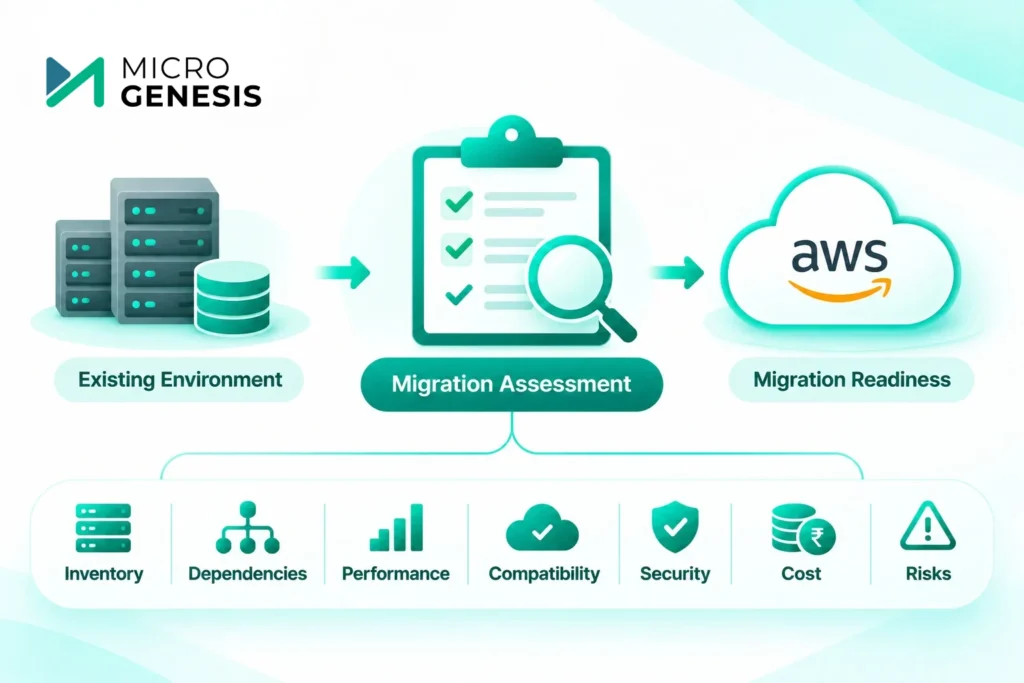
AWS migration assessment is the process of evaluating an organisation’s existing applications, infrastructure, data and operational requirements before moving workloads to AWS.
The objective is to understand what needs to be migrated, whether workloads are ready for the cloud and which migration approach is most appropriate.
A comprehensive assessment typically covers:
Existing infrastructure and application inventory.
Application and database dependencies.
Workload performance and resource utilization.
Cloud readiness and technical compatibility.
Security and compliance requirements.
Migration risks and business continuity.
Estimated migration and cloud operating costs.
The assessment provides the information needed to make informed migration decisions rather than relying on assumptions.
For organisations developing a broader cloud adoption strategy, our AWS Cloud Consulting and Transformation Guide explains how assessment, architecture, implementation and optimisation fit together.
Why AWS Migration Planning Matters
One of the common mistakes organisations make is selecting cloud services and migration tools before fully understanding their existing environment.
For example, a company may estimate its AWS infrastructure requirements using the specifications of its current physical servers.
However, those servers may be significantly underutilised. Replicating the same capacity in AWS could result in unnecessary cloud expenditure.
Similarly, migrating an application without identifying its database or authentication dependencies could interrupt business operations.
A structured AWS migration plan helps organisations:
Identify suitable workloads and migration priorities.
Reduce unexpected technical challenges.
Establish realistic budgets and timelines.
Minimise business disruption.
Select appropriate AWS services and migration strategies.
Prepare internal teams for cloud operations.
The goal is not simply to move workloads to AWS. It is to establish a cloud environment that supports business requirements effectively after migration.
1. Assess Your Current Infrastructure
The first step in AWS migration assessment is understanding your existing infrastructure.
Many enterprise environments have evolved over several years. Applications may run on different operating systems, virtual machines, physical servers and storage platforms.
Some infrastructure may no longer be required, while other components may support critical business processes.
Create a Complete Infrastructure Inventory
Start by documenting the resources currently operating within your environment.
| Assessment area | Information to collect |
|---|---|
| Servers | Physical servers, virtual machines and operating systems |
| Computing resources | CPU, memory and resource utilisation |
| Storage | Storage capacity, performance and usage |
| Databases | Database engines, versions, size and dependencies |
| Networking | Network configuration, connectivity and traffic patterns |
| Security | Access controls, firewalls and security policies |
| Applications | Application versions, ownership and business importance |
| Licensing | Software licensing and cloud deployment restrictions |
This inventory provides a foundation for evaluating migration requirements and selecting suitable AWS resources.
Evaluate Infrastructure Utilisation
Existing infrastructure capacity does not always reflect actual workload requirements.
For example, a virtual server configured with 16 virtual CPUs and 64 GB of memory may consistently use only a small portion of those resources.
Rather than automatically provisioning equivalent capacity in AWS, organisations should review historical utilisation, peak demand and expected growth.
This helps identify opportunities for appropriate resource sizing and cost control.
Read our guide to AWS cost optimisation to understand how infrastructure decisions influence long-term cloud expenditure.
2. Identify Application Dependencies
Applications rarely operate independently in enterprise environments.
A single business application may depend on databases, authentication services, file storage, external APIs and other internal applications.
Understanding these relationships is essential before deciding which workloads to migrate and in what order.
What Application Dependencies Should You Assess?
Application dependency assessment should consider:
Application-to-application communication.
Database connections.
Authentication and identity services.
File storage and shared resources.
Third-party integrations.
Scheduled jobs and automated processes.
Network connectivity and latency requirements.
Example: Migrating an Enterprise Application
Consider a manufacturing organisation planning to migrate its customer order management application to AWS.
The application communicates with an on-premises ERP system, retrieves product information from a shared database and uses an internal authentication service.
Migrating the application independently could introduce connectivity issues or affect transaction performance.
A dependency assessment helps determine whether these systems should be migrated together or connected securely during a phased transition.
This information also supports migration sequencing and testing requirements.
Explore our guide to application and infrastructure migration to AWS for a closer look at workload migration and execution.
Planning to migrate applications with complex dependencies?
Speak with MicroGenesis AWS consulting experts to evaluate your existing environment and identify a suitable migration approach.
3. Conduct an AWS Migration Readiness Assessment
Not every organisation is equally prepared to move to AWS.
Some may already have cloud experience and established security processes. Others may require additional technical preparation, operational changes or employee training.
A migration readiness assessment helps identify these gaps before implementation begins.
AWS provides the Cloud Adoption Framework (AWS CAF), which considers six perspectives that organisations can use to evaluate their cloud adoption readiness.
| Assessment perspective | Key considerations |
|---|---|
| Business | Business objectives, expected benefits and investment priorities |
| People | Cloud skills, responsibilities and organisational readiness |
| Governance | Policies, financial management and decision-making |
| Platform | Infrastructure, application architecture and cloud environments |
| Security | Data protection, access management and compliance |
| Operations | Monitoring, incident management and ongoing support |
Key Questions to Evaluate AWS Migration Readiness
Are existing applications compatible with the proposed AWS environment?
Have application and infrastructure dependencies been documented?
Are security and compliance requirements clearly defined?
Does the organisation have the necessary cloud skills?
Have operational responsibilities been assigned?
Are migration budgets and business objectives agreed?
Is there a clear approach to managing workloads after migration?
Identifying readiness gaps early allows organisations to address them before they become implementation challenges.
Our article on AWS cloud strategy and assessment explains how businesses can align cloud adoption decisions with organisational objectives.
4. Identify Migration Risks and Business Continuity Requirements
Every cloud migration involves some level of risk.
The objective of migration planning is to identify these risks, understand their potential impact and establish appropriate controls.
Common AWS Migration Risks
| Migration risk | Potential impact | Recommended approach |
|---|---|---|
| Unidentified application dependencies | Application failures | Complete dependency assessment |
| Data loss or inconsistency | Incorrect or unavailable business information | Backup, replication and data validation |
| Unexpected downtime | Business disruption | Controlled cutover and recovery planning |
| Application incompatibility | Performance or functionality issues | Compatibility assessment and pilot testing |
| Security configuration gaps | Unauthorised access or data exposure | Security reviews and access controls |
| Inaccurate cost estimates | Budget overruns | Workload sizing and cost modelling |
| Limited cloud skills | Operational difficulties | Training and defined support responsibilities |
Define Acceptable Downtime and Recovery Requirements
Different applications have different availability requirements.
An internal reporting application may tolerate several hours of downtime, while a customer-facing transaction platform may require a much shorter interruption.
During migration planning, organisations should define:
Acceptable application downtime.
Maximum acceptable data loss.
Recovery time objectives (RTO).
Recovery point objectives (RPO).
Migration windows.
Backup and recovery procedures.
Rollback options and decision criteria.
These requirements influence the migration tools, replication methods and deployment approach selected for each workload.
5. Select the Right AWS Migration Strategy
Once workloads and dependencies have been assessed, the next step is determining how each application should move to AWS.
AWS commonly describes seven migration strategies, known as the 7 Rs.
| Migration strategy | Description |
|---|---|
| Rehost | Move existing workloads with minimal application changes. |
| Replatform | Introduce selected platform improvements during migration. |
| Refactor | Redesign applications to take advantage of cloud-native capabilities. |
| Repurchase | Replace existing software with an alternative product or SaaS solution. |
| Relocate | Move supported infrastructure environments with limited architectural changes. |
| Retire | Decommission applications that are no longer required. |
| Retain | Keep selected workloads in their existing environment. |
The right strategy depends on business priorities, application complexity, licensing, technical compatibility and available resources.
For example, an organisation facing a data centre closure may prioritise rehosting its existing applications to AWS.
Another organisation looking to reduce database administration may consider replatforming compatible databases to Amazon RDS.
A workload-level assessment helps organisations avoid unnecessary modernisation while identifying applications that could benefit from architectural improvements.
6. Define Your Target AWS Architecture
Migration planning should include a clear understanding of what the target AWS environment will look like.
Moving workloads into an inadequately designed cloud environment can create security, performance and operational challenges.
Key AWS Architecture Planning Considerations
The target environment should address:
AWS account structure and governance.
Network design and connectivity.
Computing and storage requirements.
Database deployment options.
Identity and access management.
Security monitoring and logging.
Backup and disaster recovery.
Application availability and scalability.
Cost management and resource tagging.
For enterprise migrations, establishing an AWS landing zone can provide a structured foundation for managing accounts, security controls and governance.
The architecture should reflect actual workload requirements rather than introducing unnecessary services or complexity.
Our guide to AWS cloud architecture and implementation explains how organisations can design secure, scalable and reliable cloud environments.
Need help defining your target AWS environment?
Explore MicroGenesis AWS consulting capabilities to discuss cloud architecture, migration planning and implementation requirements.
7. Estimate AWS Migration Costs
A realistic migration budget should consider both the cost of moving workloads and the ongoing cost of operating them in AWS.
These are two separate areas of investment.
One-Time Migration Costs
Infrastructure and application assessment.
Architecture design and environment setup.
Migration tools and professional services.
Application modifications.
Data transfer and migration.
Testing and validation.
Employee training.
Ongoing AWS Operating Costs
Computing and database resources.
Storage and backup services.
Network and data transfer charges.
Monitoring and security services.
Software licensing.
Cloud administration and managed support.
Tools such as AWS Pricing Calculator and Migration Evaluator can support cost modelling, depending on the available workload information.
However, estimates should account for actual resource utilisation, expected growth, application availability requirements and operational responsibilities.
8. Develop an AWS Migration Roadmap
An AWS migration roadmap translates assessment findings into an actionable implementation plan.
It should define what will be migrated, in which sequence, using which approach and with what validation requirements.
Example AWS Migration Roadmap
| Phase | Key activities | Expected deliverables |
|---|---|---|
| Discovery and assessment | Infrastructure inventory, dependency mapping and readiness evaluation | Workload assessment report |
| Strategy and planning | Migration strategy selection, risk assessment and cost estimation | Migration roadmap and budget estimate |
| AWS environment preparation | Account setup, networking, security and governance | Migration-ready AWS environment |
| Pilot migration | Migrate selected workloads and validate the approach | Pilot results and lessons learned |
| Phased workload migration | Execute migration waves based on dependencies and priorities | Migrated and validated workloads |
| Production cutover | Final synchronisation, application validation and business approval | Production workloads operating on AWS |
| Post-migration optimisation | Performance review, cost optimisation and operational handover | Optimisation and support plan |
Organise Workloads into Migration Waves
Migrating every application at once can introduce unnecessary risk, particularly in complex enterprise environments.
A phased approach allows organisations to migrate related workloads together and apply lessons from earlier migration activities.
For example, an organisation could begin with selected non-production workloads, followed by internal business applications and then customer-facing systems.
However, the actual migration sequence should be based on application dependencies, business priorities and technical requirements.
AWS Tools That Support Migration Assessment and Planning
AWS provides tools that can support different stages of migration preparation and execution.
| AWS tool | Purpose |
|---|---|
| AWS Migration Evaluator | Supports infrastructure assessment and migration business case development |
| AWS Pricing Calculator | Estimates AWS service and infrastructure costs |
| AWS Migration Hub | Supports migration tracking and coordination for applicable migration workflows |
| AWS Application Migration Service (AWS MGN) | Supports replication and migration of compatible server workloads |
| AWS Database Migration Service (AWS DMS) | Supports compatible database migration and replication scenarios |
Tool selection should depend on workload compatibility, project requirements and current service availability.
Migration tools support the technical process, but they do not replace detailed business assessment, architecture planning or migration governance.
AWS Migration Assessment and Planning Checklist
Before starting migration, confirm that the following activities have been completed:
Existing infrastructure and applications have been documented.
Application and database dependencies have been identified.
Workload utilisation and performance have been assessed.
Cloud readiness gaps have been identified.
Security and compliance requirements have been reviewed.
Migration strategies have been selected for individual workloads.
Target AWS architecture has been defined.
Migration and operating costs have been estimated.
Business continuity and recovery requirements have been established.
Migration waves and pilot workloads have been identified.
Testing, cutover and rollback plans have been prepared.
Post-migration operational responsibilities have been assigned.
How MicroGenesis Helps Organisations Assess and Plan AWS Migration
Enterprise cloud migration requires more than infrastructure knowledge. It requires an understanding of applications, business processes, system integrations, security and operational dependencies.
MicroGenesis brings together cloud consulting, enterprise application engineering, DevOps, integration and managed services capabilities to support organisations throughout their AWS migration journey.
Our AWS migration assessment and planning approach covers:
Infrastructure and workload assessment: Understanding your existing technology environment and resource requirements.
Application dependency analysis: Identifying relationships between applications, databases and connected systems.
Cloud readiness assessment: Evaluating technical, security and operational preparedness.
Migration strategy development: Selecting suitable migration approaches based on workload requirements.
AWS architecture planning: Defining an appropriate target cloud environment.
Risk and cost assessment: Identifying migration challenges and estimating investment requirements.
Migration roadmap development: Establishing priorities, migration phases and implementation activities.
Our objective is to help organisations make informed migration decisions before committing to large-scale implementation.
Frequently Asked Questions About AWS Migration Assessment and Planning
What is included in an AWS migration assessment?
An AWS migration assessment typically includes infrastructure discovery, application dependency analysis, workload compatibility, cloud readiness, security requirements, cost estimation and migration risk assessment.
How long does an AWS migration assessment take?
The duration depends on the number of workloads, infrastructure complexity, application dependencies and availability of existing documentation. Complex enterprise environments may require several weeks or longer.
What is the difference between AWS migration assessment and migration planning?
Migration assessment evaluates the existing environment and identifies requirements and risks. Migration planning uses those findings to define migration strategies, architecture, timelines, resources and implementation phases.
Can all existing applications be migrated to AWS?
Not necessarily. Some applications may have operating system, licensing, architecture or regulatory restrictions. Assessment helps determine whether workloads should be migrated, modernised, replaced or retained.
How can businesses reduce AWS migration risks?
Businesses can reduce risks through dependency mapping, readiness assessment, pilot migrations, security planning, data validation, phased deployment and appropriate recovery procedures.
Plan Your AWS Migration with MicroGenesis
A successful AWS migration starts with understanding your existing environment and making informed decisions about how workloads should move to the cloud.
A comprehensive assessment helps identify technical dependencies, reduce migration risks, establish realistic budgets and create a roadmap aligned with your business priorities.
Whether you are planning a data centre exit, migrating enterprise applications or modernising legacy infrastructure, MicroGenesis can help you evaluate your cloud readiness and define a structured migration approach.
Plan Your AWS Migration with MicroGenesis
Build a migration roadmap that supports business continuity, security and long-term cloud performance.