As businesses become increasingly dependent on digital technologies, delivering reliable, secure, and efficient IT services has never been more important. Whether supporting employees, customers, or mission-critical business applications, IT teams are expected to resolve incidents quickly, automate repetitive tasks, manage IT assets, and maintain high service availability.
Managing these responsibilities through spreadsheets, email threads, or disconnected tools is no longer practical. As organizations grow, manual processes often lead to slower response times, duplicated support requests, inconsistent service delivery, rising operational costs, and poor user experiences.
This is where IT Service Management (ITSM) tools play a vital role.
Modern ITSM software helps organizations standardize service management processes, automate workflows, improve collaboration, and align IT services with business goals. These platforms combine incident management, service requests, asset management, change management, knowledge management, automation, reporting, and increasingly, AI-powered capabilities into a single solution.
However, choosing the right platform is not always straightforward.
With leading solutions such as Jira Service Management, ServiceNow, BMC Helix, Freshservice, ManageEngine ServiceDesk Plus, SysAid, Ivanti, HaloITSM, TOPdesk, and others, organizations often struggle to determine which solution best fits their business requirements.
Each platform offers different strengths. Some focus on enterprise-scale service management, while others prioritize ease of implementation, automation, affordability, or Agile and DevOps integration.
In this comprehensive guide, you’ll learn:
- What ITSM software is
- Why organizations invest in ITSM platforms
- Essential features every ITSM tool should provide
- The 15 best ITSM tools in 2026
- A detailed comparison of leading platforms
- How to choose the right ITSM solution for your organization
- Common mistakes to avoid during ITSM selection
Whether you’re implementing your first service desk or replacing an existing platform, this guide will help you evaluate the leading ITSM solutions and select the right one for your organization’s current and future needs.
What Is IT Service Management (ITSM) Software?
IT Service Management (ITSM) software is a platform that enables organizations to design, deliver, manage, automate, and continually improve IT services.
Unlike traditional IT support tools that primarily focus on resolving technical issues, ITSM platforms help organizations manage the entire lifecycle of IT services using standardized processes based on frameworks such as ITIL (Information Technology Infrastructure Library).
Modern ITSM solutions bring together people, processes, and technology to ensure IT services consistently deliver business value.
Core ITSM processes typically include:
- Incident Management
- Service Request Management
- Problem Management
- Change Enablement
- Asset Management
- Configuration Management (CMDB)
- Knowledge Management
- Service Catalog Management
- Service Level Management (SLAs)
- Reporting and Analytics
Ready to bring AI and automation into IT service management?
MicroGenesis helps organizations identify practical AI and automation opportunities across service desks, workflows, knowledge management, and IT operations.
→ Explore AI-Enabled ITSM Services
Rather than operating reactively, organizations using mature ITSM practices can proactively improve service quality, reduce downtime, optimize resources, and enhance user satisfaction.
If you’re beginning your ITSM journey, our guide on ITSM Best Practices for Service Management explains the processes, frameworks, and strategies required to build an efficient and scalable service management environment.
Why Organizations Need ITSM Tools
As organizations scale, IT environments become increasingly complex. Supporting hybrid workforces, cloud applications, cybersecurity requirements, mobile devices, and distributed infrastructure requires far more than a traditional help desk.
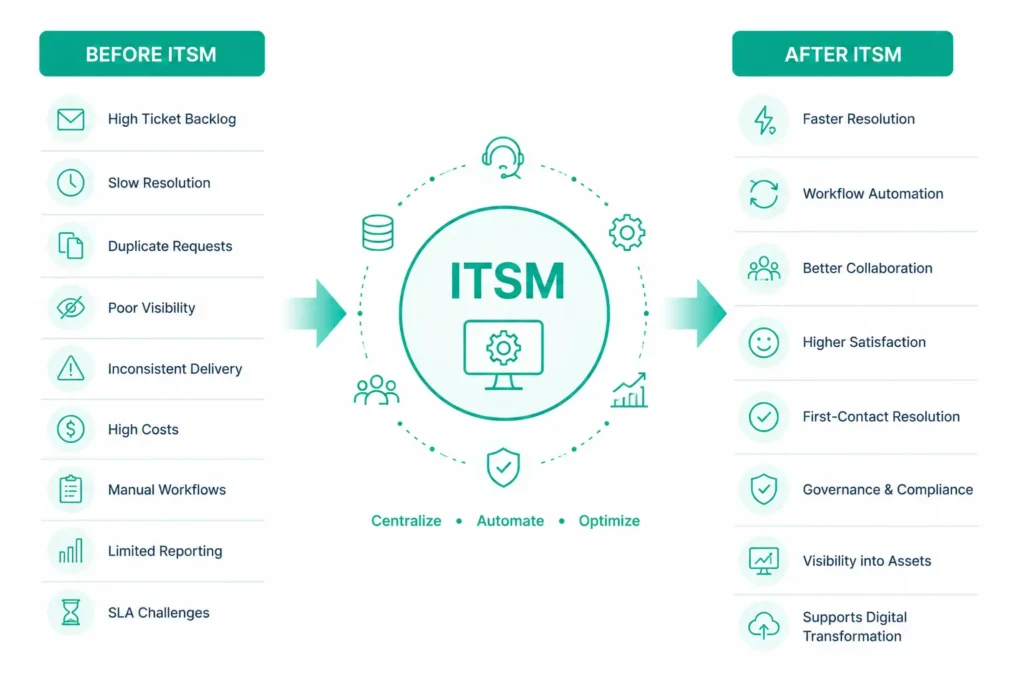
Without a dedicated ITSM platform, organizations commonly experience:
- Increasing ticket backlogs
- Slow incident resolution
- Duplicate service requests
- Poor visibility into IT assets
- Inconsistent service delivery
- High operational costs
- Manual and repetitive workflows
- Limited reporting and analytics
- Difficulty meeting SLA commitments
Modern ITSM software addresses these challenges by centralizing service management and automating routine processes.
Organizations implementing mature ITSM platforms often achieve significant improvements, including:
- Faster incident resolution
- Reduced manual effort through workflow automation
- Better collaboration between IT and business teams
- Improved employee satisfaction
- Higher first-contact resolution rates
- Enhanced governance and compliance
- Better visibility into IT assets and services
- Stronger support for digital transformation initiatives
One of the biggest drivers behind ITSM adoption is operational efficiency. Organizations looking to maximize ROI should understand How ITSM Software Reduces IT Costs and Boosts Efficiency, where we explore how automation, standardized workflows, and proactive service management help lower operational expenses while improving service quality.
Ready to modernize your IT service operations?
Transform fragmented support processes into a streamlined, automated ITSM environment with MicroGenesis.
→ IT Service Management Services for Enterprise Transformation
Key Features to Look for in an ITSM Tool
Not every ITSM platform offers the same capabilities. Before comparing vendors, it’s important to understand which features deliver the greatest business value.
Incident Management
Incident management enables IT teams to log, prioritize, assign, track, and resolve service disruptions efficiently.
Effective incident management helps minimize downtime and ensures critical issues receive immediate attention.
Look for features such as:
- Automated ticket routing
- SLA tracking
- Priority management
- Escalation workflows
- Incident categorization
Service Request Management
Modern ITSM platforms provide structured service catalogs that allow employees to request common IT services without contacting the help desk directly.
Examples include:
- Password resets
- Software installation
- Hardware requests
- VPN access
- User provisioning
Self-service portals significantly improve user satisfaction while reducing service desk workload.
Change Management
Every infrastructure or application change introduces potential business risk.
Effective change management capabilities help organizations:
- Review change requests
- Assess risks
- Schedule deployments
- Obtain approvals
- Minimize service disruptions
Organizations operating in regulated industries often consider robust change management a critical requirement.
IT Asset Management
Understanding what assets exist—and where they are deployed—is essential for controlling costs, maintaining compliance, and reducing security risks.
Modern ITSM solutions increasingly integrate IT Asset Management (ITAM) capabilities, enabling organizations to track:
- Hardware
- Software
- Licenses
- Cloud resources
- Mobile devices
- Asset lifecycle
Our guide on The Importance of IT Asset Management explains why ITAM has become a core component of modern IT service management.
Workflow Automation
Automation is one of the biggest reasons organizations invest in ITSM software.
Common automation capabilities include:
- Ticket assignment
- SLA notifications
- Approval workflows
- Escalation rules
- Change approvals
- Incident categorization
Reducing repetitive manual work allows IT teams to focus on higher-value initiatives.
Knowledge Management
A centralized knowledge base enables employees to resolve common issues independently without contacting the service desk.
Knowledge management improves:
- Self-service adoption
- First-contact resolution
- Agent productivity
- Customer satisfaction
AI-Powered Service Management
Artificial Intelligence is rapidly transforming ITSM.
Many leading platforms now provide:
- AI-powered virtual agents
- Intelligent ticket routing
- Suggested resolutions
- Predictive incident management
- Automated knowledge recommendations
- Generative AI assistance
Organizations evaluating AI capabilities should understand the Benefits and Challenges of AI in ITSM, including where AI delivers measurable value and where human expertise remains essential.
Reporting and Analytics
Comprehensive reporting helps organizations measure service performance and identify opportunities for continuous improvement.
Look for dashboards covering:
- SLA compliance
- Resolution times
- Ticket volume
- Asset utilization
- Customer satisfaction
- Automation performance
These insights support data-driven decision-making and long-term service improvement.
Types of ITSM Tools
Not every organization requires the same type of ITSM platform. The ideal solution depends on business size, industry, operational complexity, and long-term IT strategy.
Broadly, ITSM software can be grouped into several categories:
ITSM Tool Type | Best For |
Enterprise ITSM Platforms | Large enterprises with complex service management needs |
Agile & DevOps ITSM | Software development teams using Agile and DevOps methodologies |
Cloud-Based ITSM | Organizations adopting cloud-first strategies |
SMB-Focused ITSM | Small and medium-sized businesses seeking ease of implementation |
AI-Powered ITSM | Organizations investing in intelligent automation and self-service |
ITSM + ITAM Platforms | Businesses requiring integrated service and asset management |
Each category addresses different operational priorities. For example, enterprises managing thousands of users may prioritize governance, compliance, and scalability, while smaller organizations often value simplicity, affordability, and faster deployment.
Not sure which ITSM capabilities your organization really needs?
Our ITSM experts can help you define the right processes, platform capabilities, automation priorities, and implementation roadmap.
→ Build Your ITSM Strategy with MicroGenesis
The 15 Best IT Service Management (ITSM) Tools in 2026
With dozens of ITSM platforms available, selecting the right solution requires evaluating each tool’s capabilities, scalability, automation features, integrations, pricing, and long-term business value.
Below are the leading ITSM tools trusted by organizations worldwide, ranging from small businesses to global enterprises.
Jira Service Management
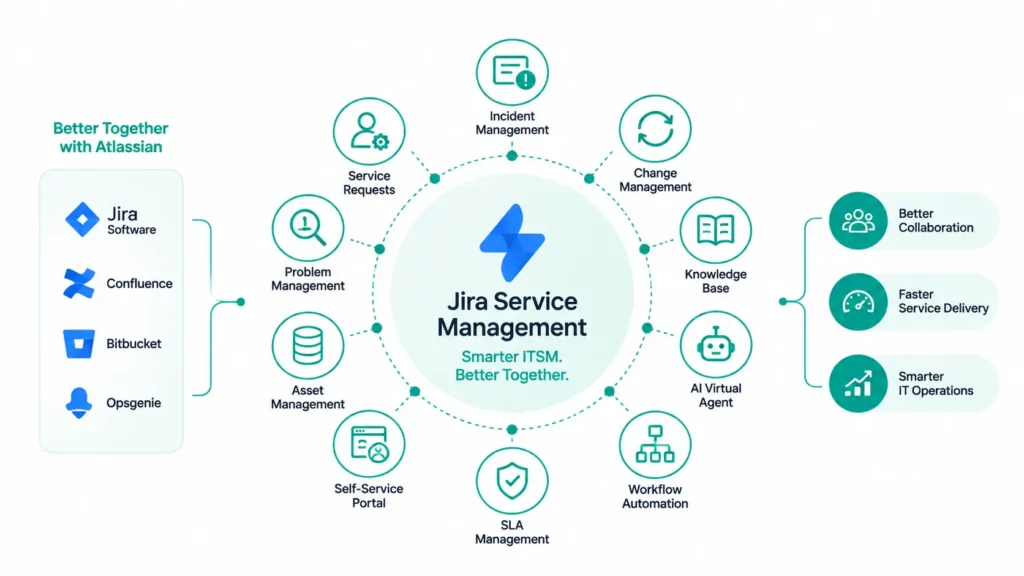
Jira Service Management (JSM), developed by Atlassian, has become one of the fastest-growing ITSM platforms by combining traditional IT service management capabilities with Agile, DevOps, and AI-powered automation.
Unlike many legacy ITSM solutions, Jira Service Management enables IT operations, software development, and business teams to collaborate within a unified platform. Its deep integration with Jira Software, Confluence, Bitbucket, and Opsgenie makes it particularly attractive for organizations already using the Atlassian ecosystem.
Key Features
- Incident Management
- Service Request Management
- Change Management
- Problem Management
- Asset Management
- Knowledge Base Integration
- AI-powered Virtual Agent
- Workflow Automation
- SLA Management
- Self-Service Portal
- Native DevOps integrations
Pros
- Modern and intuitive user interface
- Excellent automation capabilities
- Strong Agile and DevOps integration
- Fast implementation compared to traditional enterprise ITSM tools
- Highly customizable workflows
- Extensive Marketplace ecosystem
Cons
- Advanced configurations may require Atlassian expertise
- Large enterprise implementations often need experienced consultants
Best For
- Agile organizations
- DevOps teams
- Mid-sized to large enterprises
- Software development companies
- Organizations already using Jira
If your organization is evaluating Jira as its ITSM platform, our detailed guide on Why Choose Jira for ITSM explains its capabilities, implementation advantages, and how it compares with traditional service management platforms.
Jira Service Management or ServiceNow—which is right for your organization?
Get expert guidance based on your IT environment, business requirements, existing tools, scalability needs, automation goals, and budget.
→ Talk to an ITSM Platform Expert
ServiceNow ITSM
ServiceNow remains one of the most comprehensive enterprise ITSM platforms available today.
Designed for large organizations, ServiceNow extends beyond IT Service Management into HR Service Delivery, Customer Service Management, Security Operations, Governance, Risk & Compliance (GRC), and Enterprise Workflow Automation.
Its extensive customization capabilities make it suitable for organizations with complex operational environments and large-scale digital transformation initiatives.
Key Features
- Incident Management
- Change Management
- Problem Management
- CMDB
- Service Catalog
- Asset Management
- AI-powered Automation
- Predictive Intelligence
- Virtual Agent
- Workflow Designer
- Enterprise Reporting
Pros
- Enterprise-grade scalability
- Extensive workflow automation
- Mature CMDB
- Advanced AI capabilities
- Broad ecosystem
Cons
- Higher licensing costs
- Longer implementation timelines
- Greater administrative complexity
Best For
- Large enterprises
- Global organizations
- Regulated industries
- Complex IT environments
Many organizations compare ServiceNow with Jira Service Management before selecting a platform. Our comprehensive ServiceNow vs Jira Service Management comparison examines their features, pricing, scalability, and implementation considerations.
BMC Helix ITSM
BMC Helix is an enterprise-grade ITSM platform that combines traditional ITIL-based service management with artificial intelligence and predictive analytics.
It is widely used by organizations managing large, distributed, and highly regulated IT environments.
Key Features
- AI-driven Service Desk
- Incident & Problem Management
- Change Enablement
- Asset Management
- Discovery
- CMDB
- Predictive Analytics
- Multi-cloud Operations
Pros
- Strong enterprise capabilities
- Excellent AI integration
- Advanced analytics
- Scalable architecture
Cons
- Higher implementation complexity
- Premium licensing costs
Best For
- Global enterprises
- Financial institutions
- Telecommunications
- Healthcare organizations
Freshservice
Freshservice is a cloud-based ITSM solution designed for organizations seeking a modern, easy-to-use platform without the complexity of traditional enterprise ITSM software.
Its intuitive interface and rapid deployment make it particularly popular among growing businesses.
Key Features
- Incident Management
- Service Catalog
- Workflow Automation
- Asset Management
- AI-powered Assistance
- Knowledge Base
- Self-Service Portal
Pros
- User-friendly interface
- Quick deployment
- Affordable pricing
- Strong automation
Cons
- Limited enterprise customization
- Fewer advanced governance features
Best For
- Startups
- Small businesses
- Mid-sized organizations
ManageEngine ServiceDesk Plus
ManageEngine ServiceDesk Plus combines ITSM and IT Asset Management into a single platform, making it a popular choice for organizations seeking comprehensive service management at a competitive price.
Key Features
- Incident Management
- Problem Management
- Change Management
- IT Asset Management
- CMDB
- Project Management
- Automation
- Reporting
Pros
- Excellent value for money
- Strong asset management
- Easy implementation
- Flexible deployment options
Cons
- User interface could be more modern
- Advanced customization requires additional effort
Best For
- Mid-sized businesses
- Budget-conscious organizations
- Internal IT departments
SysAid
SysAid offers an integrated ITSM platform with automation, service desk, and IT asset management capabilities suitable for organizations seeking simplicity without sacrificing essential functionality.
Key Features
- Help Desk
- Asset Management
- Automation
- Self-Service Portal
- Reporting
- Knowledge Base
Pros
- Cost-effective
- Easy administration
- Good automation capabilities
Cons
- Limited enterprise scalability
- Smaller integration ecosystem
Best For
- Mid-sized organizations
- Educational institutions
- Government agencies
Ivanti Neurons for ITSM
Ivanti Neurons combines ITSM with endpoint management, asset intelligence, and AI-driven automation.
Its focus on hyperautomation helps organizations proactively identify and resolve service issues before users are affected.
Key Features
- AI Automation
- Endpoint Management
- IT Asset Management
- Self-Healing Automation
- Service Catalog
- Workflow Automation
Pros
- Strong endpoint integration
- Intelligent automation
- Enterprise scalability
Cons
- Learning curve for advanced capabilities
- Premium pricing
Best For
- Enterprise IT
- Digital workplace initiatives
- Large distributed organizations
SolarWinds Service Desk
SolarWinds Service Desk provides cloud-based ITSM capabilities focused on ease of use, asset visibility, and service desk efficiency.
Key Features
- Incident Management
- Service Catalog
- Asset Discovery
- Knowledge Base
- Change Management
- Reporting
Pros
- Simple interface
- Good asset discovery
- Quick implementation
Cons
- Limited advanced customization
- Fewer enterprise governance features
Best For
- Growing organizations
- Internal IT teams
- SMBs
HaloITSM
HaloITSM has rapidly gained popularity for delivering enterprise-grade functionality without the complexity associated with some legacy ITSM platforms.
It supports ITIL-aligned processes while offering flexible configuration and strong automation capabilities.
Key Features
- Incident & Problem Management
- Change Enablement
- Asset Management
- Workflow Automation
- SLA Management
- Self-Service Portal
Pros
- Highly configurable
- Modern interface
- Competitive pricing
Cons
- Smaller partner ecosystem
- Fewer third-party integrations than larger vendors
Best For
- Mid-sized organizations
- Managed Service Providers (MSPs)
- Enterprises seeking flexibility
TOPdesk
TOPdesk is a service management platform designed to support IT, facilities, HR, and other internal service teams through a shared service management approach.
Key Features
- Incident Management
- Self-Service Portal
- Asset Management
- Change Management
- Knowledge Management
Pros
- Strong cross-department support
- Easy adoption
- Good customer support
Cons
- Limited advanced AI capabilities
- Smaller marketplace ecosystem
Best For
- Universities
- Healthcare
- Public sector
- Internal shared services
Tool Comparison at a Glance
ITSM Tool | Best For | AI Features | IT Asset Management | Enterprise Ready |
Jira Service Management | Agile & DevOps | ⭐⭐⭐⭐⭐ | ✔ | ✔ |
ServiceNow | Large Enterprises | ⭐⭐⭐⭐⭐ | ✔ | ✔ |
BMC Helix | Complex Enterprise IT | ⭐⭐⭐⭐⭐ | ✔ | ✔ |
Freshservice | SMBs | ⭐⭐⭐⭐ | ✔ | Moderate |
ManageEngine | Cost-conscious Organizations | ⭐⭐⭐⭐ | ✔ | ✔ |
SysAid | Mid-sized Businesses | ⭐⭐⭐ | ✔ | Moderate |
Ivanti Neurons | Enterprise IT | ⭐⭐⭐⭐⭐ | ✔ | ✔ |
SolarWinds Service Desk | Growing Businesses | ⭐⭐⭐ | ✔ | Moderate |
HaloITSM | MSPs & Enterprises | ⭐⭐⭐⭐ | ✔ | ✔ |
TOPdesk | Shared Service Organizations | ⭐⭐⭐ | ✔ | Moderate |
💡
EasyVista
EasyVista is a cloud-based IT Service Management (ITSM) and Enterprise Service Management (ESM) platform designed to help organizations automate service delivery, improve operational efficiency, and support digital transformation. It combines ITSM, IT Asset Management (ITAM), Remote Support, and Digital Experience Monitoring within a unified platform.
EasyVista is particularly popular among organizations looking to extend service management beyond IT into departments such as HR, Facilities, Finance, and Customer Support.
Key Features
- Incident Management
- Problem Management
- Change Management
- Service Catalog
- IT Asset Management
- Self-Service Portal
- Workflow Automation
- AI-powered Virtual Agent
- Digital Experience Monitoring
Pros
- Supports Enterprise Service Management
- Strong automation capabilities
- Modern cloud architecture
- Flexible low-code workflow configuration
Cons
- Smaller ecosystem compared to ServiceNow
- Advanced customization requires experienced administrators
Best For
- Mid-sized enterprises
- Digital transformation initiatives
- Organizations expanding ITSM into Enterprise Service Management
Zendesk for IT
Although Zendesk is widely recognized as a customer service platform, many organizations also use it for internal IT support and service management.
Zendesk offers a modern help desk experience with ticketing, automation, knowledge management, and self-service capabilities. While it doesn’t provide the extensive ITIL functionality of dedicated ITSM platforms, it is often sufficient for organizations with relatively straightforward service desk requirements.
Key Features
- Ticket Management
- Self-Service Portal
- Knowledge Base
- Automation Rules
- SLA Management
- AI-powered Agent Assistance
- Reporting and Analytics
Pros
- Extremely easy to use
- Fast deployment
- Excellent customer experience
- Strong omnichannel support
Cons
- Limited advanced ITIL processes
- Basic configuration management capabilities
- Less suitable for complex enterprise IT environments
Best For
- Small businesses
- Internal IT help desks
- Organizations already using Zendesk for customer support
InvGateService Management
InvGate Service Management is an ITIL-certified ITSM platform focused on simplifying IT operations through automation, asset management, and intuitive workflows.
It combines service desk functionality with IT Asset Management, making it an attractive option for organizations looking for a unified IT operations platform.
Key Features
- Incident Management
- Request Fulfillment
- Change Management
- Knowledge Management
- IT Asset Management
- Automation Workflows
- Self-Service Portal
Pros
- Simple implementation
- Strong ITAM integration
- Intuitive user interface
- Competitive licensing
Cons
- Smaller marketplace ecosystem
- Fewer enterprise integrations than larger vendors
Best For
- Mid-sized organizations
- Internal IT departments
- Organizations modernizing legacy help desks
SymphonyAIIT Service Management
SymphonyAI delivers AI-first IT Service Management solutions that leverage machine learning, predictive analytics, and automation to improve service delivery and operational efficiency.
Rather than simply automating repetitive tasks, SymphonyAI focuses on intelligent service operations through predictive insights and proactive incident prevention.
Key Features
- AI-powered Service Desk
- Intelligent Ticket Routing
- Predictive Incident Management
- Virtual Agents
- Workflow Automation
- Asset Management
- Analytics Dashboard
Pros
- Strong AI capabilities
- Predictive automation
- Enterprise scalability
- Excellent analytics
Cons
- Enterprise-focused pricing
- Advanced implementation requirements
Best For
- Large enterprises
- AI-driven IT operations
- Organizations pursuing intelligent automation
Organizations investing in AI-powered service management should also understand how artificial intelligence is reshaping IT operations. Our guide on Artificial Intelligence for IT Operations: The Future of Intelligent IT Operations Management explores how AIOps complements modern ITSM platforms by enabling predictive monitoring, anomaly detection, and automated remediation.
OpenText SMAX
OpenText SMAX (Service Management Automation X) is an enterprise-grade ITSM platform designed to deliver AI-driven service management, workflow automation, and digital service experiences.
Built with machine learning and analytics at its core, SMAX helps organizations automate service delivery while supporting ITIL best practices.
Key Features
- Incident Management
- Change Management
- Service Catalog
- AI-based Recommendations
- Self-Service Portal
- Workflow Automation
- Configuration Management
- Analytics
Pros
- Enterprise-ready architecture
- AI-assisted service delivery
- Strong automation capabilities
- Flexible deployment
Cons
- More complex implementation
- Better suited for larger organizations
Best For
- Large enterprises
- Government organizations
- Regulated industries
Comprehensive ITSM Tools Comparison
ITSM Tool | Best For | AI & Automation | IT Asset Management | Deployment | Enterprise Ready | Ease of Implementation |
Jira Service Management | Agile & DevOps | Excellent | Good | Cloud/Data Center | ✔ | Easy |
ServiceNow | Large Enterprises | Excellent | Excellent | Cloud | ✔ | Moderate |
BMC Helix | Complex Enterprise IT | Excellent | Excellent | Cloud/Hybrid | ✔ | Moderate |
Freshservice | SMBs | Good | Good | Cloud | Moderate | Easy |
ManageEngine ServiceDesk Plus | Budget-conscious Organizations | Good | Excellent | Cloud/On-premises | ✔ | Easy |
SysAid | Mid-sized Businesses | Good | Good | Cloud/On-premises | Moderate | Easy |
Ivanti Neurons | Enterprise IT | Excellent | Excellent | Cloud | ✔ | Moderate |
SolarWinds Service Desk | Growing Organizations | Good | Good | Cloud | Moderate | Easy |
HaloITSM | MSPs & Enterprises | Good | Good | Cloud | ✔ | Easy |
TOPdesk | Shared Service Organizations | Good | Good | Cloud/On-premises | Moderate | Easy |
EasyVista | Enterprise Service Management | Excellent | Excellent | Cloud | ✔ | Moderate |
Zendesk | Internal Help Desk | Good | Basic | Cloud | Moderate | Very Easy |
InvGate | Mid-sized Organizations | Good | Excellent | Cloud/On-premises | Moderate | Easy |
SymphonyAI | AI-driven Enterprises | Excellent | Excellent | Cloud | ✔ | Moderate |
OpenText SMAX | Enterprise Organizations | Excellent | Excellent | Cloud | ✔ | Moderate |
💡
Jira Service Management vs ServiceNow
Among all ITSM platforms, Jira Service Management and ServiceNow are the two solutions most frequently evaluated by organizations. While both provide comprehensive ITSM capabilities, they serve different business needs and organizational maturity levels.
Capability | Jira Service Management | ServiceNow |
Best For | Agile, DevOps, Mid-sized to Enterprise | Large Global Enterprises |
Ease of Use | Excellent | Good |
Implementation Time | Faster | Longer |
Workflow Automation | Excellent | Excellent |
AI Capabilities | Strong (Atlassian Intelligence) | Advanced (Now Assist & Predictive AI) |
IT Asset Management | Good | Excellent |
DevOps Integration | Excellent | Good |
Third-party Integrations | Extensive Atlassian Marketplace | Extensive Enterprise Ecosystem |
Licensing Cost | Lower Total Cost | Higher Total Cost |
Time to Value | Fast | Moderate |
Choose Jira Service Management if:
- You already use Jira Software or Confluence.
- Your organization follows Agile or DevOps practices.
- You need rapid deployment with lower implementation costs.
- Collaboration between IT and development teams is a priority.
- You want a highly customizable platform without enterprise-level complexity.
Choose ServiceNow if:
- You operate a large global enterprise.
- You require advanced governance and compliance capabilities.
- Multiple business departments will use the platform beyond IT.
- You need extensive enterprise workflow automation.
- Budget is less of a constraint than scalability and customization.
Which ITSM Tool Is Right for Your Organization?
There is no single “best” ITSM platform for every business. The right solution depends on your organization’s size, operational complexity, budget, existing technology stack, and long-term service management strategy.
Choose Jira Service Management if:
- You use Agile or DevOps methodologies.
- You already use Atlassian products.
- You want fast implementation and excellent automation.
- You need strong collaboration between IT and software development teams.
Choose ServiceNow if:
- You require enterprise-scale service management.
- You need advanced governance and compliance.
- Multiple business functions will use the platform.
Choose Freshservice if:
- You’re a startup or growing business.
- Ease of use is a priority.
- You want cloud-native ITSM with rapid deployment.
Choose ManageEngine if:
- IT Asset Management is a high priority.
- You’re looking for cost-effective licensing.
- You need both cloud and on-premises deployment options.
Choose BMC Helix if:
- You manage highly complex IT environments.
- AI-driven operations are important.
- You require enterprise-grade scalability.
How to Choose the Best ITSM Tool
Selecting the right IT Service Management (ITSM) platform is about more than comparing feature lists or licensing costs. The best ITSM solution should align with your organization’s operational goals, support future growth, integrate with your existing technology ecosystem, and deliver measurable improvements in service quality and efficiency.
Before evaluating vendors, consider the following key factors.
Understand Your Business Requirements
Begin by identifying the specific challenges your organization is trying to solve.
Ask questions such as:
- Do you primarily need a help desk or a full ITSM platform?
- Are you replacing an existing ITSM solution?
- Which ITIL processes do you plan to implement?
- Will the platform support only IT or multiple departments?
- What level of automation is required?
Clearly defining business objectives helps eliminate tools that may be overly complex or lack essential capabilities.
Evaluate Organizational Size and Growth
The needs of a startup differ significantly from those of a multinational enterprise.
Consider:
- Number of service desk agents
- Number of end users
- Geographic locations
- Future business expansion
- Expected ticket volumes
Choosing a scalable platform reduces the need for costly migrations as your organization grows.
Prioritize Automation
One of the biggest advantages of modern ITSM software is automation.
Evaluate whether the platform can automate:
- Ticket routing
- Incident categorization
- SLA monitoring
- Escalations
- Approval workflows
- Change requests
- Notifications
Automation reduces repetitive manual work, allowing IT teams to focus on strategic initiatives rather than administrative tasks.
Organizations looking to streamline operations can also explore our guide on How IT Teams Slash Waste and Boost Efficiency, which highlights practical strategies for eliminating operational bottlenecks and improving IT productivity.
Review Integration Capabilities
An ITSM platform should integrate seamlessly with the tools your organization already uses.
Look for integrations with:
- Microsoft 365
- Google Workspace
- Jira Software
- Confluence
- DevOps platforms
- Monitoring tools
- Identity providers
- CMDB solutions
- Collaboration platforms like Slack and Microsoft Teams
Strong integrations eliminate data silos and improve collaboration across teams.
Assess AI Capabilities
Artificial Intelligence has become a major differentiator among modern ITSM platforms.
Look for AI capabilities such as:
- Intelligent ticket routing
- Virtual agents
- Automated knowledge recommendations
- Predictive incident management
- Root cause analysis
- AI-assisted service desk agents
Organizations planning AI adoption should also review Atlassian AI-Powered ITSM Innovations to understand how AI is transforming modern service management.
Evaluate Reporting and Analytics
The right ITSM platform should provide actionable insights not just operational data.
Look for dashboards that measure:
- SLA compliance
- First response time
- Mean Time to Resolution (MTTR)
- Ticket trends
- Automation effectiveness
- Customer satisfaction (CSAT)
- Agent productivity
These metrics help IT leaders continuously improve service performance and make informed decisions.
Consider Security and Compliance
Security should be a core evaluation criterion, particularly for organizations operating in regulated industries.
Evaluate whether the platform supports:
- Role-based access control (RBAC)
- Multi-factor authentication (MFA)
- Audit logs
- Data encryption
- Compliance reporting
- Change approvals
- Identity management integration
Organizations modernizing their IT operations should also align their ITSM strategy with Zero Trust Security Architecture to improve security without compromising productivity.
Common Mistakes to Avoid When Choosing an ITSM Tool
Many ITSM implementations fail not because of the software itself but because organizations choose a platform without fully understanding their requirements.
Here are some of the most common mistakes to avoid.
Choosing Based Only on Price
Lower licensing costs can be attractive, but the least expensive platform may lack the automation, scalability, or integrations needed to support long-term business growth.
Instead of focusing solely on upfront costs, evaluate the total cost of ownership (TCO), including implementation, customization, training, administration, and ongoing support.
Ignoring Future Growth
An ITSM platform should support your organization’s future not just its current needs.
Businesses often outgrow entry-level solutions within a few years, resulting in expensive migrations and operational disruption.
Choose a platform that can scale alongside your business.
Underestimating Implementation Complexity
Enterprise-grade platforms often require:
- Process redesign
- Workflow configuration
- Data migration
- Integration development
- User training
- Change management
Working with an experienced implementation partner can significantly reduce project risk and accelerate adoption.
Our guide on How to Choose an ITSM Implementation Partner explains what to look for when selecting a consulting partner for a successful ITSM deployment.
Overlooking User Experience
A feature-rich platform offers little value if employees struggle to use it.
Look for:
- Intuitive interfaces
- Self-service portals
- Mobile access
- Easy navigation
- Simple request submission
Higher user adoption typically leads to greater automation, faster resolutions, and improved satisfaction.
Neglecting IT Asset Management
Service management and asset management are closely connected.
Without visibility into IT assets, organizations often struggle with:
- License compliance
- Hardware lifecycle management
- Software inventory
- Security vulnerabilities
- Cost optimization
Platforms with integrated IT Asset Management (ITAM) provide better operational visibility and improve decision-making.
Find the right ITSM approach for your organization
Get an expert assessment of your current service management environment, processes, technology stack, automation opportunities, and future requirements.
ITSM Evaluation Checklist
Use the following checklist when comparing ITSM vendors.
Evaluation Criteria | Priority |
Incident Management | ⭐⭐⭐⭐⭐ |
Service Request Management | ⭐⭐⭐⭐⭐ |
Change Management | ⭐⭐⭐⭐⭐ |
Problem Management | ⭐⭐⭐⭐ |
IT Asset Management | ⭐⭐⭐⭐⭐ |
CMDB Support | ⭐⭐⭐⭐ |
Workflow Automation | ⭐⭐⭐⭐⭐ |
AI & Virtual Agents | ⭐⭐⭐⭐ |
Self-Service Portal | ⭐⭐⭐⭐⭐ |
Reporting & Analytics | ⭐⭐⭐⭐ |
Integration Capabilities | ⭐⭐⭐⭐⭐ |
Security & Compliance | ⭐⭐⭐⭐⭐ |
Cloud Deployment | ⭐⭐⭐⭐⭐ |
Scalability | ⭐⭐⭐⭐⭐ |
Total Cost of Ownership | ⭐⭐⭐⭐ |
Rather than focusing on a single feature, evaluate how each platform aligns with your business objectives, operational processes, and future growth plans.
💡
How MicroGenesis Helps Organizations Implement ITSM Successfully
Choosing the right ITSM platform is only the beginning. Successful implementation requires careful planning, process optimization, workflow configuration, integrations, and user adoption to deliver long-term business value.
As an experienced IT solutions provider and Atlassian Platinum Solution Partner, MicroGenesis helps organizations modernize IT operations through tailored ITSM consulting and implementation services.
Our ITSM expertise includes:
- ITSM strategy and roadmap development
- ITIL-aligned process consulting
- Jira Service Management implementation
- ServiceNow consulting and implementation
- Workflow automation
- IT Asset Management integration
- Service catalog design
- Knowledge management implementation
- ITSM platform migration
- Third-party system integrations
- AI-powered service management adoption
- Training and ongoing managed services
Whether you’re implementing a new ITSM platform, replacing a legacy service desk, or optimizing an existing environment, our experts help you accelerate implementation, improve service delivery, and maximize return on investment.
Frequently Asked Questions
What is an ITSM tool?
An ITSM (IT Service Management) tool is software that helps organizations manage, automate, and improve IT services through processes such as incident management, service requests, change management, problem management, asset management, and knowledge management.
Which is the best ITSM tool?
There is no one-size-fits-all answer. Jira Service Management is well suited for Agile and DevOps teams, ServiceNow excels in large enterprise environments, while platforms like Freshservice and ManageEngine are popular among small and mid-sized businesses.
What features should an ITSM platform include?
A modern ITSM platform should provide:
- Incident Management
- Service Request Management
- Change Management
- Problem Management
- IT Asset Management
- Workflow Automation
- Self-Service Portal
- Knowledge Management
- Reporting & Analytics
- AI-powered Automation
- Security and Compliance
Is Jira Service Management an ITSM tool?
Yes. Jira Service Management is a comprehensive ITSM platform that supports ITIL-aligned processes while offering strong integration with Agile, DevOps, and the Atlassian ecosystem.
How do I choose the right ITSM software?
Start by evaluating your business requirements, organizational size, automation needs, integration capabilities, security requirements, budget, and future scalability. Comparing platforms against a structured evaluation checklist can help you make an informed decision.
What is the difference betweenITSMand a help desk?
A help desk primarily focuses on resolving user issues and service requests. ITSM is broader, encompassing the design, delivery, management, and continual improvement of IT services, including processes such as change management, asset management, configuration management, and service level management.
Can ITSM software reduce IT support costs?
Yes. By automating repetitive tasks, enabling self-service, improving incident resolution, and optimizing workflows, ITSM platforms help organizations reduce operational costs while improving service quality.
Why is AI becoming important in ITSM?
AI enhances ITSM by automating ticket routing, providing virtual agents, recommending knowledge articles, predicting incidents, identifying trends, and improving overall service efficiency. It enables IT teams to resolve issues faster while reducing manual effort.
Conclusion
Modern organizations rely on IT Service Management platforms to deliver reliable, secure, and efficient IT services in increasingly complex digital environments. The right ITSM tool goes beyond basic ticket management by enabling automation, improving collaboration, optimizing IT assets, strengthening compliance, and supporting long-term digital transformation.
Whether you’re considering Jira Service Management, ServiceNow, BMC Helix, Freshservice, ManageEngine, or another leading platform, your decision should be guided by business requirements, scalability, automation capabilities, integration needs, and total cost of ownership—not simply by licensing costs.
By carefully evaluating vendors, avoiding common implementation mistakes, and aligning your ITSM strategy with business objectives, you can build a service management environment that improves operational efficiency and delivers measurable value.
If you’re reassessing your current approach to service management, our guide on 12 Warning Signs You Need to Change Your ITSM Strategy can help you identify whether it’s time to modernize your ITSM platform and processes.
For organizations looking to implement or optimize ITSM, partnering with experienced specialists can accelerate adoption, reduce implementation risk, and maximize ROI. With deep expertise in ITSM consulting, automation, and platform implementation, MicroGenesis helps businesses transform their IT operations into efficient, scalable, and business-aligned service management environments.
Ready to Build an ITSM Environment That Works for Your Business?
Choosing an ITSM platform is only the first step. The real value comes from implementing the right processes, automating the right workflows, integrating your existing tools, and ensuring your teams can actually adopt the solution.
MicroGenesis helps organizations assess, implement, integrate, and optimize ITSM platforms to create faster, smarter, and more scalable service operations.
Don’t settle for a service desk that only manages tickets. Transform IT into a strategic business enabler.