
A requirements document can look complete on paper and still leave an engineering team with a difficult question: How do we know every important requirement has actually been tested?
This becomes harder when requirements and testing are managed in different tools.
A requirements engineer may work in one platform, test engineers may manage test cases in another, developers may track defects somewhere else, and project teams may rely on spreadsheets for reporting. Each tool may work well on its own, but the connections between them can become fragile.
For safety-critical and regulated software, that gap matters. Teams need to understand not only whether a test passed, but which requirement it verified, which version was tested, what defects were identified, and whether those defects were resolved and retested.
This is why integrating requirements and test management is more than a technology exercise. It is about creating a reliable engineering flow from requirement definition through verification.
Why Disconnected Tools Create Traceability Risk
Imagine a project with 2,000 requirements and several thousand test cases.
The requirements are maintained in one system. Test cases are stored in another. The teams exchange Excel files to establish relationships between them.
At first, this may seem manageable.
Then a requirement changes.
The requirements team updates the specification, but the test team may not immediately know:
- Which test cases are affected?
- Which tests need to be updated?
- Which completed tests are now invalid?
- Which defects relate to the changed requirement?
- What evidence needs to be regenerated?
This is where traceability risk appears.
The problem is not necessarily that either tool is inadequate. The problem is that the relationship between the information is difficult to maintain.
A useful traceability chain looks like:
Requirement → Test Case → Test Execution → Result → Defect → Retest
When those relationships are maintained consistently, teams have a much clearer picture of verification status.
For more on this principle, see Importance of Requirements Traceability.
What happens when the connection is missing?
A disconnected environment can lead to:
- Duplicate requirements or test cases
- Tests that no longer match current requirements
- Manual reconciliation before reviews
- Unclear impact of requirement changes
- Difficulty identifying coverage gaps
- More effort preparing audit or project evidence
- Delays when investigating failed tests
For teams that still depend heavily on spreadsheets after implementing ALM tools, Why Requirements Still Live in Excel After Buying an ALM Tool explores a related challenge.
What Does Requirements and Test Integration Actually Mean?
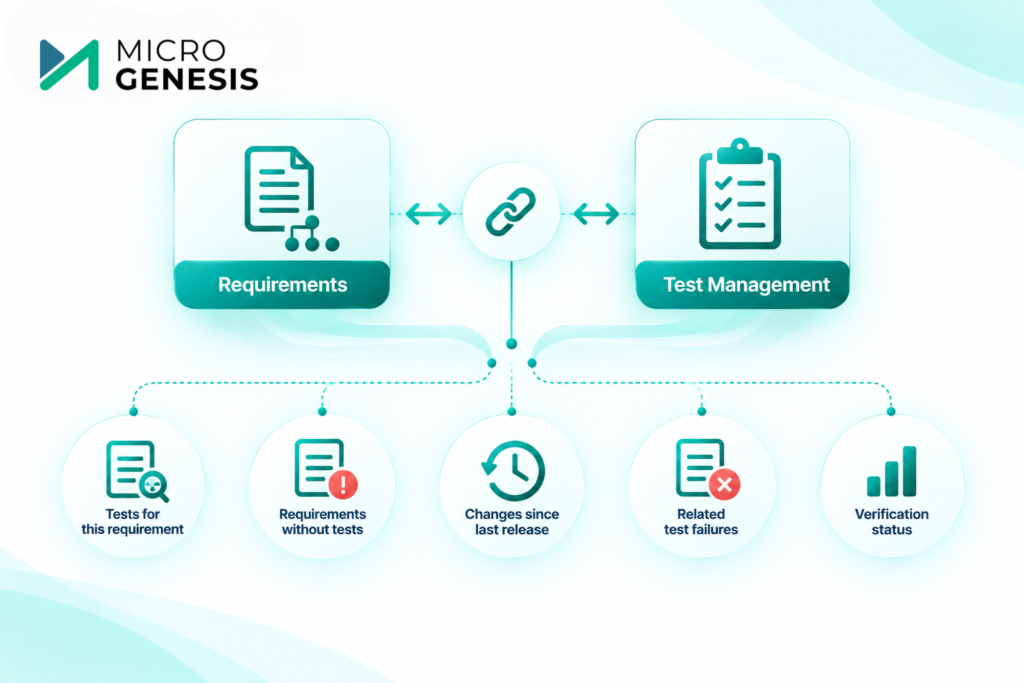
Integration does not necessarily mean putting everything into one application.
It means establishing reliable relationships between information managed across systems.
For example, a requirements tool might remain the system of record for requirements, while a test management platform remains responsible for test execution.
The integration should allow teams to answer questions such as:
Which tests verify this requirement?
Which requirements are not covered by tests?
What changed since the last release?
Which test failures are related to this requirement?
What is the current verification status?
The exact implementation depends on the tools, processes, and level of integration required.
This is also why Test Lifecycle Management for Regulated Software is closely related. Test management is not only about executing tests. It also involves planning, evidence, defects, retesting, and lifecycle control.
Common Integration Patterns
There are two broad approaches organizations commonly consider.
1. Native or Built-In Integration
In this approach, the requirements and testing capabilities are provided within the same ALM environment or have a direct integration mechanism.
For example, Codebeamer ALM provides requirements and test management capabilities within its ALM environment.
This can simplify relationships between requirements, test cases, test executions, and other lifecycle information because the information is managed within a connected environment.
It can be particularly useful when an organization wants to reduce the number of separate systems involved in its engineering lifecycle.
If your organization is evaluating a connected requirements and test management environment, explore Codebeamer ALM to understand how requirements and testing can be managed within an ALM platform.
2. Middleware or Integration-Based Approach
Sometimes replacing an existing tool is neither practical nor desirable.
An organization may already have:
- IBM DOORS for requirements
- A separate test management platform
- A defect tracking system
- Source control
- CI/CD tools
- Other engineering applications
In this situation, integration can connect the systems rather than forcing teams to replace everything.
Middleware, APIs, connectors, or integration platforms can exchange selected information between systems.
For example:
DOORS Requirements → Integration Layer → Test Management Tool
The integration might synchronize requirement identifiers and selected attributes while keeping each system responsible for its primary information.
This approach can provide flexibility, but it requires careful decisions about data ownership, synchronization, error handling, and versioning.
Codebeamer Test Management as an Example
Consider an automotive engineering organization developing an ECU.
Requirements are defined for a particular function, and engineers need to verify those requirements through unit, integration, SIL, HIL, and system-level testing.
With a connected ALM environment, requirements can be related to test cases and their execution results.
When a requirement changes, the team can investigate the associated test relationships and determine which verification activities may need attention.
This is particularly valuable when testing includes both manual and automated execution.
As discussed in Manual vs Automated Test Management in Safety-Critical Projects, automation does not remove the need for test management. Automated results still need to be connected to the appropriate requirements, versions, defects, and evidence.
DOORS + Test Tools: When Integration Makes Sense
IBM DOORS is commonly used for requirements management in engineering environments where requirements need to be structured and controlled.
An organization may choose to retain DOORS as its requirements system while using a separate test tool.
In that case, the integration needs to establish dependable relationships between the two systems.
For example:
Requirement ID: REQ-1025
could be associated with:
- Test Case TC-301
- Test Case TC-302
- Test Execution EX-450
- Defect DEF-87
If REQ-1025 changes, the team should be able to identify the associated verification activities.
This is more useful than simply copying requirements from one system into another.
The objective is to preserve the relationship and context, not just duplicate data.
If your organization is working with IBM’s engineering lifecycle environment and needs to connect requirements, testing, and other lifecycle activities, explore IBM Engineering Lifecycle Management as part of the integration strategy.
How to Plan a Requirements and Test Integration Project
Integration projects can become complicated when teams start connecting tools before defining what they actually need.
A better approach is to plan the integration in stages.
Step 1: Map the Existing Tools
Start by documenting where information currently lives.
For example:
Information | Current System |
Requirements | DOORS |
Test cases | Test management tool |
Automated tests | CI environment |
Defects | Defect management system |
Source code | Version control |
Reports | Spreadsheet |
This quickly exposes where information is duplicated and where important relationships are currently maintained manually.
Step 2: Define the Traceability You Need
Do not begin by asking, “What data can we synchronize?”
Start with:
What relationships does the engineering team need?
For example:
Requirement → Test Case
Test Case → Test Execution
Test Execution → Result
Failed Result → Defect
Defect → Retest
These relationships should be defined before selecting the integration mechanism.
Step 3: Decide Which System Owns What
This is one of the most important decisions.
For example:
- Requirements remain authoritative in DOORS.
- Test cases are managed in the test tool.
- Execution results are generated by the test environment.
- Defects remain controlled in the defect system.
Without clear ownership, synchronization can create conflicting versions of the same information.
Step 4: Define What Should Be Synchronized
Not everything needs to move between systems.
You might synchronize:
- Requirement ID
- Requirement title
- Requirement status
- Test case ID
- Test status
- Execution result
- Defect ID
- Verification status
Avoid transferring unnecessary information simply because the integration technically allows it.
A smaller, clearly defined data flow is usually easier to maintain.
Step 5: Define Change and Error Handling
What happens when a requirement is modified?
What happens when a test case is deleted?
What happens when synchronization fails?
What happens when two systems contain different values?
These scenarios should be defined before the integration goes live.
Step 6: Pilot With a Real Project
Do not begin by integrating every project and every tool.
Choose a representative project or workflow.
For example:
20 requirements → 40 test cases → automated and manual execution → defects → reporting
Use the pilot to identify problems with mappings, synchronization, permissions, data ownership, and reporting.
Then expand the integration.
Integration Is More Than Connecting APIs
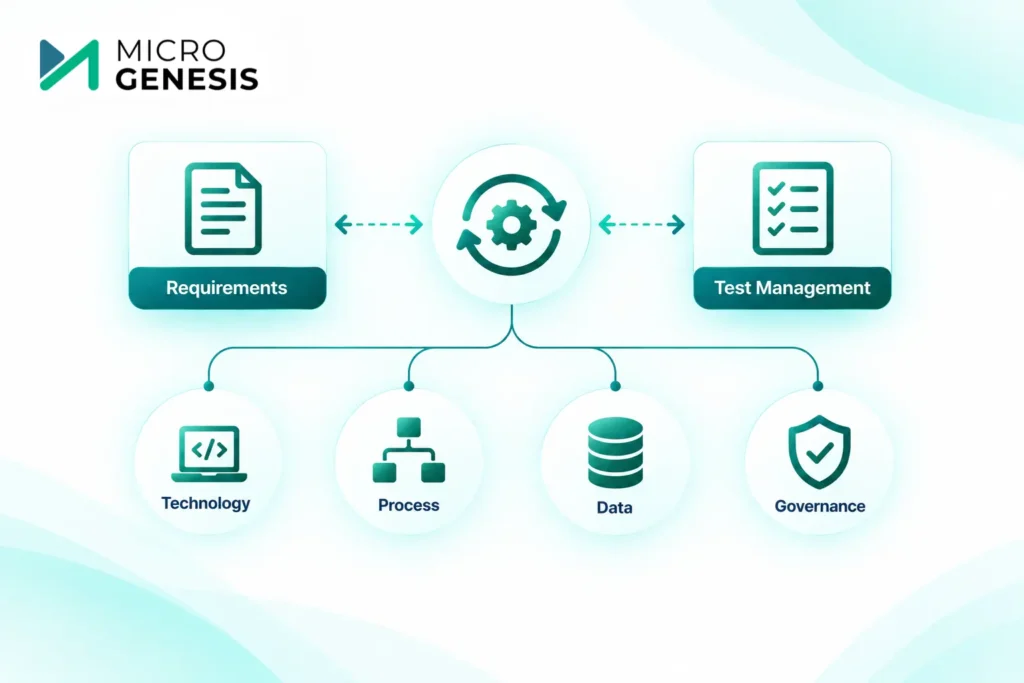
A technically successful integration can still fail from an engineering perspective.
For example, two tools may successfully exchange data, but if teams have different naming conventions, unclear ownership, inconsistent status definitions, or poorly designed workflows, traceability may remain difficult.
That is why integration should be treated as a combination of:
Technology + Process + Data + Governance
This is also where ALM Integration Solutions becomes relevant. The goal is not simply to connect tools, but to create a useful flow of engineering information.
A Practical Example
Consider an automotive project with 500 safety-related requirements.
The requirements team uses DOORS, while the verification team uses a separate test platform.
Without integration, the test team may periodically export requirements into Excel and manually map them to test cases.
Now imagine 50 requirements change.
The team needs to determine:
- Which requirements changed?
- Which test cases are affected?
- Which tests have already been executed?
- Which results may no longer represent the current requirement?
- Which defects need reassessment?
With a well-designed integration, these relationships can be surfaced much more efficiently.
The benefit is not simply saving time.
It gives engineers a more reliable view of what has changed and what that change means for verification.
Common Mistakes to Avoid
Integrating everything at once
Start with the relationships that matter most.
Treating synchronization as traceability
Copying data between tools does not automatically create meaningful traceability.
Ignoring data ownership
Every important object should have a clear source of truth.
Automating a broken process
Integration can make a bad workflow faster without making it better.
Forgetting automated test results
Automated testing still needs lifecycle context. Results should be associated with the appropriate test, software version, environment, and requirement where applicable.
Ignoring users
Engineers need workflows that fit how they actually work. A technically elegant integration that creates additional manual steps may not deliver the expected value.
Why Businesses Choose MicroGenesis
Requirements and test integration sits at the intersection of tools, engineering processes, and traceability. Businesses therefore need more than a connector between two applications.
MicroGenesis helps organizations approach ALM integration from the engineering workflow perspective, including requirements management, test management, traceability, tool integration, and lifecycle processes.
The focus is on understanding the existing environment first, identifying where information is disconnected, and then designing an integration approach that fits the organization’s needs.
This can include working with enterprise platforms such as IBM Engineering Lifecycle Management and Codebeamer ALM, depending on the organization’s existing tools and requirements.
Looking to connect requirements and testing without disrupting your existing engineering workflow? Explore MicroGenesis ALM Services to understand how an integrated ALM approach can support requirements, testing, traceability, and lifecycle management.
Final Thoughts
Integrating requirements and test management is ultimately about maintaining the connection between what the system is supposed to do and how the team proves that it does it.
Whether an organization uses a native ALM approach such as Codebeamer or integrates existing platforms such as DOORS and separate test tools, the same principles apply:
- Define the required traceability.
- Establish clear data ownership.
- Choose the appropriate integration pattern.
- Synchronize only what is necessary.
- Plan for changes and integration failures.
- Pilot before scaling.
- Keep manual and automated testing connected to the same lifecycle.
- Make traceability useful for engineers, not just for reporting.
When requirements and testing remain connected throughout the lifecycle, teams spend less time reconciling spreadsheets and more time understanding whether the product is actually meeting its requirements.