
Testing regulated software is not simply about finding bugs before release.
In automotive, medical device, and other regulated environments, teams also need to demonstrate what was tested, why it was tested, how it was tested, what happened, and whether the results support the release decision.
Consider an automotive software project approaching a release milestone. The team has hundreds of test cases, several software versions, thousands of test executions, and a growing list of defects. Someone asks:
“Which tests verify these safety-related requirements, which software version was tested, and what happened when a test failed?”
If answering that question requires searching through spreadsheets, emails, test logs, and different repositories, testing has become difficult to manage.
This is where test lifecycle management becomes important.
Test lifecycle management provides a structured way to plan, design, execute, monitor, document, and improve testing throughout the software lifecycle. It connects testing with requirements, development, defects, changes, and release decisions rather than treating testing as an isolated activity.
What Is Test Lifecycle Management?
Test lifecycle management is the structured management of testing activities from test planning through execution, defect resolution, reporting, and closure.
The important word is lifecycle.
Testing does not begin when development ends. It starts when teams understand requirements and determine how those requirements will be verified.
A practical lifecycle looks like:
Planning → Test Design → Preparation → Execution → Defect Management → Retesting → Reporting → Closure
In a regulated environment, the evidence created during these activities also needs to remain available and traceable.
A well-managed lifecycle therefore connects:
Requirements → Test Cases → Test Execution → Defects → Retesting → Results → Release Evidence
That connection separates structured test management from a collection of test scripts and reports.
Phases of Test Lifecycle Management
1. Test Planning
Testing starts with a plan.
The team needs to establish:
- What needs to be tested?
- Which requirements need verification?
- What testing methods are required?
- What environments are needed?
- Who is responsible?
- What are the entry and exit criteria?
- What evidence needs to be retained?
For regulated software, testing needs to be intentional and repeatable.
A test plan should provide enough structure for the team to understand what will be tested, how it will be evaluated, and what constitutes an acceptable result.
If your testing process starts with execution rather than planning, it may be worth looking at the complete lifecycle instead of improving individual test activities.
2. Test Design and Preparation
Once the testing approach is established, the team creates test cases and prepares the required environments.
For example:
Requirement: The system shall detect an invalid sensor value within the specified response time.
The corresponding test could define:
- Input condition
- Test environment
- Test procedure
- Expected result
- Acceptance criteria
- Actual result
The requirement-to-test relationship answers an important question:
Why are we running this test?
This becomes particularly important for safety-related software.
Our guide on Automotive Software Testing Best Practices explores how automotive teams can structure testing around requirements, automation, traceability, and verification.
For teams managing large numbers of requirements and tests, connecting them early can reduce the effort required to demonstrate coverage later.
3. Test Execution
Test execution involves running planned tests and recording results.
Depending on the product, this may include:
- Manual testing
- Automated testing
- Unit testing
- Integration testing
- System testing
- Regression testing
- Hardware-in-the-loop testing
- Software-in-the-loop testing
- Performance testing
- Security testing
A result should not simply be recorded as “Passed.”
Teams should be able to identify:
- Which test was executed
- Which software version was tested
- Which environment was used
- When it was executed
- Who or what executed it
- What result was obtained
This becomes particularly useful when the same test is executed against multiple software versions.
4. Defect Management
Testing will identify problems.
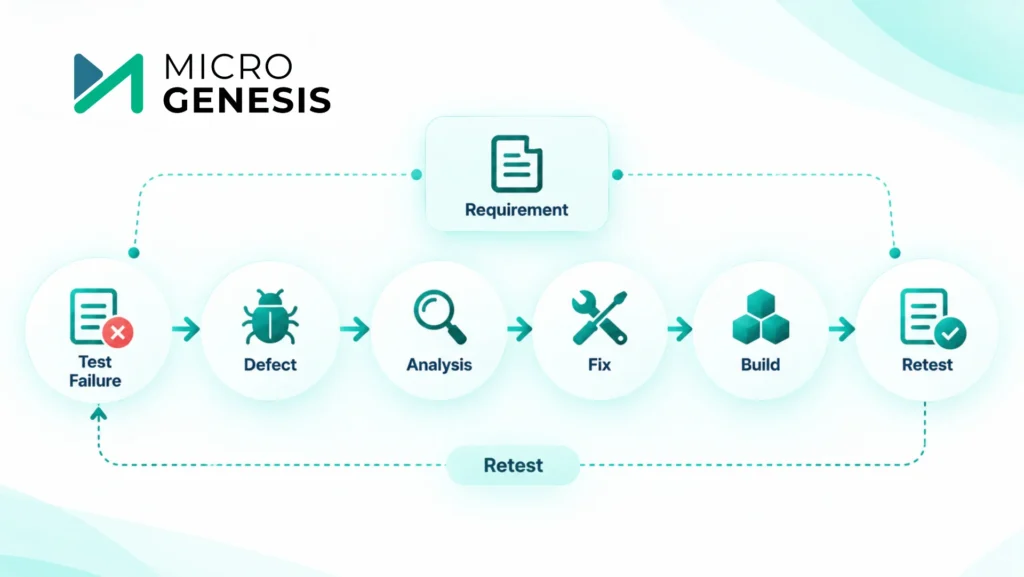
A failed test normally starts another lifecycle activity:
Test Failure → Defect → Analysis → Fix → Build → Retest
The defect should remain connected to the original test and, where relevant, the requirement.
This allows the team to answer:
What failed?
Why did it fail?
What was changed?
Was the fix retested?
Did the retest pass?
Without those connections, teams can lose the history of why a test failed and how it was resolved.
This is where structured test management becomes valuable. Failures, fixes, retesting, and requirements can be connected instead of maintained as separate records.
If your organization is dealing with disconnected requirements and testing activities, MicroGenesis ALM Services can help you explore a more connected lifecycle approach.
5. Retesting and Regression Testing
After a defect is fixed, the team needs to verify the fix.
But there is another question:
Did the fix break something else?
That is where regression testing becomes important.
Suppose a software change fixes one requirement but modifies a shared component. The team may need to rerun:
- The original failed test
- Related tests
- Tests for dependent functionality
- Broader regression tests
A managed test lifecycle makes it easier to identify which tests need to be repeated.
For teams using automated regression testing, integrating test execution with development and build processes can also provide faster feedback.
6. Test Reporting and Closure
At the end of a testing cycle, teams need to understand:
- What was tested?
- What passed?
- What failed?
- Which defects remain open?
- What requirements have verification coverage?
- Which tests were excluded?
- What risks remain?
- Is the software ready for the next stage?
The resulting test report becomes part of the project’s engineering evidence.
For regulated software, this is more than a management summary. It helps demonstrate that defined verification activities were performed and appropriately recorded.
A strong reporting process means this information should come from the lifecycle itself rather than being manually reconstructed before an audit or assessment.
Test Lifecycle Management vs. Ad-Hoc Testing
The difference is straightforward.
Ad-Hoc Testing
An engineer receives a build, starts testing, finds a problem, reports it, and tests again after the developer fixes it.
This can work for exploratory testing or early development.
As the project grows, however, problems emerge:
- Tests may be repeated inconsistently.
- Some requirements may never be tested.
- Results may not be recorded consistently.
- Previous evidence may be difficult to find.
- Test coverage may be unclear.
Managed Test Lifecycle
A structured process looks like:
Requirement → Test Plan → Test Case → Execution → Result → Defect → Retest → Report
The difference is not whether testing happens.
It is control, repeatability, traceability, and evidence.
Regulatory Expectations: ASPICE, ISO 26262 and IEC 62304
The exact expectations depend on the product and applicable standard, but three important examples illustrate why test lifecycle management matters.
Automotive SPICE
Automotive SPICE is a process assessment model used to evaluate automotive software and systems engineering processes.
Its verification and validation processes include expectations around defined verification or validation measures, execution, recorded results, and traceability.
For automotive teams, the practical message is clear:
Testing needs to be a defined and repeatable engineering process, not an activity performed only when developers believe the software is ready.
ISO 26262
ISO 26262 addresses functional safety for road vehicles.
ISO 26262-6 covers software-level activities including software safety requirements, architecture, unit verification, software integration and verification, and embedded software testing.
A practical relationship is:
Safety Requirement → Software Requirement → Test → Result → Evidence
If a requirement changes, the team needs to determine whether related tests and evidence also need to change.
That makes traceability an important part of safety-oriented testing.
If your team manually connects safety requirements with test evidence, a structured test lifecycle can make this process easier to manage.
IEC 62304
IEC 62304 applies to software used as or within medical devices.
It defines lifecycle requirements for medical device software and establishes a framework of processes, activities, and tasks for software development and maintenance.
For medical device software teams, testing therefore needs to fit into the controlled software lifecycle rather than exist as a final activity.
The key point is:
Regulated testing is not only about the final result. It is about how testing is planned, performed, recorded, and connected to the software lifecycle.
Roles in Test Lifecycle Management
A mature test lifecycle needs clear ownership.
Test Manager
The test manager focuses on the overall testing strategy and may be responsible for:
- Test planning
- Resource allocation
- Test schedules
- Coverage
- Test risks
- Defect status
- Test reporting
- Release readiness
The central question is:
Are we testing the right things at the right time with enough evidence to support the release decision?
Test Engineer
The test engineer works closer to execution and may handle:
- Test case design
- Test environments
- Test execution
- Result recording
- Failure investigation
- Defect reporting
- Retesting
- Regression testing
- Test evidence
Quality Assurance
QA provides a broader process perspective, including:
- Process compliance
- Test process reviews
- Evidence quality
- Audit readiness
- Defect trends
- Process improvement
QA should not have to recreate test evidence. Engineering teams should generate evidence through their normal activities.
Manual and Automated Testing
Test lifecycle management does not mean replacing manual testing with automation.
Manual testing remains useful for exploratory testing, changing scenarios, and situations requiring human judgment.
Automation becomes valuable when the same tests need to be repeated frequently.
For example, a regression suite containing hundreds of tests can be executed automatically after a software change.
However, automation also needs management.
Test scripts need version control. Results need to be retained. Failures need investigation, and changes to the product may require test updates.
See Manual vs Automated Test Management for a deeper comparison.
Automation improves execution efficiency. Test lifecycle management provides the structure around that automation.
Traceability: Connecting Requirements and Testing
One of the strongest reasons to implement test lifecycle management is traceability.
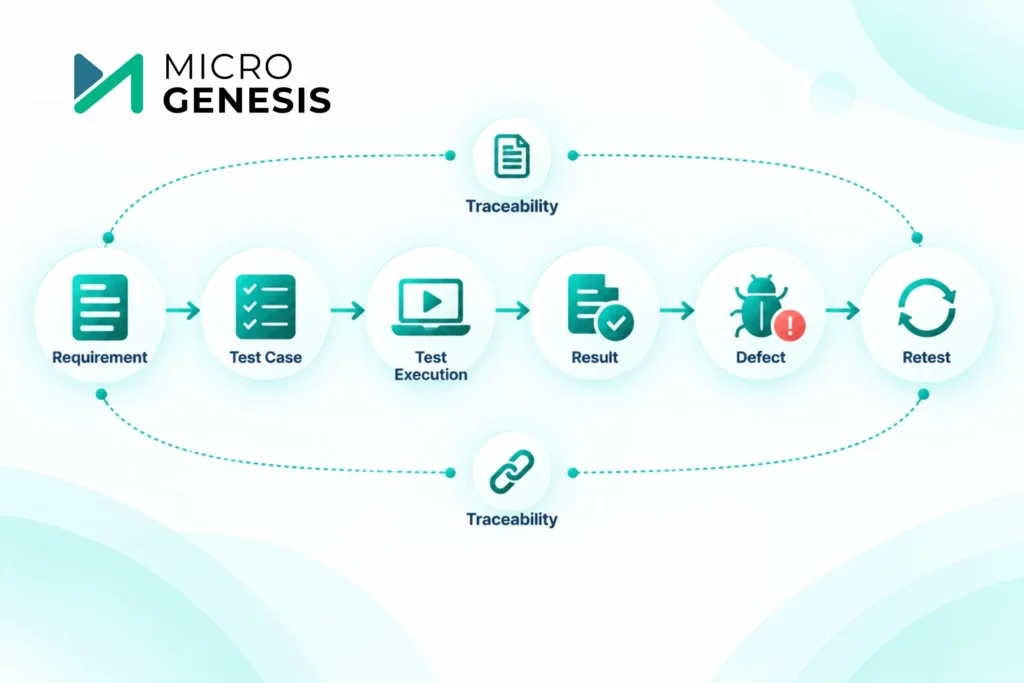
Consider:
Requirement → Test Case → Test Execution → Result → Defect → Retest
Suppose an assessor asks:
“How did you verify this safety-related requirement?”
The team can follow the relationship from requirement to test case, execution, result, and defect history.
When a requirement changes, the team can also identify related tests that may need review.
For a deeper look at this relationship, see Integrating Test Management with Requirements Tools.
You can also explore Importance of Requirements Traceability to understand why traceability matters beyond testing.
A Practical Example
Consider an automotive ECU responsible for monitoring a sensor.
The requirement states that the software must detect an invalid sensor condition and initiate the defined response within a specified time.
A structured lifecycle could look like:
Requirement: Requirement is reviewed and approved.
Test Design: Test cases are created for valid and invalid sensor conditions.
Execution: Tests run against a defined software version.
Failure: One test shows the response takes too long.
Defect: A defect is created and linked to the failed test.
Fix: Development modifies the software.
Retest: The original test is executed again.
Regression: Related tests are executed.
Evidence: Results and defect history are retained.
Months later, the team can follow the engineering history without relying on individual engineers to remember what happened.
That is the practical value of test lifecycle management.
Why MicroGenesis for Test Lifecycle Management?
For regulated software teams, the difficult part is often not creating test cases.
The bigger challenge is keeping testing connected to everything around it.
Requirements change. Software versions change. Defects are discovered. Tests are repeated. Release decisions require evidence.
When these activities are managed separately, test teams can spend considerable time maintaining spreadsheets, reconciling information, and preparing reports.
MicroGenesis focuses on connecting engineering activities through ALM rather than treating testing as an isolated function.
This can include relationships between:
Requirements → Testing → Defects → Changes → Verification → Release Evidence
The objective is to help organizations establish a structured and traceable lifecycle around their existing engineering processes.
If your team is struggling with disconnected requirements, testing, defects, and evidence, explore MicroGenesis ALM solutions to see how a connected lifecycle approach can support your engineering process.
For organizations already using IBM’s engineering ecosystem, IBM Engineering Lifecycle Management can support a broader approach to connecting requirements and engineering activities.
For teams evaluating PTC’s platform, Codebeamer ALM is another option for managing requirements, testing, traceability, and related workflows.
The important point is not simply to introduce another tool.
The technology should support the engineering process your teams actually need to follow.
How to Make Test Lifecycle Management Work
A successful test lifecycle starts with process, not technology.
Define Testing Early
Decide how requirements will be verified before development is complete.
Connect Tests to Requirements
Every important test should have a clear purpose.
Keep Results Consistent
Use defined methods for recording execution and outcomes.
Connect Defects to Testing
Maintain the relationship between failure, fix, and retest.
Automate Where It Makes Sense
Automate repeatable tests while retaining manual testing where human judgment matters.
Preserve Evidence
Maintain information about what was tested, when, how, and with what result.
Review Continuously
Do not wait for an assessment to discover incomplete test coverage.
Final Thoughts
Test lifecycle management brings structure and visibility to software verification.
For regulated software, this becomes particularly important because testing needs to be planned, performed, recorded, traceable, and connected to the wider development lifecycle.
Automotive SPICE emphasizes defined verification and validation activities, recorded results, and traceability. ISO 26262 includes software verification and testing within the functional safety lifecycle. IEC 62304 establishes lifecycle processes for medical device software.
The practical lesson is simple:
Testing should not start when development ends.
Plan it early.
Connect it to requirements.
Execute it consistently.
Manage failures.
Retest fixes.
Maintain evidence.
And use the results to support informed release decisions.
That is what turns testing from a collection of activities into a managed, traceable, and repeatable test lifecycle.