AWS gives organizations the flexibility to scale infrastructure as business demand changes. But that flexibility can also create a problem: cloud spending can grow faster than the business understands why.
A few oversized resources may not seem significant. An environment that runs outside working hours may look harmless. Additional storage, data transfer, backup retention, unused IPs, or duplicated environments can each appear manageable on their own.
The problem emerges when these decisions accumulate across accounts, teams, applications, and regions.
For a CTO, AWS cost optimization therefore isn’t simply about finding cheaper instances or shutting down unused servers. It is about creating a cloud environment where every significant technology expense has a reason, an owner, and a measurable business outcome.
This guide presents a practical blueprint for doing that.
What Is AWS Cost Optimization?
AWS cost optimization is the continuous process of understanding cloud consumption, eliminating unnecessary expenditure, selecting appropriate resources and pricing models, and aligning AWS spending with business requirements.
The objective isn’t to make the AWS bill as small as possible.
Instead, the objective is:
Get the required business outcome from AWS without paying for unnecessary capacity, services, or operational inefficiencies.
For example, reducing the size of a production database may lower the bill, but if it creates performance problems, the organization hasn’t really optimized anything.
A better approach considers the complete picture:
Cost + Performance + Reliability + Security + Business Requirements
That is why cost optimization should be treated as an engineering and governance discipline, not simply a finance exercise.
Why AWS Costs Become Difficult to Control
Most unexpected AWS spending doesn’t come from one dramatic mistake.
It usually develops gradually.
A development environment is left running.
An application is overprovisioned “just in case.”
Storage grows without lifecycle policies.
Teams create resources without consistent tagging.
Data moves between services without anyone considering transfer charges.
A workload scales successfully, but the architecture isn’t revisited afterward.
Over time, these decisions create cloud waste.
Common causes of AWS cost growth include:
- Overprovisioned compute resources
- Idle or forgotten infrastructure
- Poorly managed storage
- Inefficient database configurations
- Uncontrolled development and testing environments
- Unoptimized data transfer
- Missing budgets and cost alerts
- Lack of ownership for cloud spending
- Ineffective resource tagging
- Incorrect pricing model selection
- Architecture decisions made without considering long-term operating costs
The first step toward optimization is therefore visibility.
The CTO’s AWS Cost Optimization Blueprint
A successful strategy can be organized into seven connected areas:
1. Establish cost visibility
2. Right-size and optimize resources
3. Control storage and data transfer
4. Optimize pricing and purchasing
5. Automate cloud cost governance
6. Build cost accountability across teams
Continuously review architecture
Let’s look at each one.
1. Establish Visibility Before Cutting Costs
You cannot optimize what you cannot see.
Before changing infrastructure, establish a clear understanding of:
- Which AWS accounts are generating costs
- Which applications consume the most resources
- Which teams own those workloads
- Which AWS services contribute most to spending
- How spending changes over time
- Which environments are production, staging, development, or testing
- Where unexpected increases are occurring
This is where AWS-native cost-management capabilities can become useful.
But dashboards alone aren’t enough.
A CTO should be able to answer:
Why did our AWS spending increase this month?
And the answer shouldn’t be:
AWS usage went up.
It should be something more specific, such as:
“The increase came from the analytics workload after its data-processing schedule changed. Compute consumption increased, while storage and data-transfer costs remained stable.”
That level of visibility enables better decisions.
Example
Imagine three development teams using AWS.
The monthly bill increases significantly, but finance cannot determine which team caused the increase.
Without cost allocation, engineering may see the issue as a finance problem.
With proper tagging, account structure, dashboards, and ownership, the conversation changes:
Team A: Application infrastructure
Team B: Data processing
Team C: Development environment
Now optimization becomes actionable.
2. Right-Size AWS Resources
One of the most common optimization opportunities is resource right-sizing.
Organizations often provision infrastructure based on expected peak requirements rather than actual usage.
That can result in resources that are significantly larger than necessary for normal workloads.
Right-sizing means asking:
- What resources are actually being used?
- What are the workload’s normal and peak patterns?
- Is the current instance type appropriate?
- Can resources scale automatically?
- Are resources sitting idle?
- Could a managed or serverless option reduce operational overhead?
- Can workloads be consolidated?
Example
Suppose a business application runs on an instance sized for anticipated future traffic.
Months later, actual utilization remains consistently low.
The answer isn’t automatically to reduce the instance size.
First evaluate:
- Performance requirements
- Traffic patterns
- Scaling behavior
- Application dependencies
- Availability requirements
Then determine whether a smaller resource or a different architecture can deliver the same business outcome.
This is the difference between cost cutting and cost optimization.
3. Control Storage Costs
Storage is another area where AWS costs can quietly accumulate.
Data tends to stay around.
Backups remain longer than required.
Old snapshots are forgotten.
Logs accumulate.
Development data is duplicated.
Frequently accessed and rarely accessed data may be treated the same way.
A cost optimization review should examine:
Storage lifecycle
Ask:
- How long does the business need this data?
- How frequently is it accessed?
- Can older data move to a more appropriate storage tier?
- Are obsolete files automatically removed?
Backup retention
Backups are important, but keeping every backup forever isn’t necessarily a good strategy.
Retention should reflect:
- Recovery requirements
- Compliance requirements
- Business needs
- Actual restoration requirements
Logs
Log retention should also be intentional.
Keeping operational logs indefinitely can increase storage costs without necessarily creating additional business value.
4. Don’t Ignore Data Transfer Costs
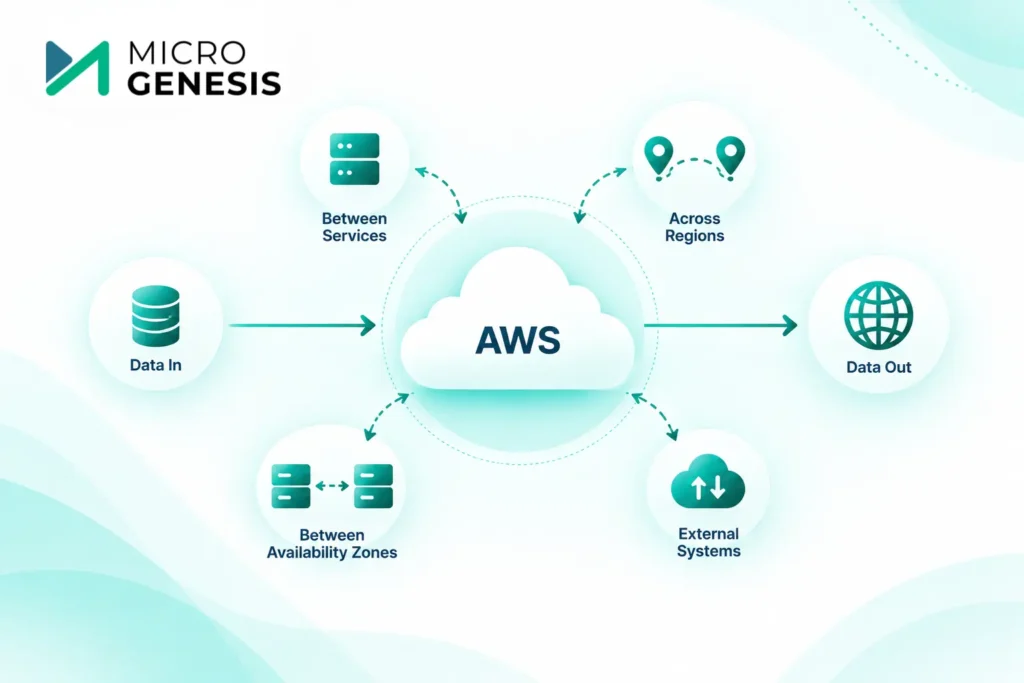
Data transfer is often overlooked during architecture planning.
An application may use inexpensive compute resources while generating unnecessary charges through how data moves between services, Availability Zones, regions, or external systems.
During an architecture review, examine:
- Where data enters the environment
- Where it leaves
- How frequently it moves
- Which services communicate with each other
- Whether cross-region transfer is necessary
- Whether the architecture creates avoidable network traffic
Example
A distributed application may have several components communicating frequently across infrastructure boundaries.
The architecture may perform well, but if the communication pattern generates substantial data transfer, the resulting costs may become significant as usage grows.
The right answer isn’t always “move everything into one location.”
The team needs to evaluate cost, latency, availability, security, and architectural requirements together.
This is where experienced AWS architecture expertise can make a difference.
Want an expert assessment of your AWS architecture and cost drivers?
Explore MicroGenesis AWS Consulting Services
5. Choose the Right AWS Pricing Model
Cost optimization isn’t limited to reducing resource consumption.
Organizations should also evaluate whether they’re using the appropriate purchasing model for their workloads.
Depending on the workload, organizations may evaluate options such as:
- On-Demand pricing
- Savings Plans
- Reserved capacity options
- Spot capacity
- Auto Scaling
- Serverless consumption models
The important question is not:
Which option is cheapest?
Instead ask:
Which pricing model matches this workload’s usage pattern and risk tolerance?
Example
A workload that runs continuously with predictable demand may justify a different pricing approach from a temporary development environment or a highly variable workload.
A CTO should therefore avoid blanket policies such as:
“Always choose the cheapest pricing option.”
The right approach is to evaluate workload behavior first.
6. Automate AWS Cost Governance
Manual cost management doesn’t scale well.
If engineers have to remember every day to check whether resources are running unnecessarily, the organization is already depending too heavily on human behavior.
Automation can help enforce cost controls.
Consider automating:
- Budget alerts
- Cost anomaly notifications
- Non-production shutdown schedules
- Resource tagging policies
- Idle-resource detection
- Scaling policies
- Infrastructure provisioning
- Policy enforcement
- Cost reporting
Example: Development environments
Instead of relying on developers to shut down infrastructure at the end of the day, organizations can introduce automated schedules where appropriate.
This turns cost optimization from:
Please remember to switch it off.
into:
The environment follows an automated lifecycle.
That is a much more scalable model.
7. Build Cost Accountability Across Engineering
AWS cost optimization should not belong exclusively to finance.
Engineering teams make many of the decisions that determine cloud expenditure.
Developers decide how applications are designed.
Architects decide which services are used.
DevOps teams determine how infrastructure scales.
Operations teams manage environments.
Finance sees the final bill.
A mature cost-management model connects all of them.
A practical ownership model
Role | Cost Optimization Responsibility |
CTO | Establish strategy and governance |
Cloud Architect | Make cost-aware architecture decisions |
DevOps | Automate infrastructure and optimization |
Developers | Build efficient applications |
Operations | Monitor resource utilization |
Finance | Track budgets and business spending |
Business Owners | Connect cloud spending to outcomes |
The goal isn’t to make developers worry about every dollar.
It is to make cost a consideration during engineering decisions.
AWS Cost Optimization Should Start With Architecture
One of the biggest mistakes organizations make is optimizing the AWS bill without reviewing the architecture that produces it.
Consider a workload that consistently generates high compute costs.
You could:
- Reduce instance size
- Purchase a different pricing model
- Add scaling policies
But perhaps the real issue is that the application is performing unnecessary processing.
In that case, infrastructure optimization may only address the symptom.
A deeper architecture review might identify:
- Inefficient application workflows
- Excessive database queries
- Poor caching
- Unnecessary data processing
- Inefficient integration patterns
- Resources that should be serverless or managed
- Scaling policies that don’t match real demand
This is why AWS cost optimization should be connected to cloud architecture, application modernization, DevOps, and operational management.
A structured AWS Well-Architected Review can help teams examine these architectural factors systematically across reliability, security, performance efficiency, cost optimization, operational excellence, and sustainability.
A Practical AWS Cost Optimization Review
If you’re starting from scratch, use this sequence.
Step 1: Establish the baseline
Document:
- Current AWS spend
- Major cost contributors
- Account structure
- Workloads
- Environments
- Resource ownership
Step 2: Identify obvious waste
Look for:
- Idle resources
- Unused resources
- Oversized instances
- Forgotten environments
- Old snapshots
- Excessive storage
- Unnecessary workloads
Step 3: Investigate architecture
Ask whether high spending is caused by the underlying application or infrastructure design.
Step 4: Prioritize
Don’t attempt to optimize everything simultaneously.
Prioritize opportunities based on:
Potential savings × business impact × implementation effort
Step 5: Automate
Where possible, turn recurring optimization actions into automated policies or workflows.
Step 6: Measure
Track whether optimization actually improved:
- Cost
- Performance
- Resource utilization
- Reliability
- Business outcomes
Step 7: Repeat
AWS cost optimization is not a one-time project.
Your architecture changes.
Your traffic changes.
Your business changes.
Your AWS bill changes with them.
Common AWS Cost Optimization Mistakes
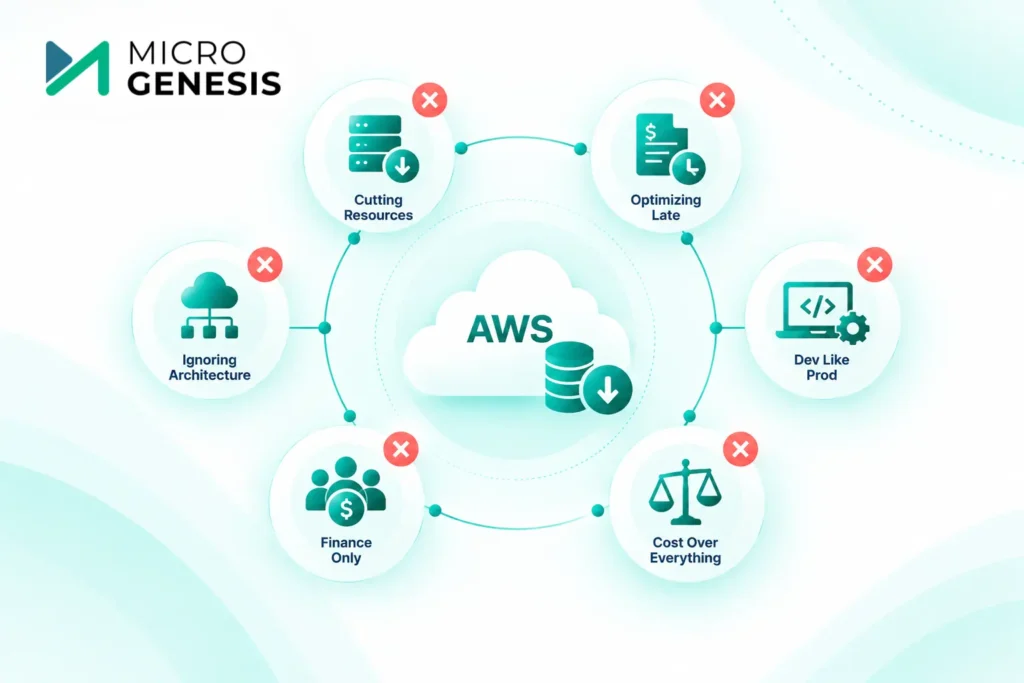
Cutting resources without understanding workloads
Reducing infrastructure simply because utilization appears low can create performance or reliability problems.
Better approach: understand workload behavior before making changes.
Optimizing only after receiving a large bill
By then, unnecessary spending has already occurred.
Better approach: implement budgets, alerts, monitoring, and regular reviews.
Treating development environments like production
Development environments often have different availability requirements.
Better approach: apply lifecycle and scheduling policies appropriate to each environment.
Ignoring architecture
Changing instance types won’t solve an inefficient application design.
Better approach: connect cost reviews with architecture reviews.
Making finance solely responsible
Finance can report the bill, but engineering decisions drive much of the expenditure.
Better approach: create shared accountability.
Optimizing for cost at the expense of everything else
The cheapest architecture isn’t necessarily the best architecture.
Better approach: optimize against business requirements for cost, performance, security, and reliability.
How MicroGenesis Can Help With AWS Cost Optimization
AWS cost optimization requires more than identifying unused resources.
It requires an understanding of cloud architecture, infrastructure, application workloads, operational practices, and business priorities.
MicroGenesis brings AWS consulting capabilities together with broader technology expertise to help organizations plan, implement, optimize, and manage AWS environments.
Our AWS consulting approach can support organizations across areas such as:
- AWS cloud strategy and consulting
- AWS architecture
- Cloud migration
- Application modernization
- Cloud infrastructure management
- DevOps and automation
- Security and governance
- Performance optimization
- Cloud cost optimization
- Ongoing AWS environment improvement
This broader view is important because the most valuable cost improvements don’t always come from simply reducing infrastructure.
Sometimes the right solution is to change the architecture.
Sometimes it is to automate operations.
Sometimes it is to modernize an application.
And sometimes the answer is simply to improve visibility and governance.
If your AWS environment has become difficult to control, speak with the MicroGenesis AWS consulting team about your current architecture and optimization priorities
A CTO’s AWS Cost Optimization Checklist
Before considering your AWS environment optimized, ask:
Visibility
- Can we identify our major AWS cost drivers?
- Do workloads have clear owners?
- Can teams see spending associated with their workloads?
Compute
- Are resources right-sized?
- Are idle resources identified?
- Is Auto Scaling configured where appropriate?
- Are non-production environments managed efficiently?
Storage
- Are lifecycle policies being used?
- Are old snapshots reviewed?
- Are backup retention periods appropriate?
- Are storage tiers aligned with access patterns?
Networking
- Do we understand data-transfer costs?
- Are cross-region and cross-boundary transfers necessary?
- Has network architecture been reviewed for efficiency?
Pricing
- Are pricing models aligned with workload behavior?
- Are predictable workloads evaluated for commitment-based pricing?
- Are variable workloads treated differently from steady workloads?
Governance
- Are budgets configured?
- Are cost anomalies monitored?
- Are resources consistently tagged?
- Are cost policies automated where possible?
Architecture
- Is cost considered during architecture decisions?
- Are inefficient application patterns contributing to cloud spend?
- Are managed or serverless services being evaluated appropriately?
- Are cost, performance, security, and reliability considered together?
When Should You Bring in an AWS Consulting Partner?
An external AWS consulting partner can be particularly valuable when:
- AWS spending has increased without a clear explanation
- Your environment has become difficult to manage
- Multiple teams or accounts are involved
- You are migrating significant workloads to AWS
- You are modernizing legacy applications
- Your organization lacks dedicated AWS architecture expertise
- Cost optimization efforts haven’t produced sustainable improvements
- You need to balance cost reduction with performance and reliability
- You want an independent assessment of your cloud architecture
The objective shouldn’t be to outsource every cloud decision.
A good consulting partner should help your organization understand the environment, make better architectural decisions, implement improvements, and establish processes that support continuous optimization.
Final Thoughts
For a CTO, AWS cost optimization should never be reduced to a search for the lowest possible cloud bill.
The better question is:
Are we getting the right business value from every significant AWS investment?
That requires visibility, accountability, architecture discipline, automation, and continuous review.
Start with the basics:
See the spending → understand the workload → eliminate waste → optimize architecture → automate controls → assign ownership → continuously improve.
When these practices become part of everyday cloud operations, cost optimization stops being a reactive exercise after an unexpected bill and becomes a strategic part of how the organization builds and operates on AWS.
Ready to take a closer look at your AWS environment?
Explore MicroGenesis AWS Consulting Services and discuss your cloud architecture, migration, modernization, or optimization requirements with our AWS experts.
Frequently Asked Questions
What is AWS cost optimization?
AWS cost optimization is the process of managing AWS resources and architecture so organizations achieve their required business outcomes without unnecessary cloud expenditure. It includes resource right-sizing, cost visibility, storage optimization, pricing strategy, automation, governance, and architecture optimization.
What is the first step in AWS cost optimization?
Start with visibility. Identify which workloads, accounts, services, and resources are responsible for AWS spending before making infrastructure changes. Without understanding the source of costs, optimization can become guesswork.
How can companies reduce AWS costs without affecting performance?
The safest approach is to understand workload behavior before reducing resources. Right-sizing, Auto Scaling, storage lifecycle management, architecture optimization, and appropriate pricing models can reduce unnecessary spending while maintaining required performance.
Is AWS cost optimization only about reducing the AWS bill?
No. Effective optimization balances cost with performance, reliability, security, and business requirements. A cheaper architecture that causes outages or poor application performance is not necessarily an optimized architecture.
How often should AWS costs be reviewed?
AWS costs should be monitored continuously, with deeper optimization reviews performed regularly and whenever there are significant changes to workloads, architecture, traffic, applications, or business requirements.
What causes unexpected AWS cost increases?
Common causes include increased workload usage, overprovisioned resources, idle infrastructure, unexpected data transfer, storage growth, new AWS services, inefficient scaling, and environments that aren’t governed effectively.
Can MicroGenesis help optimize an existing AWS environment?
Yes. MicroGenesis provides AWS consulting capabilities that can support organizations with cloud architecture, migration, modernization, infrastructure, DevOps, security, performance, and cost optimization. Discuss your AWS environment with MicroGenesis
Should AWS cost optimization be handled by finance or IT?
It should be a shared responsibility. Finance provides financial visibility and governance, while architects, developers, DevOps, and operations teams make many of the technical decisions that directly influence AWS consumption.